

Activity Log
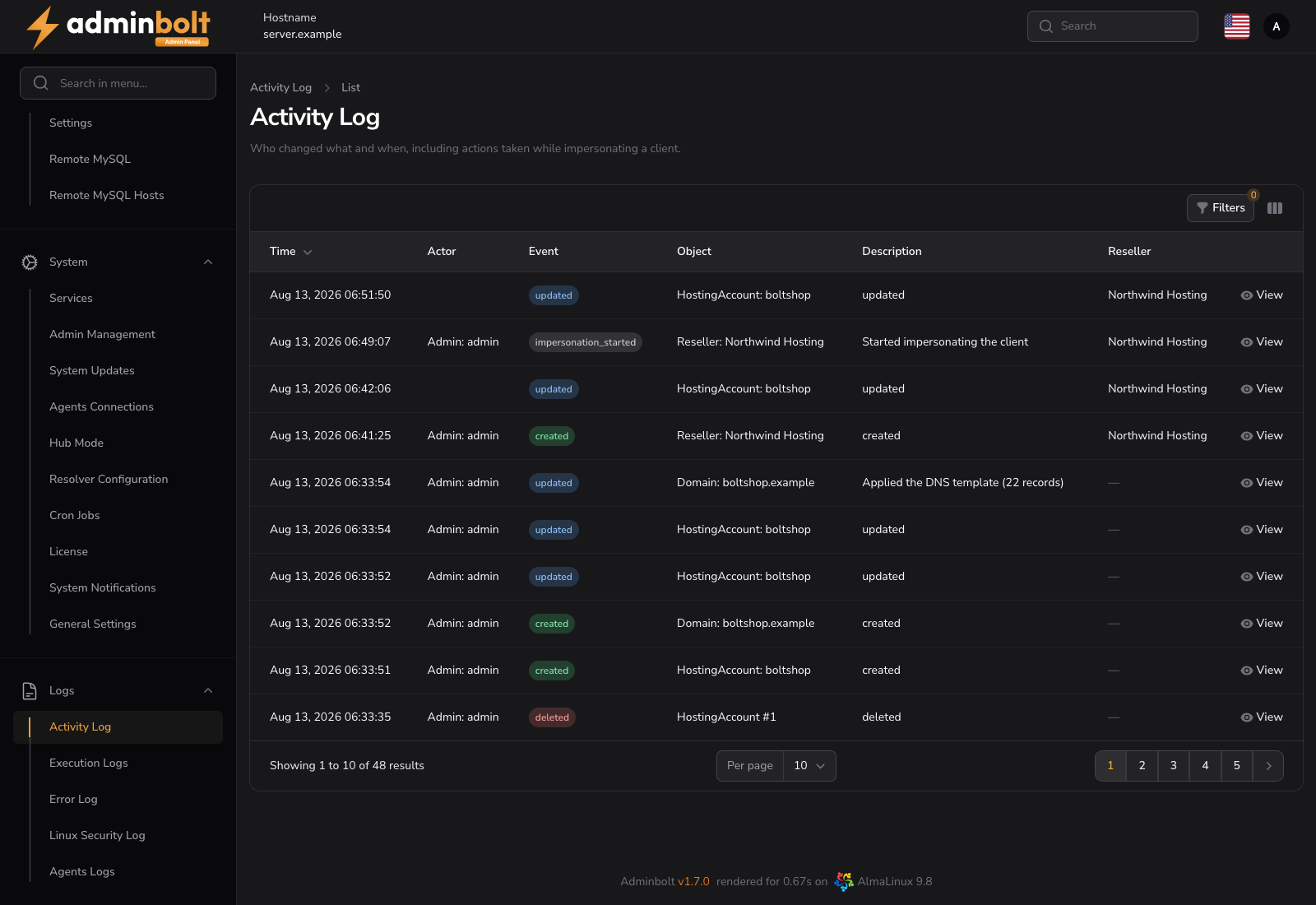
The Activity Log records who changed what in the panel, and when. Every entry names the actor, the object and the event, and an entry that changed values carries them as they were before and after.
Added in AdminBolt 1.7.0.
Overview
URL: /admin/activity-logs
The page sits in the Logs navigation group, next to Execution Logs and the Error Log. It is read-only: entries are written by the panel and cannot be edited or deleted from the interface.
Note: This page answers "who changed this". For "what did the panel do on the server", see Execution Logs, which records the commands the panel ran, and the Panel Log for the application's own diagnostics.
What is recorded
Changes to the objects a hosting panel is judged on:
- Hosting accounts, resellers, hosting plans and API keys
- Domains, DNS records and certificates
- Email accounts, forwarders, autoresponders and catch-alls
- Databases users, FTP accounts and cron jobs
- Firewall rules
- The panel's own administrator and client accounts
Each entry stores the event, the object, the actor, and the previous and new values of what changed.
Reading the table
| Column | Description |
|---|---|
| Time | When the change happened |
| Actor | Who made it, as role and name, for example Admin: root |
| Event | Created, Updated, Deleted, Impersonation started or Impersonation ended |
| Object | What was changed, as type and name, for example Domain: shop.example |
| Description | A short summary of the change |
| Reseller | The reseller the object belongs to, when it belongs to one |
The newest entry is first. View on a row opens the full record, including the old and new values side by side.
Filters
Filters narrows the list by:
- Event - created, updated, deleted, or the two impersonation events.
- Object type - hosting account, domain, email account, DNS record, certificate, API key, cron job, hosting plan, reseller, and the other audited types.
- Actor role - admin, reseller or client.
- Only impersonated actions - a toggle that leaves only changes made while an administrator was signed in as somebody else.
- Created at - a date range.
Impersonation
When an administrator uses Login to work inside a customer's account, the log names both people. The Actor column reads as the administrator with the account they acted as underneath, so a change made on a customer's behalf is never mistaken for one the customer made themselves.
The start and the end of every impersonation session are recorded as their own entries, so a session shows up even when nothing was changed during it.
Resellers
Resellers have the same page in their own panel, Activity Log, narrowed to the accounts they own. They cannot see activity on other resellers' accounts or on the server itself.
Passwords and other secrets
A password, token or key is recorded as having changed, without the value. The log tells you that a customer's password was changed, by whom and when, and never what it was set to.
Retention
Entries are kept for 90 days and then removed automatically.
Related pages
- Execution Logs - the commands the panel ran on the server.
- Panel Log - the panel's own application log.
- Reseller Activity Log - the same page for a reseller.
- Security - two-factor changes, which are recorded here too.