

Backups
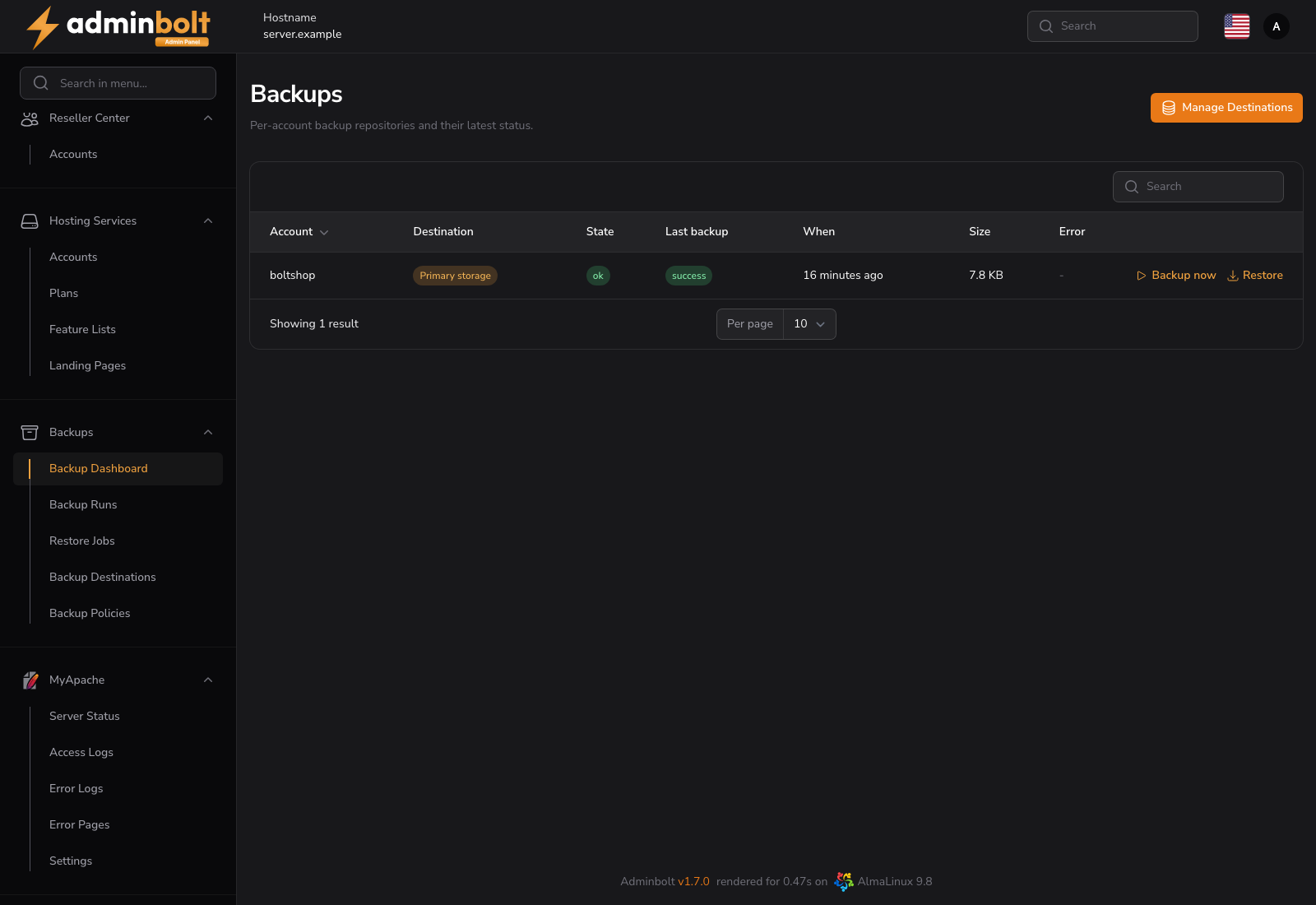
The Backups dashboard is the operator's view of per-account backups: one row per hosting account that has a backup repository, with its state, last run, size and last error. From here you can start a backup or a restore for any account on the server.
Added in AdminBolt 1.7.0.
Overview
URL: /admin/backup-dashboard
The page is Backups → Backup Dashboard in the sidebar, next to Backup Runs, Restore Jobs, Backup Destinations and Backup Policies in the same group.
Note: Three unrelated features carry the word "backup" in AdminBolt. This page documents per-account backups: scheduled, off-site snapshots managed by AdminBolt itself. JetBackup is a separate third-party product with its own storage and restore model. The client Filesystem Backups and Database Backups are on-demand archives written into the account's own home directory, and they count against the customer's quota.
How the pieces fit together
Per-account backups have three moving parts, and they are configured in this order:
- A destination is where snapshots are stored: S3, SFTP, WebDAV, a restic REST server, a local path, or any provider you describe with a raw rclone configuration. See Backup Destinations.
- A policy says who is backed up, how often, what is included, how long snapshots are kept, and whether the customer may restore without asking you. A policy is attached to a hosting plan, to a reseller, or to a single account. See Backup Policies.
- A repository is created automatically for each account covered by a policy, inside the destination that policy names. Repositories are what this dashboard lists.
Until a destination exists and a policy points at it, no account has a repository and the dashboard stays empty.
Reading the table
| Column | Description |
|---|---|
| Account | The hosting account the repository belongs to |
| Destination | The destination the policy sends this account to |
| State | Repository state: ok, error, or locked while an operation holds it |
| Last backup | Result of the most recent run, or never |
| When | When that run started, as a relative time |
| Size | Size of the repository at the destination |
| Error | The reason the last run failed, truncated; hover for the full text |
The table refreshes itself every 30 seconds, so a running backup updates without reloading the page.
Backup now
Backup now on a row starts an immediate run for that account, on top of whatever the policy schedules. The run is recorded on the Backup Runs page with admin as the requester.
The action reports that it could not start when the account has no active policy, when backups are switched off for it, or when the server could not be reached.
Restore
Restore is offered on repositories whose state is ok. It asks for three things:
- Snapshot - the point in time to restore from. Snapshots are listed newest first, with their short ID and size.
- Path to restore - the account's home directory by default. Narrow it to a subpath to bring back a single site or folder.
- Mode - In place (overwrite) writes the files back over the live ones, and Copy into restored-files puts them in a
restored-filesfolder in the account's home directory instead, leaving the live site untouched.
Restores run in the background. Track them on the Restore Jobs page, which records who asked for each one.
Warning: An in-place restore overwrites existing files with the same names. When you are not certain which snapshot holds the good copy, restore as a copy first and compare.
Failed runs
A failed run raises a Backup failed system notification, so you learn about it without watching this page. The notification templates are editable under System Notifications.
What is backed up
A policy covers the account's home directory, its databases, or both. Database dumps are staged outside /home before they are added to the snapshot, so they never count against the customer's disk quota.
Scheduling
Due backups are started by the panel's scheduler every five minutes, running backups are reconciled every minute, and retention prunes old snapshots daily at 04:30 server time. A server with no backup policy does no work.
By default at most two accounts are backed up at a time per server, and at most two restores run at a time, so backups do not saturate the disks the live sites are served from.
Delegation
- Resellers get the same dashboard narrowed to their own accounts, on the reseller Backups page. They can start backups and restores; destinations and policies stay with the administrator.
- Clients get their own Backups page when their hosting plan grants the Backups feature and a policy covers the account. Whether they may restore on their own is decided per policy.
Related pages
- Backup Destinations - where snapshots are stored.
- Backup Policies - who is backed up, how often, and for how long.
- Backup Runs - the history of executions.
- Restore Jobs - the history of restores.
- JetBackup - the separate third-party backup product.
- Client Backups - the account owner's view.