

SpamExperts
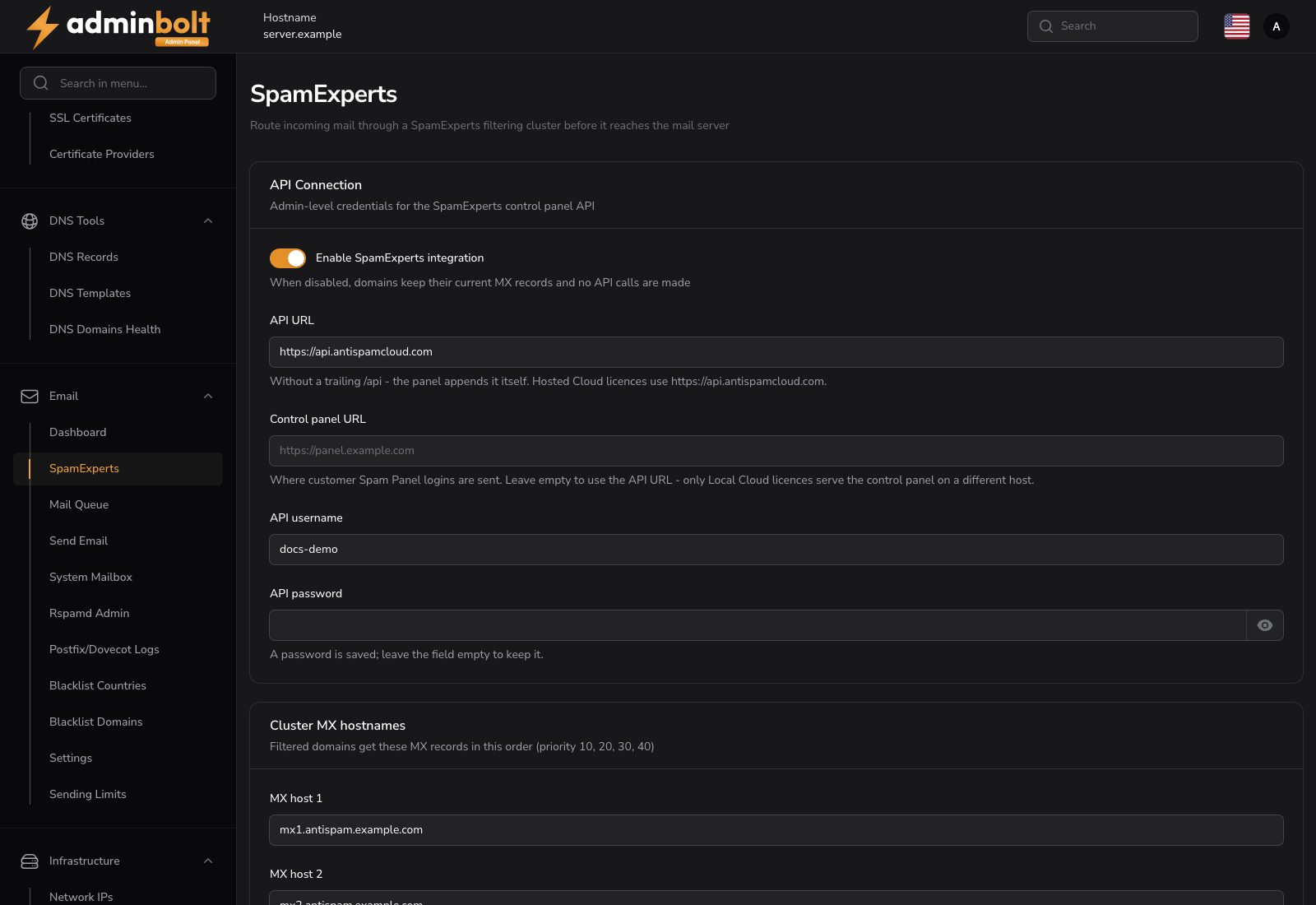
The SpamExperts page connects the server to a SpamExperts filtering cluster, so incoming mail for selected domains is cleaned before it ever reaches the mail server.
Added in AdminBolt 1.7.0.
Overview
URL: /admin/spam-experts-settings
The page sits in the Email navigation group. It holds the cluster credentials, the MX hostnames filtered domains are pointed at, the delivery addresses the local spam scan should trust, and which resellers may use the feature.
Once the integration is configured, customers whose hosting plan includes the feature switch filtering on per domain from their own SpamExperts page.
Note: SpamExperts is a separate product with its own licence, sold by N-able. AdminBolt talks to a cluster you already have; it does not provide one.
API Connection
- Enable SpamExperts integration turns the whole feature on. While it is off, domains keep their current MX records and the panel makes no calls to the cluster.
- API URL is the cluster's API address, for example
https://api.antispamcloud.comfor a Hosted Cloud licence. Enter it without a trailing/api; the panel appends that itself. - Control panel URL is where customer Spam Panel sign-ins are sent. Leave it empty to use the API URL. Only Local Cloud licences serve the control panel on a different host.
- API username and API password are admin-level credentials for the SpamExperts control panel API.
The API password is stored encrypted and never sent back to the browser. On a later visit the field is blank: leave it empty to keep the saved password, or type a new one to replace it.
Both addresses have to point at a public host, so the panel cannot be pointed at an internal service.
Cluster MX hostnames
MX host 1 to MX host 4 are the filtering cluster's mail servers. A filtered domain gets these as its MX records, in this order, at priorities 10, 20, 30 and 40.
At least the first host is required. The hostnames are validated here, so a typo or a pasted value with a stray space is refused on this page rather than failing later, per domain, when a customer switches filtering on.
Trusted delivery IPs
Mail that the cluster delivers to your server arrives from the cluster's own addresses, not from the original sender. Listing those addresses stops the local spam scan from penalizing already-filtered mail for failing SPF against the relay.
- Automatically include the N-able Hosted Cloud delivery ranges downloads the official list and refreshes it daily. Use it with a Hosted Cloud licence.
- Cluster delivery IP ranges takes one IP address or CIDR range per line, for example
203.0.113.0/24. For a Local Cloud licence, enter your own cluster's addresses here.
Reseller access
- Limit access to selected resellers restricts the feature. With it off, every account whose plan includes SpamExperts can use it.
- Allowed resellers picks who may. Accounts the administrator manages directly are always allowed.
Filtering is switched off automatically for domains whose reseller loses access.
How enabling and disabling a domain works
The order of operations is what keeps mail flowing:
- Enabling registers the domain on the cluster first, and only then rewrites its MX records. Mail is never pointed at a cluster that does not know the domain yet.
- Disabling restores the MX records first, and removes the domain from the cluster afterwards.
DNS changes take time to propagate, so a domain can keep receiving mail on its old route for up to an hour after either change.
A scheduled sync retries changes that did not finish, hourly, and checks every filtered domain against the cluster once a day, repairing a domain whose delivery route has drifted. Retries back off and stop after several failed attempts, so a domain stuck on Failed needs someone to look at the cluster side.
Making it available to customers
The client page appears when three things are true: the integration is configured here, the account's reseller is allowed, and the account's hosting plan grants the SpamExperts feature. Grant or withdraw the feature on the Hosting Plans page.
Related pages
- Client SpamExperts - the per-domain switch customers see.
- Email Settings - the mail server's own configuration.
- Hosting Plans - the plan feature that exposes the client page.
- DNS Records - the MX records the integration rewrites.