

Domain Security
Domain Security holds the policies that apply when accounts add domains to this server, the list of domains nobody may add, and the queue of domain adds that were rejected because they would overlap another owner's namespace.
Overview
URL: /admin/settings/domain-security-settings
The page sits under Settings > Security. The navigation badge carries the number of requests waiting for a decision.
Blocked domains
Blocked domains is a list of domains nobody can add to this server: not an administrator, a reseller, a client, or an API key. Available since panel 1.9.0.
The list applies everywhere a domain enters an account:
- creating a hosting account (its primary domain),
- adding a domain, a subdomain, or a parked domain,
- renaming a domain, including changing an account's primary domain.
The person adding the domain is told which entry blocks it, and the refusal is recorded in the Panel Log and in the Activity Log.
How entries match
Enter one domain per line.
| Entry | Blocks | Does not block |
|---|---|---|
example.com | example.com, mail.example.com, a.b.example.com | notexample.com |
*.example.net | shop.example.net, a.b.example.net | example.net |
Entries are case-insensitive. Internationalised names can be entered in Unicode or in Punycode. A line that is not a domain name is refused when you save, and the message lists the lines. Save an empty list to block nothing.
The default list
AdminBolt ships a default list of large mail providers, social networks, and brands, such as gmail.com, outlook.com, icloud.com, google.com, facebook.com, and paypal.com. The default list is active on servers updated to 1.9.0 as well as on new ones.
While the field holds exactly the default list, the server follows the default, including entries a later panel update adds to it. Once you save a different list, even an empty one, your list replaces the default and is kept across updates. Restore the default list fills the field with the default entries again; save to go back to following the default.
The server's own hostname is not blocked automatically. Add it, and any domain you keep for yourself, if clients should not be able to use it.
Imports, migrations, and restores
An account import or an external migration is never stopped by the list, because a migrated account must arrive with everything it had. Instead, the migration report shows a warning for every imported domain the list would have refused, and an archive import writes the same warning to the panel log. Remove such a domain from the account if it should not be on this server.
Domains that were on the server before an entry was added stay where they are. The list only applies to domains being added or renamed. An account that already holds a blocked domain can still add names under it, for example blog.brand.example under its own brand.example, while other accounts cannot.
Recreating a deleted account from a backup creates its domains again, so a blocked domain is refused there like any other add. Remove the entry for the duration of the restore if the account should come back with that domain.
The namespace check
A domain being added is checked against the whole platform's namespace, not just against exact matches. An add is blocked when the name matches, is a subdomain of, or is a parent of a domain another owner already holds. This is what stops two accounts ending up serving overlapping names.
An account's own subdomains are unaffected. Adding shop.example.com to the account that already holds example.com is ordinary use, not an overlap.
This check is always on. It is not a policy you can turn off; what you decide here is what happens to the rejections.
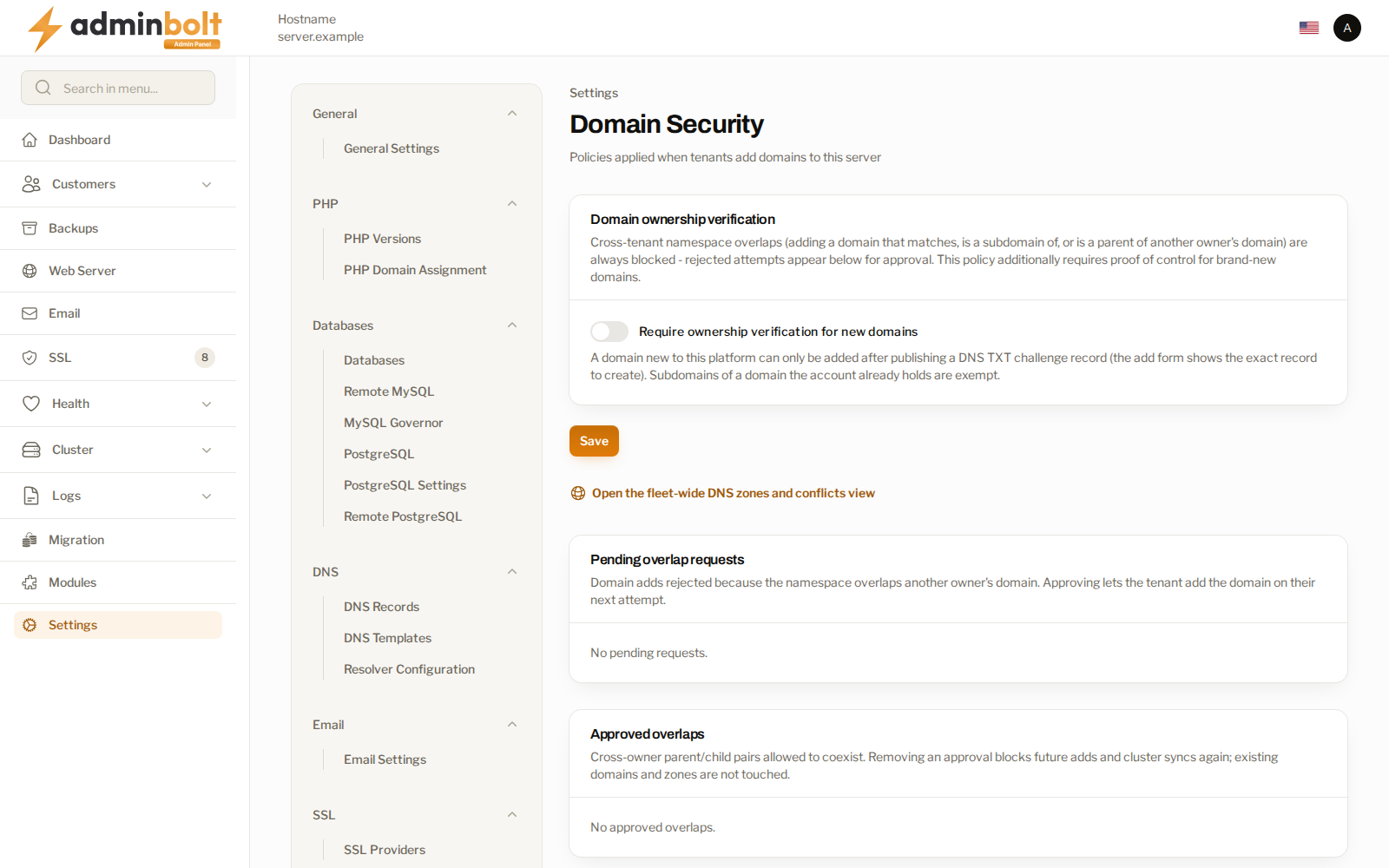
Ownership verification
Require ownership verification for new domains adds a second rule on top: a domain that is new to this platform can only be added after the account publishes a DNS TXT record proving it controls the name.
The add form shows the exact record to create, and verification runs again automatically when the account retries. Subdomains of a domain the account already holds are exempt, so the rule applies to the first claim on a name rather than to every add.
Turn this on where accounts are self-service and you cannot vouch for who is adding what.
Pending overlap requests
Every blocked add is recorded here with the domain and the account that tried. You have two answers:
- Approve - the account can add the domain on its next attempt.
- Dismiss - the rejection stands.
Approving is a deliberate act. It means you have decided these two owners may hold overlapping names, so approve when you know the relationship and dismiss when you do not.
Approved overlaps
The pairs you have allowed to coexist. Removing an approval blocks future adds and cluster syncs for that pair again; it does not remove a domain that has already been added on the strength of it.
DNS clusters
A DNS cluster zone that overlaps an earlier claim by another owner is flagged rather than served, so the check is not something an account can walk around by bringing the name in through a cluster. Open the fleet-wide DNS zones and conflicts view takes you to the fleet-wide picture.
Upgrades
Overlaps that already existed on the server, and overlaps arriving with a migration, are carried over as approved. Nothing that was resolving before an upgrade stops resolving because of it.
Related pages
- Domains - the domains on this server.
- DNS Cluster - where cluster overlaps are flagged.
- Global DNS Zones - the fleet-wide zone view.
- Activity Log - the record of approvals and dismissals.