

DNS Domains Health
The DNS Domains Health page verifies the DNS status of all hosted domains: whether their records are configured, resolvable, and free of errors. Open it from Health > DNS Domains in the sidebar, or from the button at the bottom of Health. Since panel 1.9.3 the menu entry drops the repeated "Health"; the page is still titled DNS Domains Health.
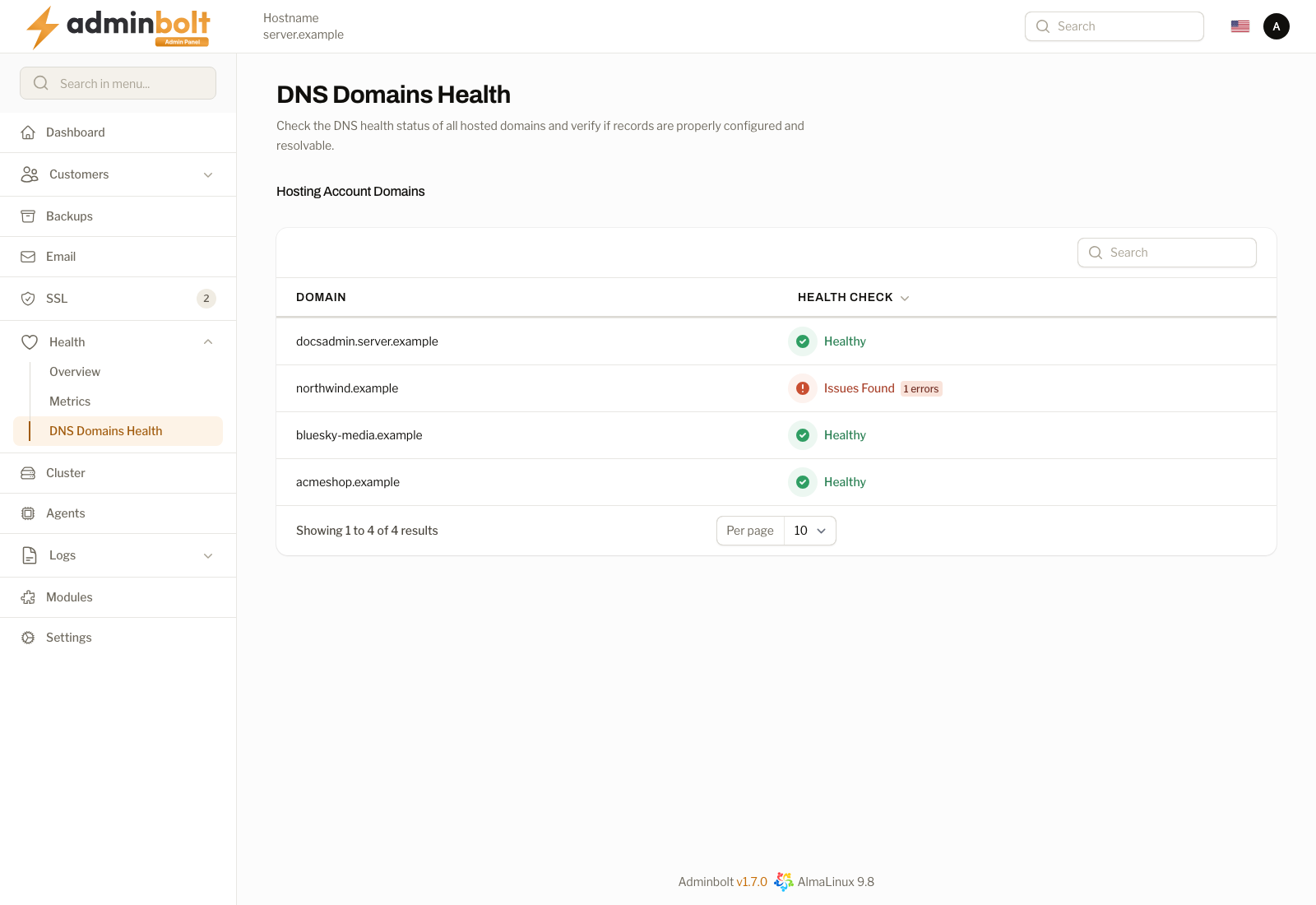
Overview
URL: /admin/dns-domains-health-check
The page header reads "Check the DNS health status of all hosted domains and verify if records are properly configured and resolvable."
Under Hosting Account Domains, every hosted domain except subdomains is listed. A search box filters domains by name, and the list is paginated (5, 10, 25, 50, or All per page).
The table has two columns:
- Domain - Fully qualified domain name (FQDN).
- Health check - The result of the DNS health check of that domain.
How a domain is judged
Since panel 1.9.4 the check answers two questions, not one: whether the zone on this server has issues, and whether public DNS resolves the domain to this server. A domain is Healthy only when its zone has no issues and public DNS resolves its name to this server. Before 1.9.4 only the zone on this server was checked, so a domain that did not exist in public DNS, or pointed somewhere else, could still show as healthy.
The Health check column shows one of:
- Checking... - the row is still being checked. Since panel 1.9.4 the page opens at once and each row loads on its own as soon as its check is done, so a slow domain does not hold up the others.
- Healthy - the zone has no issues and public DNS resolves the domain to this server.
- N issues found - the zone has issues, or public DNS does not resolve the domain to this server, or both. Each problem counts as one issue.
- Unable to verify - nothing that was checked is wrong, but public DNS could not be asked right now, so nothing is known about the name. It is not reported as a fault.
The result of a check is kept for a short while, so reloading the page does not run every check again. A domain that is checked too often in a short time shows Unable to verify with "domain could not be checked in public DNS right now." and "Try again in a few minutes."
DNS Health Check Details
Clicking a row's result opens DNS Health Check Results for that domain.
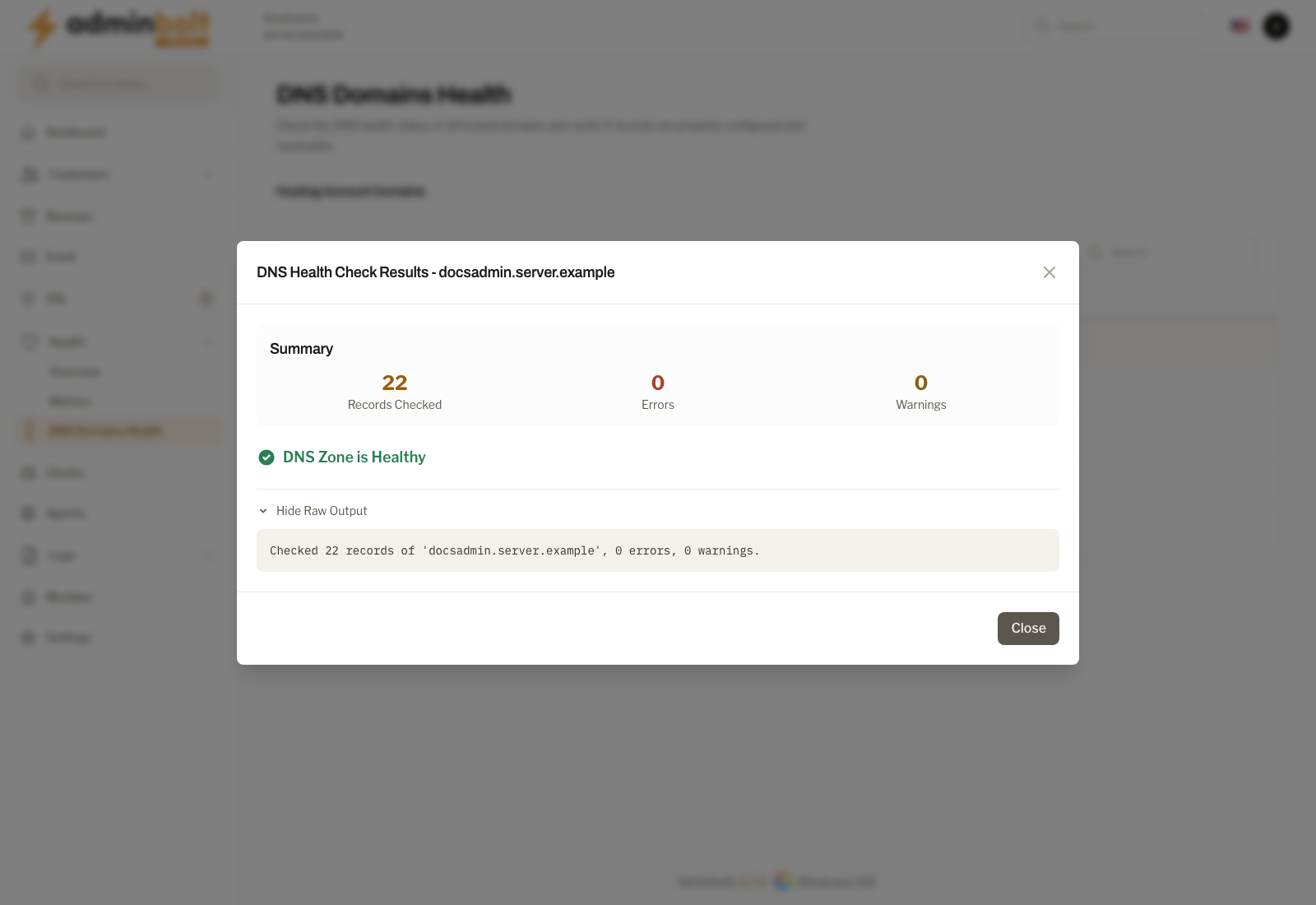
The zone on this server
The first line says DNS Zone is Healthy or DNS Zone has Issues. Below it:
- Records Checked - Total number of DNS records analyzed.
- Errors - Number of records with critical issues, listed under Errors Found.
- Warnings - Number of records with minor issues, listed under Warnings Found.
Show Raw Output reveals the full output of the zone check.
Public DNS
Since panel 1.9.4 the Public DNS section says what public DNS answers for the domain, the next step, and the addresses the name resolves to, after Resolves to. The main answers are:
| Message | What to do |
|---|---|
| domain points at this server. | Nothing. |
| domain does not exist in public DNS. | Register the domain, or check the name servers set for it at your registrar. |
| domain has no public A or AAAA record. | Add the record the next step names, for example "At your DNS provider, set the A record of domain to address." |
| domain points only at private or reserved IP addresses, which cannot be reached from the internet. | Point the domain at the public address the next step names. |
| domain does not point at this server. | Point the domain at the address the next step names. "If the domain is behind a proxy or CDN on purpose, you can ignore this." |
| domain points at this server, but public DNS answers that the name does not exist for one of its record types. | Check the A and AAAA records of the domain at your DNS provider. |
| Public DNS servers could not get an answer for domain from its name servers. | Check the name servers set for the domain at your registrar, and that they serve its zone. |
| domain is not a public domain name, so it cannot be reached from the internet. | Use a registered public domain name. |
| domain could not be compared with this server, because the server has no active public IP address configured. | Add the server's public IP address under Network IPs. |
The address in the next step is the dedicated address of the domain's hosting account when it has one, and otherwise the server's first public address.
Mail DNS on a free temporary domain
Since panel 1.9.4, for a free temporary domain and the names under it, a Mail DNS section checks whether public DNS publishes the domain's mail records: MX, SPF, and DKIM. Public DNS for a free temporary domain publishes its A record only, so the mail records this server holds never reach other mail providers. Each record is marked Published in public DNS, Missing from public DNS, Different in public DNS, Not in the zone on this server, or Could not be checked.
When a record is not published, the domain is not healthy, and the section says "domain is a free temporary domain, and public DNS does not publish all of its mail records. Mail sent from it may fail SPF and DKIM checks at other mail providers." with the next step "To send mail, use your own domain and publish its SPF and DKIM records where its DNS is hosted." Other domains do not get this section: their mail may be hosted elsewhere on purpose.
The client panel shows the same warning where a customer sets up mail on such a domain; see Email Accounts.