

Api Keys
The Api Keys page allows resellers to create and manage API keys for authenticating with AdminBolt via REST API endpoints.
Overview
URL: /reseller/api-keys
The page header reads: "Create and manage secure API keys with access control and IP restrictions."
A New api key button opens the API key creation form.
Integration Overview
Below the header, an integration overview section explains that API keys enable secure authentication for external applications to interact with AdminBolt via REST API endpoints.
A link to the API Documentation is provided (e.g., /api/documentation) for endpoints, authentication, and usage details.
Api Keys Table
The table displays all API keys created by the reseller.
Search and Filter
A search bar filters keys. Click the Filter button to apply advanced filters:
- Status - Filter by status (All, Active, Inactive).
- IP Whitelist - Filter by IP whitelist status (All, Enabled, Disabled).
A Reset button clears all filters.
Table Columns
- Name - The API key name
- API Key - The generated key value
- Active - Whether the key is active
Since panel 1.9.4, the table no longer shows any part of the secret.
Empty State
When no API keys exist, the page shows "No API Keys Yet" with the message "No API Keys found. Create one to get started."
Creating an API Key
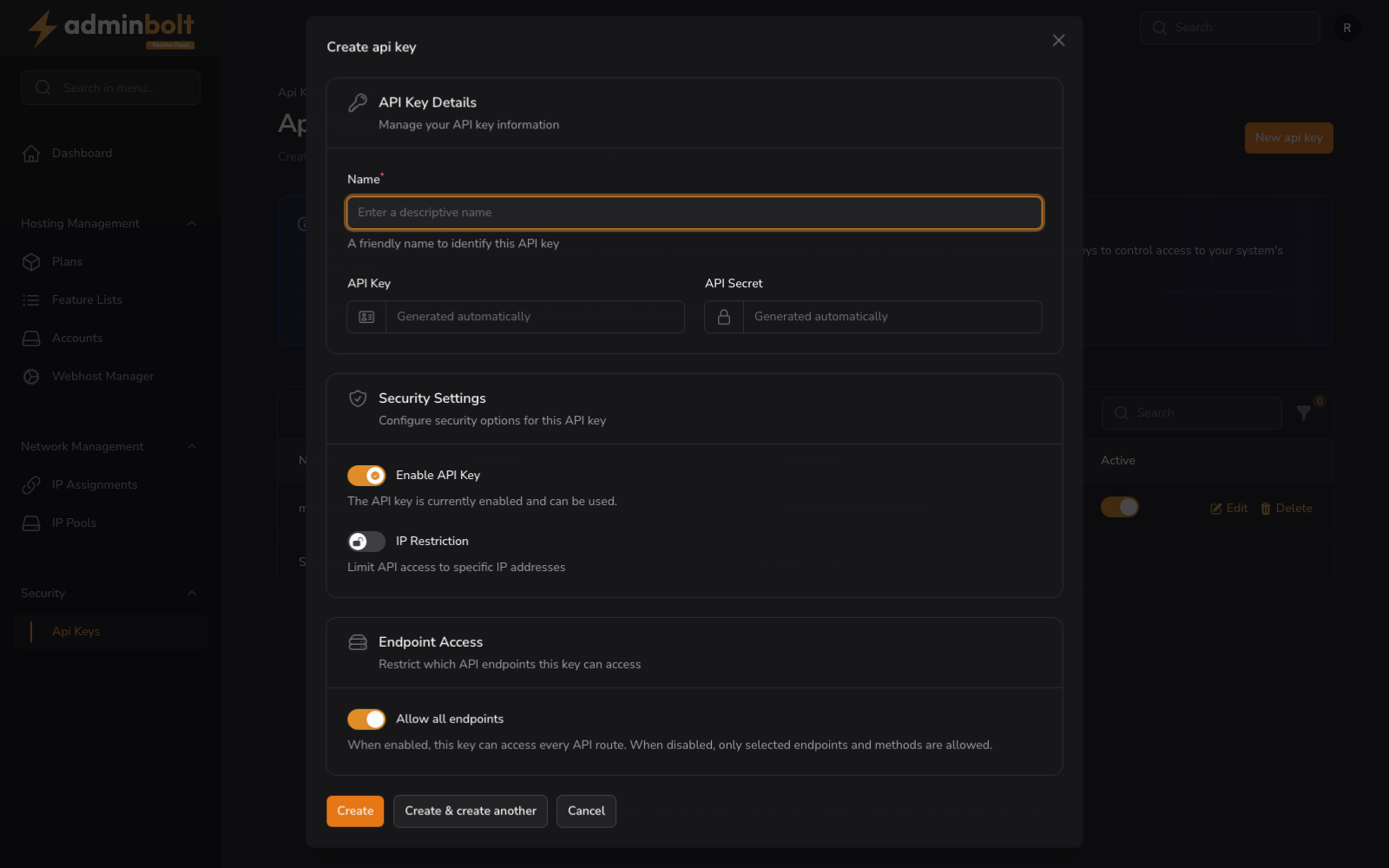
Clicking New api key opens a modal with the following sections:
API Key Details
- Name (required) - A friendly name to identify this API key (placeholder: "Enter a descriptive name")
- API Key and API Secret (read-only) - Both read Generated automatically. You do not choose them.
Security Settings
- Enable API Key (toggle) - Enable or disable the API key. Default: enabled
- IP Restriction (toggle) - Limit API access to specific IP addresses. Default: disabled
Endpoint Access
- Allow all endpoints (toggle) - When enabled, this key can access every API route. When disabled, only selected endpoints and methods are allowed. Default: enabled
Form Actions
- Create - Save the API key
- Cancel - Close the modal without saving
Copy the secret
Since panel 1.9.4, Create shows the new key and its secret once, in a notification titled API key created - copy the secret now. The notification stays until you close it, so copy the secret before you do. The panel never shows the secret again: not in the table and not in the edit form. If the secret is lost, delete the key and create a new one.
In panel 1.9.3 the modal confirmed the key without showing its secret, so a key created there could not be used. Delete such a key and create a new one.
Hosting plan and suspension rules
Since panel 1.9.4, when your key acts on one of your hosting accounts (Acting on behalf of a hosting account), the account's hosting plan applies: an endpoint whose feature the plan's Feature List leaves out is refused with HTTP 403, and the answer names the feature. Your key keeps working while the account is suspended. See Client API Keys.
Acting on behalf of a hosting account
A reseller API key can call any /api/client/* endpoint on behalf of one of your own hosting accounts, so you do not need a separate key per account. Name the account in the X-Hosting-Account header, using either its numeric id or its username:
curl https://server.example:8443/api/client/domains \
  -H "X-API-Key: <your-key>" \
  -H "X-API-Secret: <your-secret>" \
-H "X-Hosting-Account: alice"- The header is required. Without it, the request is refused rather than being applied to an unspecified account.
- You can only name accounts you own. An account belonging to another reseller, or to the server administrator, is reported as not found.
- The key's endpoint access settings apply exactly as they do on the reseller API.
Connecting a billing platform
A reseller can plug their own billing system into AdminBolt with a key issued on this page. The reseller API mirrors the administrator API under the /api/reseller prefix, scoped to your own accounts and plans. See the Billing Integration API for the account lifecycle, usage synchronisation, and single sign-on.