

LiteSpeed PHP Migration
Where to find it: this is the PHP Migration tab of the Web Server area, at
/admin/web-server/litespeed/migration.
The LiteSpeed PHP Migration page moves your domains and hosting plans between REMI PHP and the matching LSPHP version. MyApache serves REMI PHP, while LiteSpeed Enterprise and OpenLiteSpeed both serve LSPHP, so after switching the active web server you run a LiteSpeed PHP migration to keep your sites on the engine that matches the server.
The page is the PHP Migration tab of Web Server in the sidebar, where its heading reads PHP Engine Migration. The LiteSpeed page also links to it with a PHP Migration button. The direction it defaults to follows the active web server.
Not on CloudLinux
On CloudLinux, websites belong on CloudLinux alt-php, so this page does not apply there. Websites still on REMI PHP or LSPHP stay there until you move them. Since panel 1.9.2, the Web Server tabs, the PHP Migration button, and the menu search leave it out on CloudLinux. To move websites to alt-php, use Move websites to alt-php on Settings > CloudLinux > Isolation Report.
This page is the per-view reference for LiteSpeed PHP migration. For where it fits in the full workflow, see Integrations > LiteSpeed or Integrations > OpenLiteSpeed.
Nothing moves between servers here
Despite the name, this "migration" only re-assigns the PHP engine used by domains on this server. It does not move hosting anywhere. For moving hosting, see Migration: which one do you need?.
Overview
URL: /admin/web-server/litespeed/migration
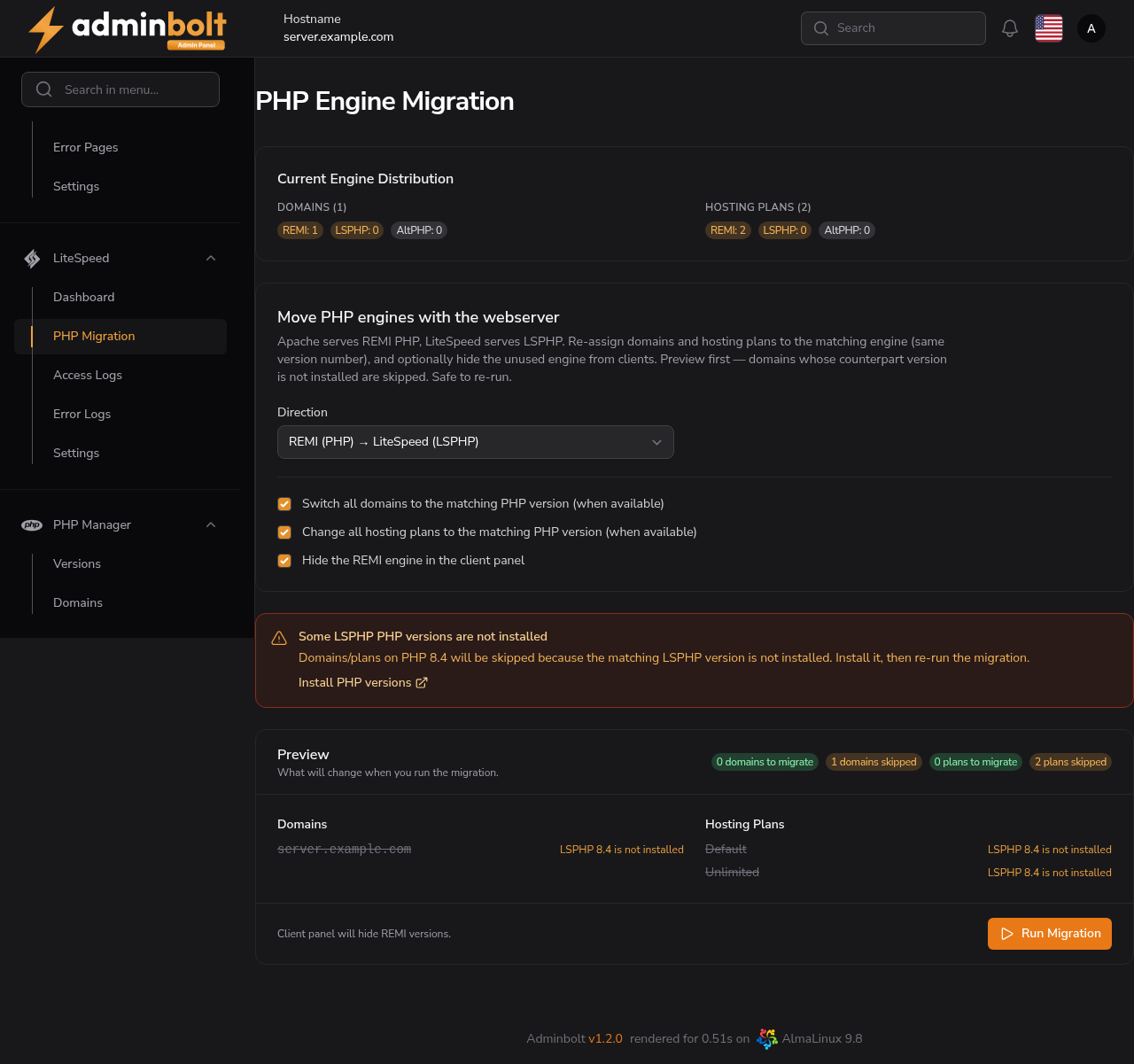
The page previews what will change before you commit. Each domain is re-assigned to the matching PHP version in the chosen direction. Domains whose matching version is not installed are skipped, and the migration is safe to re-run.
Migration direction
The migration is bidirectional:
- REMI (PHP) → LiteSpeed (LSPHP) - use when moving to LiteSpeed, so each domain on REMI PHP moves to the matching LSPHP version.
- LiteSpeed (LSPHP) → REMI (PHP) - use when switching back to MyApache, so each domain returns to the matching REMI PHP version. Run this before the switch: the panel refuses to switch back while any domain is still on LSPHP.
Preview and options
Before running, the page previews the per-item result and offers these options:
- Switch domains - re-assign each domain to the matching PHP version in the target engine.
- Change plans - update hosting plans to the matching PHP version so new accounts use the right engine.
- Hide the unused engine - hide the engine you are migrating away from in the client panel, so clients only see the relevant PHP versions.
Domains without a matching target version are listed as skipped. Install the missing version from Settings > PHP > PHP Versions, then re-run the migration.
Run Migration
Click Run Migration, then Confirm. The page re-assigns each domain and plan to the matching version and reports the result per item.
The migration is safe to re-run. If you add a missing LSPHP version later, run it again to pick up the previously skipped domains.
Related pages
- LiteSpeed Dashboard - switch the active web server before or after migrating.
- Integrations > LiteSpeed - the full end-to-end guide.