

Apache Includes
Apache Includes holds custom Apache directives that survive every rebuild of the server configuration and the virtual hosts. Directives you add by hand to a generated file are lost the next time the panel writes that file; directives you add here are written by the rebuild itself, so they stay.
Since panel 1.9.2, the Apache Includes tab is shown only while Apache, or LiteSpeed Enterprise as the Apache drop-in, is the web server, because nothing else reads the Apache configuration.
Overview
URL: /admin/web-server/apache-includes
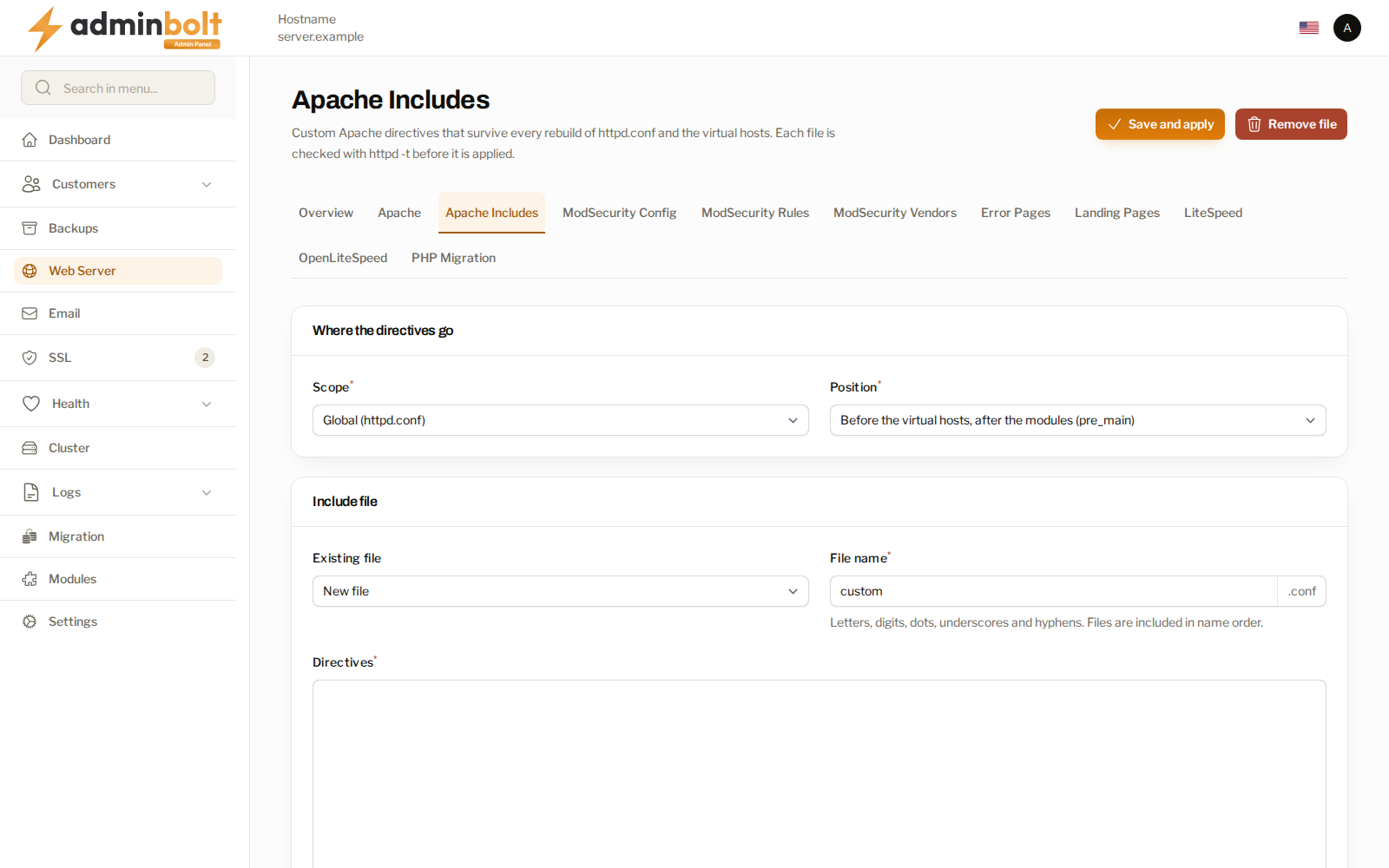
Open Web Server in the sidebar, then the Apache Includes tab. The page is available while Apache, or LiteSpeed Enterprise as the Apache drop-in, is the web server.
Each include is a .conf file with a name you choose. You decide where its directives are placed, write them in the editor, and apply them. Every file is checked with the Apache configuration test before it is applied. A file the test refuses is not applied, and the output of the test is reported back to you, so a broken directive never reaches a running web server.
Where the directives go
The Where the directives go section decides which part of the configuration receives the file.
Scope offers two choices:
| Scope | What it covers |
|---|---|
| Global (httpd.conf) | The main server configuration, outside the virtual hosts. |
| Virtual host | One hosting account, and within it a single domain or every domain. |
Global scope
With Global selected, Position decides where in the main configuration the file is included:
- Before the virtual hosts, after the modules (pre_main) - the usual choice for server-wide directives that depend on a loaded module.
- Right before the virtual hosts (pre_virtualhost) - for directives that must be read immediately before the virtual hosts.
- After the virtual hosts (post_virtualhost) - for directives that must come last.
Virtual host scope
With Virtual host selected, three fields narrow the target:
- Hosting account - the account whose virtual hosts receive the file.
- Domain - a single domain of that account, or Every domain of the account.
- Applies to - HTTP and HTTPS virtual hosts, HTTP virtual host only (:80), or HTTPS virtual host only (:443).
The include file
The Include file section holds the file itself.
- Existing file - pick a file already saved for the selected target to load its contents into the editor. Leave it on New file to create one.
- File name - the name of the file, without the
.confsuffix, which the panel adds. Letters, digits, dots, underscores, and hyphens are accepted. Files are included in name order, so a name such as10-headersgives you control over the order when you keep several files for the same target. - Directives - the Apache directives themselves.
Actions
- Save and apply - write the file and apply it. The configuration test runs first, and the file is rejected with the test output if it does not pass.
- Remove file - delete the file named in File name from the selected target. You are asked to confirm.
After an upgrade
Upgrading to AdminBolt 1.8.2 re-renders the server configuration and every virtual host once, so the first include you save on this page takes effect without any further step.
Related pages
- Apache Settings - the generated Apache configuration itself, including the MPM limits.
- ModSecurity Vendors - rule sets served by the same web server.