

Remote MySQL
Remote MySQL is one screen with two halves. The top holds the server-wide policy for remote database access; the rest lists every host that hosting accounts have allowed to reach their databases from outside the server. Accounts allow individual hosts themselves on their Remote MySQL page; this screen limits what they are allowed to allow, and lets you revoke what they allowed.
Overview
URL: /admin/settings/remote-mysql
Navigate to Settings > Databases > Remote MySQL.
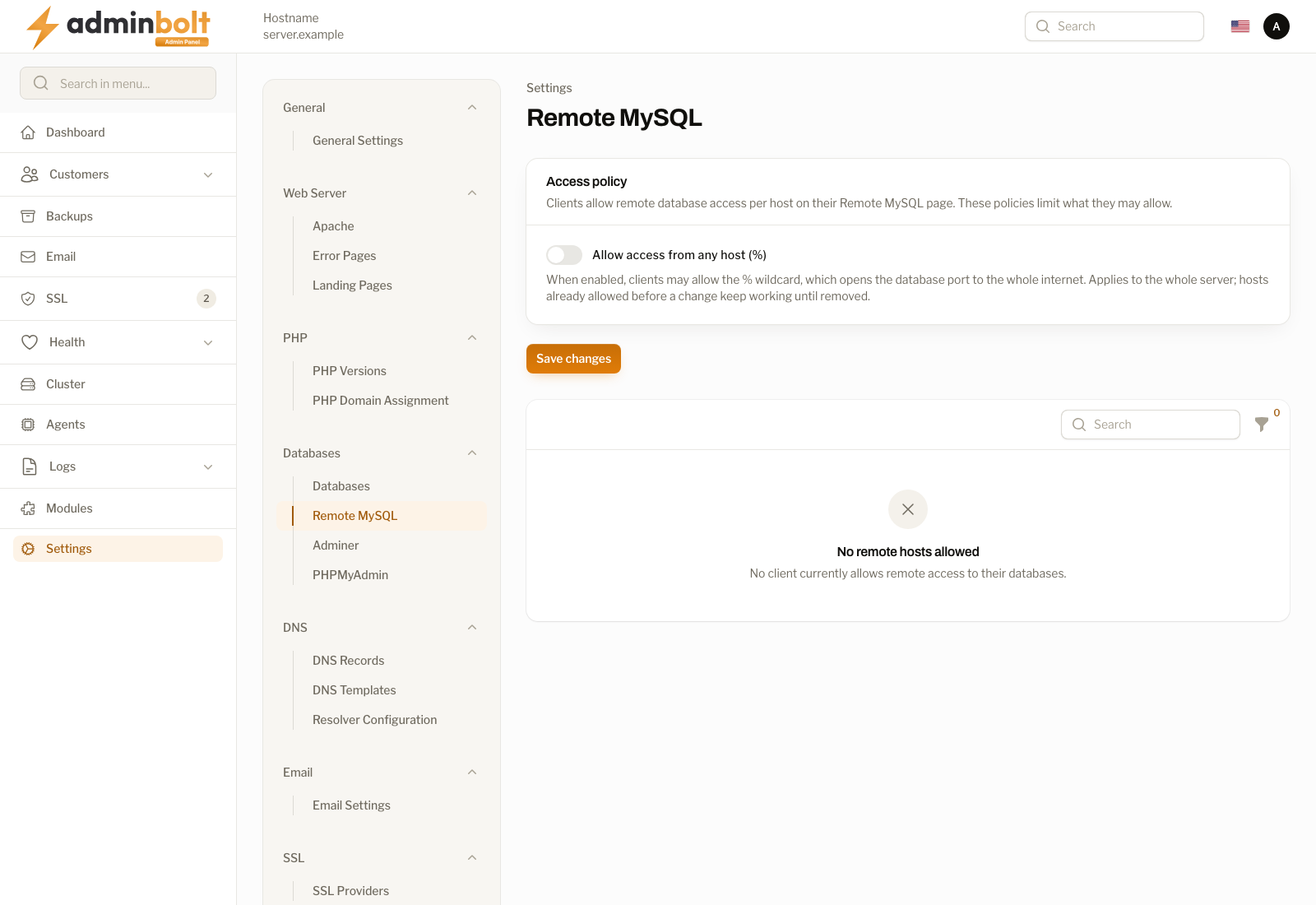
Access policy
Allow access from any host (%) decides whether accounts may use the % wildcard, which opens the database port to the whole internet.
- Off (default) - accounts may only allow specific addresses, ranges (
/8,/16,/24), and patterns such as203.0.113.%. An attempt to add%is refused with an explanation. - On - accounts may additionally allow
%.
Use Save changes to apply the policy.
The policy applies to the whole server. Hosts allowed before you turn the policy off keep working until they are removed, so switching it off is not retroactive. Use the host list below to find and revoke the wildcard entries that predate the change.
Warning: Leave this off unless you have a concrete reason. A
%entry exposes a customer's databases to every address on the internet, and the password becomes the only thing protecting them.
Allowed hosts
The lower half lists every host allowed across all accounts. Rows are only ever created by account owners on their Remote MySQL page, so there is nothing to add here. A server where nobody has allowed a host shows No remote hosts allowed.
| Column | Meaning |
|---|---|
| Account | The hosting account that allowed the host. |
| Allowed host | The address, range, or pattern. A % entry, meaning any host, is highlighted. |
| Description | The label the account owner gave it. |
| Added | When the entry was created. |
The list is sorted newest first, and can be searched by account, host, or description. The Any host (%) only filter narrows it to the wildcard entries, which is the fastest way to audit the server after turning the wildcard policy off.
Revoke
Revoke on a row, or Revoke selected for several at once, removes database access from that host immediately. The database permissions are dropped and the firewall opening is removed, unless another account still allows the same host, in which case the opening stays for that account.
Since panel 1.9.4 a row stays in the list until the server has revoked the access. When the revocation does not finish, the notification Could not revoke this host names what is still in place, for example the database accounts that could not be dropped or the firewall opening that could not be closed, and Revoke can be run again. The local database users of the account are never dropped.
Local addresses
Since panel 1.9.4 Remote MySQL accepts remote addresses only. Account owners can no longer add localhost, 127.0.0.1, or another loopback address: the account's applications on this server always reach their databases. The update to 1.9.4 takes the 127.0.0.1 and localhost entries off every account's list and closes the firewall openings they made, without touching the local database users. Before 1.9.4 removing such an entry dropped the database users those applications log in with. Other loopback entries saved earlier, such as 127.0.0.%, stay on the list until they are revoked. An account moved to this server by an account migration between AdminBolt nodes arrives without its loopback entries, and the move is not marked as failed for them.
Revoking is not a warning to the customer: connections from that host stop working at once. Tell the account owner what changed, or ask them to remove the entry themselves.
Making the feature available
Whether an account sees the client page at all is decided per hosting plan, not here. Grant or withdraw the Remote MySQL feature on the Hosting Plans page. This screen only governs what accounts that already have the feature may do.
What happens on the server
Allowing a host does two things: it creates the matching database permissions for that account's database users at that host, and it opens the database port to that source in the firewall. Removing the host reverses both. The port stays closed for every source nobody has allowed.
Related pages
- Remote MySQL Hosts - the former host inventory page, now part of this one.
- Client Remote MySQL - the account owner's view.
- Hosting Plans - which plans expose the feature.
- Firewall Rules - the rules the openings are added to.