

Fail2Ban Jails
A jail is the unit that makes Fail2Ban act. It ties a log file, a filter, thresholds, and an action into one rule that watches a service and bans the addresses that abuse it.
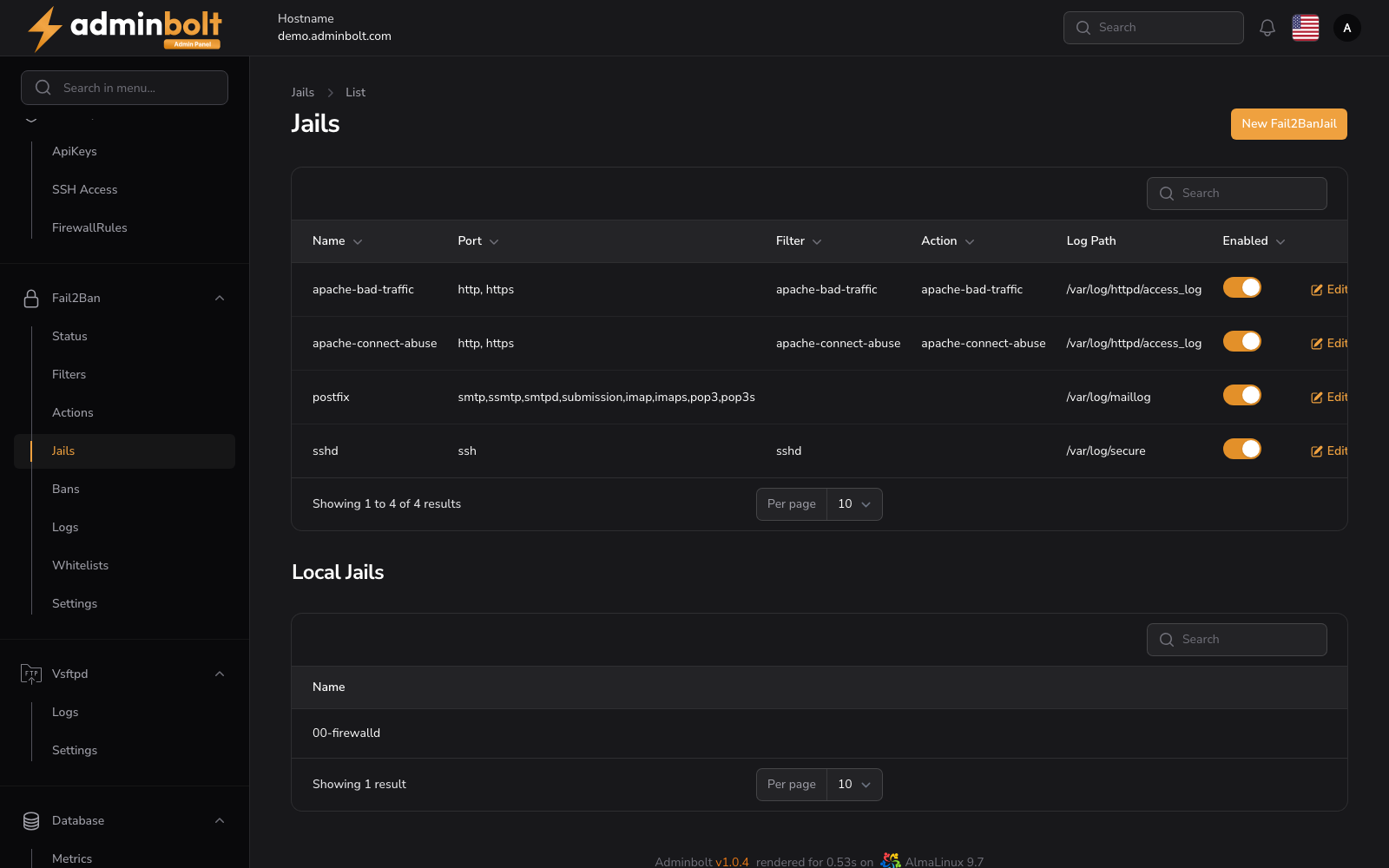
Overview
URL: /admin/settings/fail2ban-jails
Open it from Settings > Security > Fail2Ban in the sidebar, then pick the Jails tab. The tab carries a counter showing how many jails exist.
The page has two lists: the jails this panel manages at the top, and the jails present on the server below.
Shipped jails
AdminBolt ships jails for the services it manages, and their bans are enforced by the server firewall:
| Jail | Protects |
|---|---|
sshd | SSH logins. |
postfix | The mail server. |
apache-bad-traffic, apache-connect-abuse | The web server. |
bolt-panel | Panel logins. Repeated failed sign-ins are banned, covering admin, reseller, and client sign-in alike. |
The bolt-panel jail is installed on new servers and added to existing installations when they are upgraded. Existing installations also pick up the enforcing ban action on upgrade, and any tuning you made to the shipped jails is kept.
The jail list
Each row shows:
- Name - the jail name (sortable).
- Port - the ports it watches, for example
http, httpsorssh(sortable). - Filter - the filter it matches lines with (sortable).
- Action - what happens on a ban. Empty means the default ban action from Fail2Ban Settings (sortable).
- Log Path - the file it reads, for example
/var/log/secure(sortable). - Enabled - a switch. Turning it applies the change on the server, not only in the panel (sortable).
Row actions are Edit, Stats (ban statistics for that jail), and Delete. A search box filters by name, and the page size can be set to 5, 10, 25, 50, or All.
The lower list, Local Jails, is the read-only set of jails present in the server's own configuration, with its own search box.
Creating a jail
New Jail opens Create Jail at /admin/settings/fail2ban-jails/create. The form is grouped into General, Detection, and Thresholds & Backend.