

PHP Versions
The PHP Versions page lets you install, manage, and configure the supported PHP versions on the server, across every available engine on a single page.
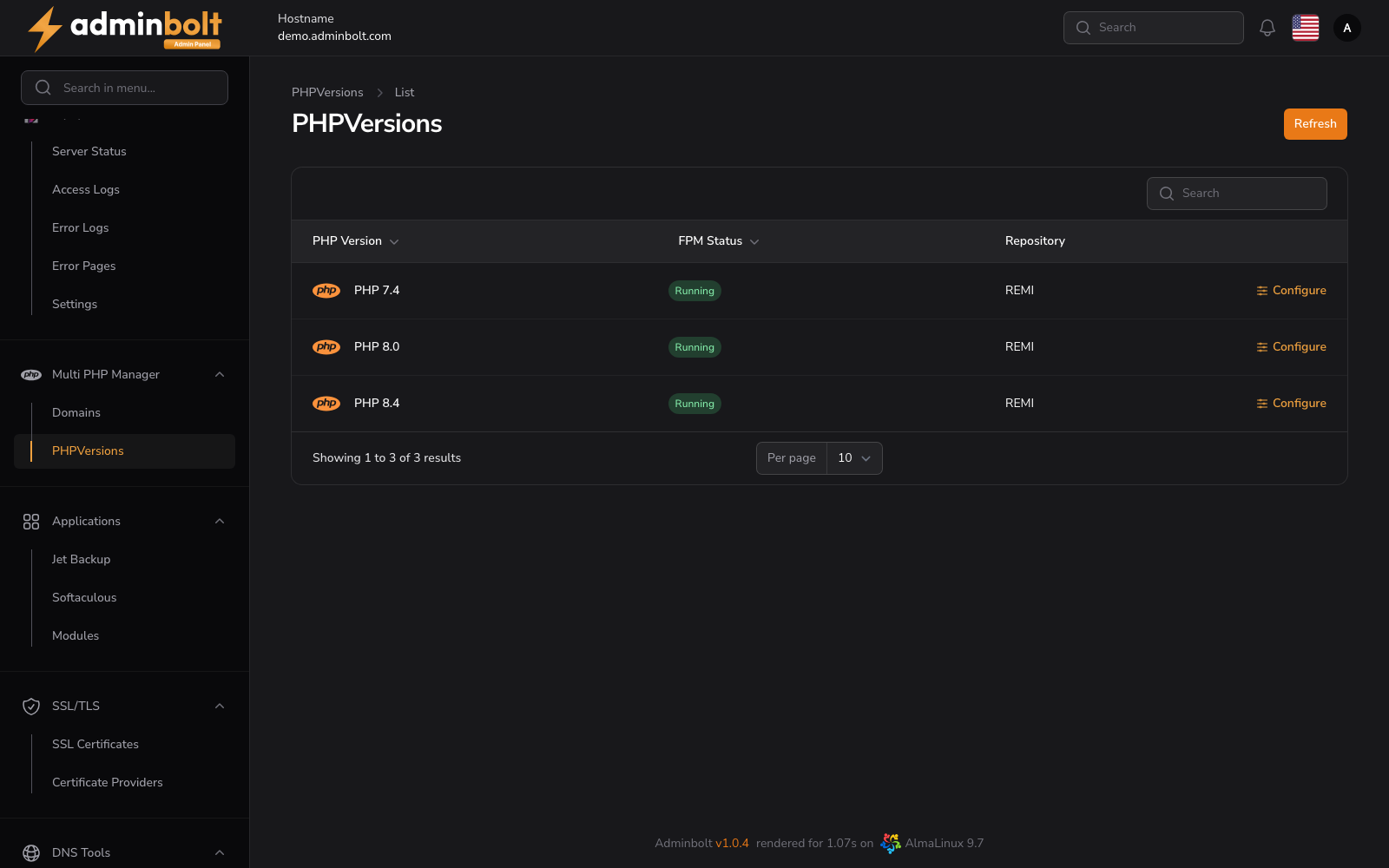
Overview
URL: /admin/settings/php-manager-versions
Navigate to Settings > PHP > PHP Versions.
The PHP area has two tabs across the top of the content, and each one is a page in its own right:
| Tab | Address | Documented in |
|---|---|---|
| Versions | /admin/settings/php-manager-versions | This page. |
| Domain Assignment | /admin/settings/php-manager-domains | Multi PHP Domains Manager |
The counter next to Versions shows how many versions are installed out of the total, and the one next to Domain Assignment counts the domains on the server.
The page shows summary counters (Total, Installed, Available, Repositories) and a card for every supported PHP version. Each card shows the version, its repository (engine), whether it is Installed or Not Installed, and an Install, Configure, or Uninstall action. A search box above the cards filters by version, name, or repository.
PHP versions come from up to three repositories, selected with the filter chips above the card list:
- REMI - standard PHP for Apache (mod_php / PHP-FPM).
- LiteSpeed - LSPHP builds served through LSAPI, used when LiteSpeed is the active web server.
- CloudLinux - Alt-PHP, available after a CloudLinux conversion, including legacy versions down to PHP 5.2.
The REMI repository is always present; LiteSpeed appears once the LiteSpeed module is installed, and CloudLinux (Alt-PHP) appears after conversion, each as an extra chip alongside All. Assign domains and plans to the matching engine on the Domain Assignment tab and, for LiteSpeed, the PHP Migration page.
Configuring a PHP Version
Configure on an installed version opens the configuration page for that version, at /admin/php-versions/<id>/configure. That page sits outside the Settings area, so the Settings groups are replaced by a PHP Versions breadcrumb that takes you back.
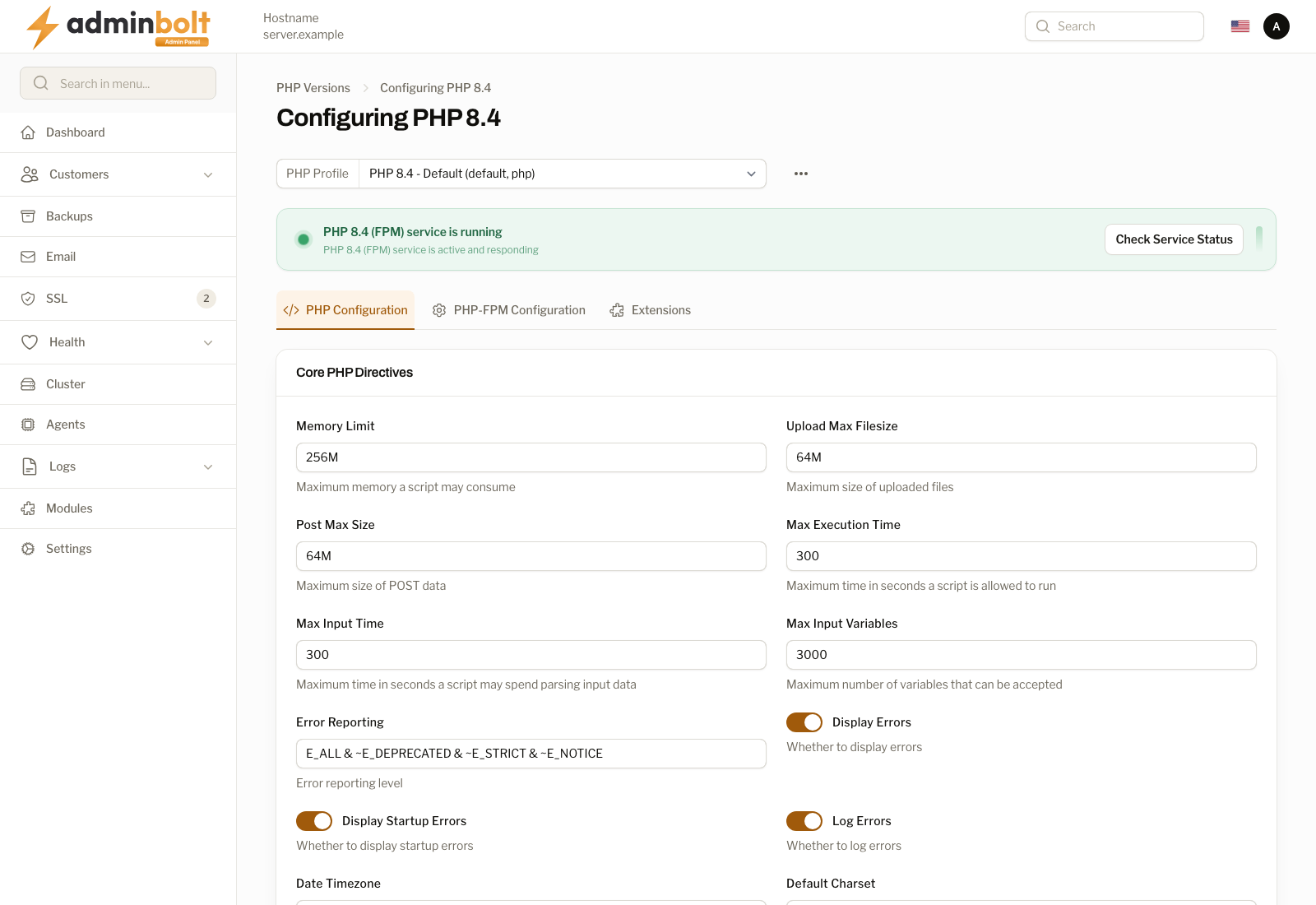
PHP Profile
At the top, a PHP Profile dropdown allows selecting which configuration profile to edit (e.g., "PHP 8.4 - Default (default, php)"). An options menu (three dots) is available next to the profile selector.
Service Status
A status banner shows whether the PHP-FPM service is running, with a Check Service Status button.
Configuration Tabs
The configuration page is organized into three tabs:
1. PHP Configuration
Contains Core PHP Directives with the following settings:
- Memory Limit - Maximum memory a script may consume.
- Upload Max Filesize - Maximum size of uploaded files.
- Post Max Size - Maximum size of POST data.
- Max Execution Time - Maximum time in seconds a script is allowed to run.
- Max Input Time - Maximum time in seconds a script may spend parsing input data.
- Max Input Variables - Maximum number of variables that can be accepted.
- Error Reporting - Error reporting level.
- Display Errors - Whether to display errors (toggle).
- Display Startup Errors - Whether to display startup errors (toggle).
- Log Errors - Whether to log errors (toggle).
- Date Timezone - Default timezone.
- Default Charset - Default character set.
- Default Mime Type - Default MIME type.
- File Uploads - Whether to allow HTTP file uploads (toggle).
- Upload Tmp Dir - Temporary directory for uploaded files.
- User INI Filename - Name of the file where user-defined INI settings can be set.
- User INI Cache TTL - TTL for caching user INI files.
- Variables Order - Order of variables.
- Request Order - Order of request variables.
- Register ARGC ARGV - Whether to register the argv and argc variables (toggle).
- Auto Globals JIT - Whether to enable auto globals JIT (toggle).
- Short Open Tag - Whether to allow the short-form
<?tag (toggle). - Precision - Number of significant digits displayed in floating point numbers.
- Output Buffering - Output buffering size.
- Output Handler - Output handler to use.
- Zlib Output Compression - Whether to transparently output pages with the text/html content-type (toggle).
- Zlib Output Handler - Zlib output handler.
- Implicit Flush - Whether to flush output buffers automatically (toggle).
- Unserialize Callback Function - Callback function for unserialize.
- Serialize Precision - Precision for serializing floating point numbers.
- Disable Functions - Comma-separated list of functions to disable.
- Disable Classes - Comma-separated list of classes to disable.
- Zend Assertions - Zend assertions mode.
- Zend Detect Unicode - Whether to detect Unicode (toggle).
- Zend Enable GC - Whether to enable garbage collection (toggle).
- Zend Multibyte - Whether to enable multibyte support (toggle).
- Zend Script Encoding - Script encoding for multibyte support.
Click Apply Configuration to save changes, or Cancel to discard.
2. PHP-FPM Configuration
Contains PHP-FPM Global Settings:
- PID File - Path to the PID file.
- Error Log File - Path to the error log file.
- Log Level - Log level for error log (dropdown: e.g., Notice).
- Emergency Restart Threshold - Number of child processes that can die before restart.
- Emergency Restart Interval - Time interval for emergency restart (e.g., 60s, 1m).
- Process Control Timeout - Time limit for child processes to respond to signals.
- Daemonize - Whether to daemonize the process (toggle).
- RLimit Files - Maximum number of open files.
- RLimit Core - Maximum core file size (unlimited or size).
- Events Mechanism - Event mechanism to use (dropdown: e.g., epoll).
- Systemd Interval - Interval for systemd status updates (seconds).
- Include Path - Path to include additional configuration files.
Click Apply Configuration to save changes, or Cancel to discard.
3. Extensions
Manage PHP extensions organized by category. Each extension can be enabled or disabled with a toggle, and some extensions expose additional configuration fields when enabled.
Database Extensions:
- Enable PDO MySQL Extension - Toggle to enable/disable. When enabled, shows: PDO MySQL Default Socket, PDO MySQL Default User, PDO MySQL Default Password, PDO MySQL Default Host, PDO MySQL Default Port.
- Enable MySQLi Extensions - Toggle to enable/disable. When enabled, shows: MySQLi Allow Persistent, MySQLi Max Persistent, MySQLi Max Links, and additional MySQLi configuration options.
Click Apply Configuration to save changes, or Cancel to discard.