

Background Jobs
Background Jobs shows the work the panel runs in the background, such as checking for system package updates or setting up a website, and the jobs that failed. While a job has failed, the dashboard and Health report a problem. This page is where you find out what failed and why, and where you run the job again or delete it. Available since panel 1.9.2.
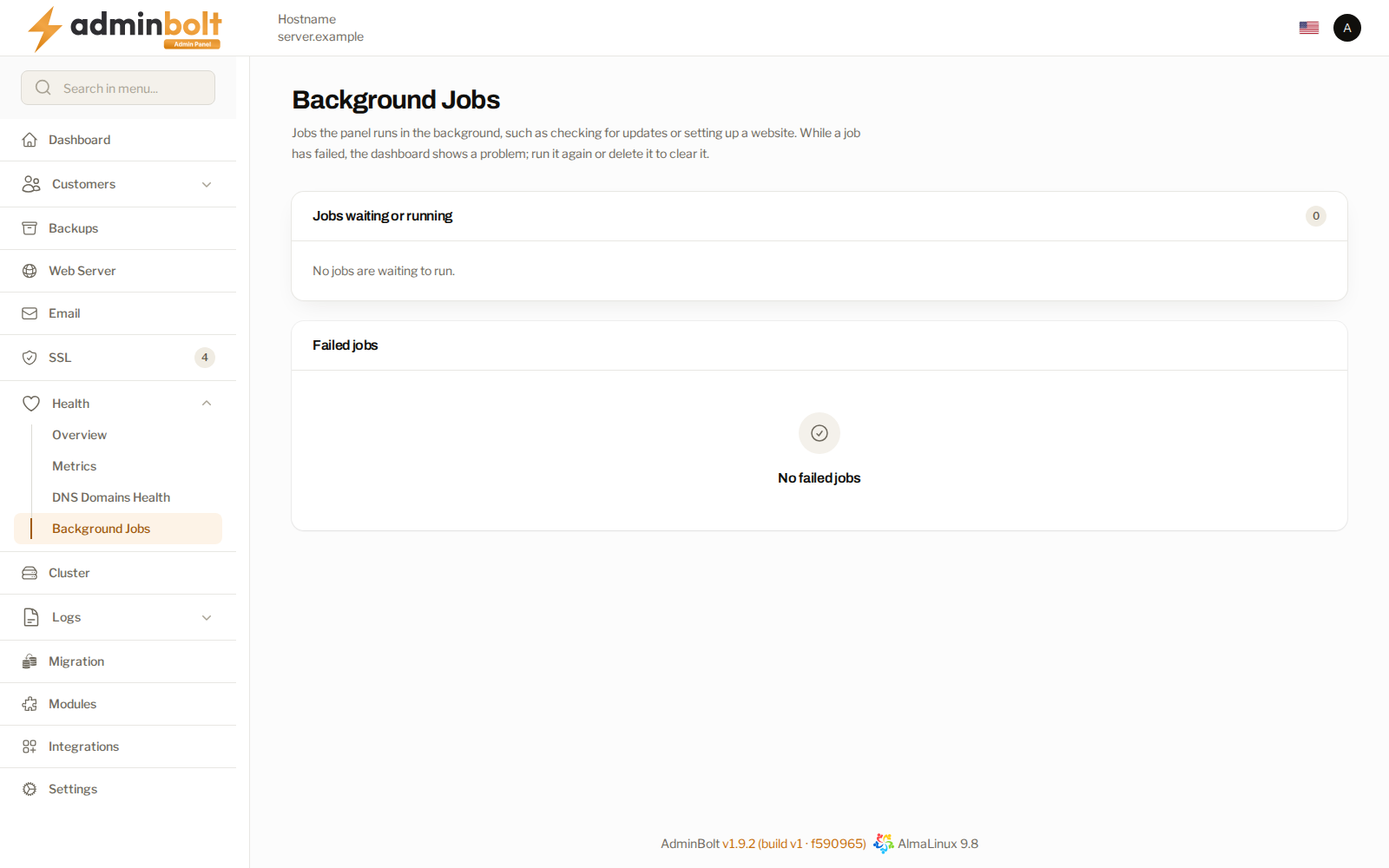
Overview
URL: /admin/background-jobs
Open it from Health > Background Jobs in the sidebar. The Background Jobs row of System Status on the Dashboard, and the Background jobs finding on Health, open it too.
The page has two parts: the jobs waiting or running, and the failed jobs.
Jobs waiting or running
The Jobs waiting or running section lists the queued jobs, oldest first, with the number of all of them beside the heading. When nothing is queued, it says No jobs are waiting to run.
| Column | What it shows |
|---|---|
| Job | What the job does, in plain words, for example Check for system package updates or Set up hosting account domain. Hover over it to see the job's technical name. |
| Queue | The queue the job waits in. |
| Status | Waiting until the job starts, then Running. |
| Added | How long ago the job was queued. |
| Started | How long ago a running job started. |
When many jobs are queued, the section lists the oldest of them and says how many it shows out of the total. Waiting jobs normally start within a minute.
Failed jobs
The Failed jobs table lists every job that failed, newest first. It is split into pages of 25, 50, or 100 rows, with links to the first and the last page, so every failed job can be reached however many there are. When nothing has failed, the table says No failed jobs.
| Column | What it shows |
|---|---|
| Job | What the job does, in plain words. Hover over it to see the job's technical name. |
| Queue | The queue the job ran in. |
| What went wrong | Why the job failed, in one sentence. |
| Error message | The first line of the error the job stopped with. |
| When it failed | When the job failed. Click the heading to sort by it. |
What went wrong reads one of these:
| Reason | What to do |
|---|---|
| Took too long and was stopped. | Run the job again. If it is stopped again, include its Details when you contact support. |
| Failed too many times. | Read Error message and Details, fix the cause, then run the job again. |
| The item it worked on no longer exists. | The item the job was for, such as an account or a domain, is gone. Delete the job. |
| Failed with an error. | Read Error message and Details, fix the cause, then run the job again. |
| Broken and can't run anymore; delete it. | The job can never run again, usually because an older panel version created it. Delete it, or use Delete broken jobs. |
Technical details
Details on a row opens Technical details: the job, its Technical name, its Queue, and the Full error with its stack trace. Include them when you contact support. An unusually long error is cut, and the details say how much more of it the server keeps.
Values that look like credentials, such as passwords, keys, tokens, and private keys, are masked in Error message and in the details.
Running a failed job again
Run again on a row asks you to confirm (Run job again), then queues the job again. It leaves the failed list and starts within a minute. When the job cannot be queued, the row stays and the notification says why:
| Message | Next step |
|---|---|
| The job will start again within a minute. | Nothing. The job is queued. |
| This job is broken and can't run anymore. | Delete it, then repeat the action that created it. |
| This job is no longer in the list. Someone may have run it again or deleted it already. | Reload the page to see the current list. |
| Any other reason | If it keeps happening, contact support with the reference the notification gives. |
Run all again, above the table, runs the failed jobs again, oldest first, a batch at a time. The confirmation says how many one click takes. A job that cannot be queued does not stop the rest:
- When every job in the batch was queued, the notification says how many start again within a minute.
- When some could not be queued, it says how many of them start again and how many broken jobs it found. Click Delete broken jobs to remove the broken ones, then Run all again. For the others, try again in a few minutes; if they keep failing, delete them and repeat the action that created them.
- When more failed jobs are left than one click takes, the notification says how many are left. Click Run all again once more to continue.
When several Check for system package updates jobs have failed, running them again queues one check, not one per failed copy.
Deleting failed jobs
Delete on a row asks you to confirm (Delete job), then removes the job. It does not run again.
Delete broken jobs, above the table, removes every failed job that can never run again, without touching the others. One click checks a batch of failed jobs; when more are left to check, the notification says so, and you click Delete broken jobs again to continue.
Run all again and Delete broken jobs appear only while there is at least one failed job.
When the problem clears
The dashboard and Health update as soon as you run a failed job again or delete it. While no job has failed but some are waiting, System Status and Health show a warning instead of a failure, and it clears once the jobs have run.
The administrator API
Everything on this page is also on the administrator REST API, so failed jobs can be listed, run again, and deleted from your own tooling. The endpoints need an administrator API key; authentication is the same as for the rest of the API, and a key that is not an administrator key is refused.
| Method and path | What it does |
|---|---|
GET /api/background-jobs | The waiting and running jobs, and one page of the failed jobs. |
POST /api/background-jobs/failed/{uuid}/retry | Run one failed job again. The same as Run again. |
POST /api/background-jobs/failed/retry-all | Run the failed jobs again, oldest first, one batch per call. The same as Run all again. |
DELETE /api/background-jobs/failed/{uuid} | Delete one failed job without running it. The same as Delete. |
DELETE /api/background-jobs/failed/unreadable | Delete the failed jobs that can never run again, one batch per call. The same as Delete broken jobs. |
{uuid} is the uuid of a failed job, as the list returns it.
Listing jobs
curl "https://server.example:8443/api/background-jobs?page=1&per_page=100" \
  -H "X-API-Key: <your-key>" \
  -H "X-API-Secret: <your-secret>"
The response holds:
| Field | What it holds |
|---|---|
pending_total | How many jobs are waiting or running. |
pending | The oldest of them, each with its id, queue, job (the technical name), job_label (what it does, in the panel language), attempts, state (waiting or running), queued_at, available_at, and reserved_at. |
failed_total | How many jobs have failed. |
failed | One page of the failed jobs, newest first, each with its uuid, connection, queue, job, job_label, reason (the What went wrong sentence), exception_class, and failed_at. |
failed_meta | Which page this is: page, per_page, total, and last_page. |
Page through failed with the page and per_page query parameters to reach every failed job. The API returns only the class of the error a job failed with, not its message, because the message can carry whatever the failed command carried. Read the masked message in Details on this page.
Running jobs again and deleting them
A call that succeeds answers 200 with status: success and a message. A call for a job that is no longer in the list answers 404. A job that cannot be queued again answers 422 with the reason in message, a next_step, and a correlation_id to quote to support; the failed job is kept.
POST /api/background-jobs/failed/retry-all answers with:
retried, the uuids queued again,failed, each uuid that could not be queued, with itsmessageandcorrelation_id,unreadable, how many broken jobs it skipped; remove them withDELETE /api/background-jobs/failed/unreadable,remaining, how many failed jobs this call did not reach.
status is partial when some jobs were queued and others were not. The call answers 422 when none of them could be queued. Call it again until remaining is 0.
DELETE /api/background-jobs/failed/unreadable answers with deleted, how many broken jobs it removed, and remaining, how many failed jobs it did not check yet. Call it again until remaining is 0.
Only page and per_page on the list are accepted. Any other query parameter, and any request body, is refused with 422 and the names of the fields that were not accepted.