

Resolver Configuration
The Resolver Configuration page manages the DNS resolvers the server itself uses for outbound name resolution: the nameservers written to /etc/resolv.conf. The panel titles it Resolver Configuration (/etc/resolv.conf).
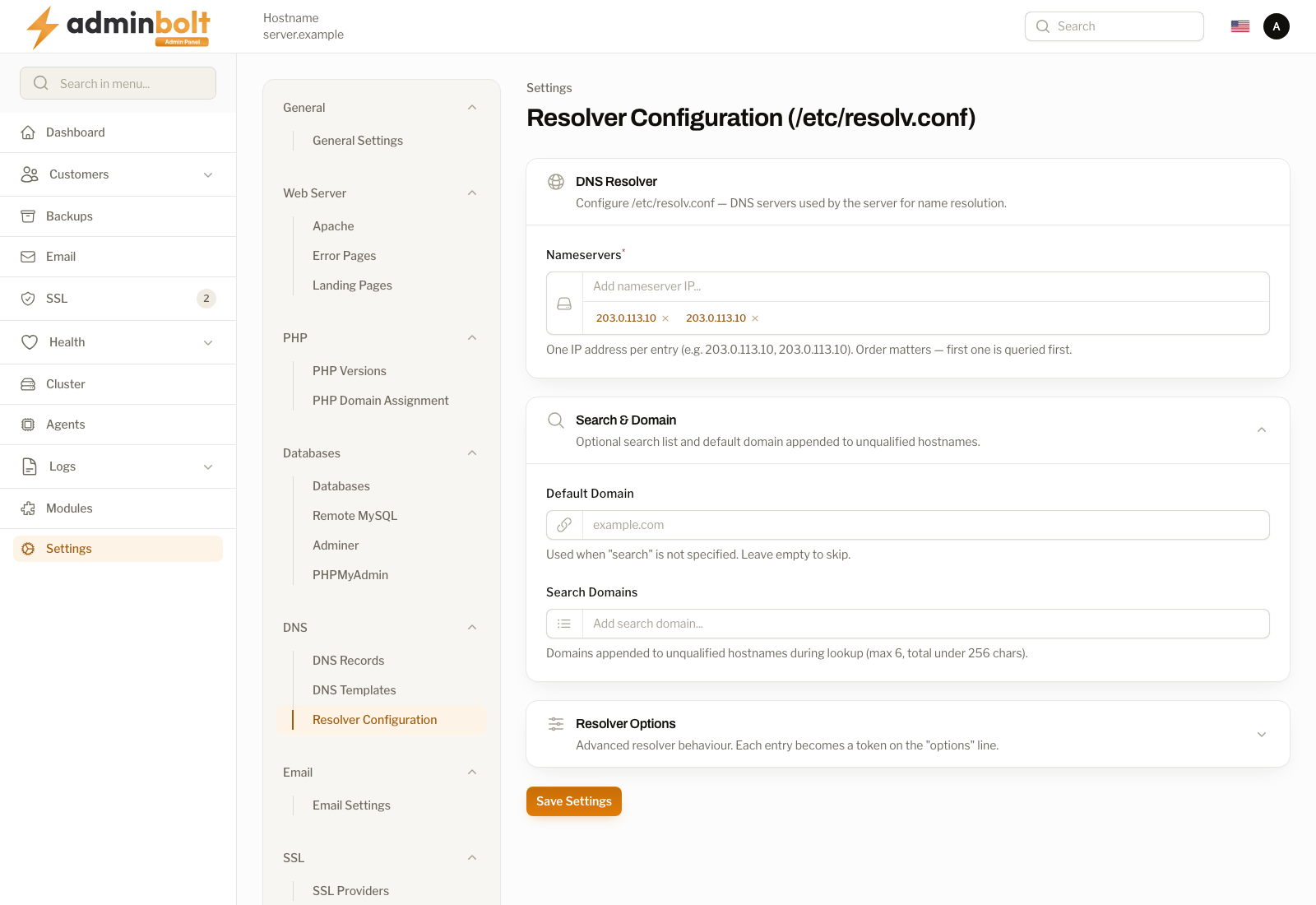
Overview
URL: /admin/settings/resolver-configuration
Navigate to Settings > DNS > Resolver Configuration.
This is a server-level setting, separate from the DNS records AdminBolt serves for hosted domains (see DNS Records). It controls which upstream nameservers the server queries when it needs to resolve hostnames itself, for example when fetching packages, validating licenses, sending mail, or issuing SSL certificates.
What the page shows
Since panel 1.9.2 the page reads /etc/resolv.conf from the server every time it opens and fills the form with the resolvers, search domains, default domain, and options the server really uses. A save sends only the fields you changed, so every other line of the file stays as it is. Before 1.9.2 the page could show default resolvers the server did not use, and any save rewrote the whole file.
If the settings cannot be read, the page shows no form and says:
The DNS resolver settings could not be read from the server, so they are not shown and cannot be changed here.
Reload the page in a minute. If it keeps happening, contact support and quote the reference shown under the message.
Resolvers set by another service
When another service writes the server's resolvers, such as NetworkManager or systemd-resolved, the page shows the values read-only, without Save Settings, and names that service, because it would undo a change made here. The notice says where to change them instead:
- NetworkManager - set the DNS servers on the server's network connection, for example with
nmcli, then reload the page. - systemd-resolved - set
DNS=in/etc/systemd/resolved.conf, restart systemd-resolved, then reload the page. - Any other service - change the DNS settings in the service that writes the file, then reload the page.
Fields
DNS Resolver
- Nameservers - one IP address per entry, for example
1.1.1.1and8.8.8.8. Order matters: the first entry is queried first. When you change the list, it must keep at least one nameserver.
Search and domain
Both fields are optional and affect how unqualified hostnames are completed.
- Default Domain - used when no search list is specified. Leave it empty to skip.
- Search Domains - domains appended to unqualified hostnames during lookup. At most six entries, and under 256 characters in total.
Resolver Options
Advanced resolver behaviour. Each entry becomes one token on the options line of /etc/resolv.conf, for example timeout:2, attempts:3, or rotate.
Saving
Save Settings writes the fields you changed to /etc/resolv.conf and confirms with The changed resolver settings were applied on the server. With nothing changed, it says that nothing was sent to the server. Only the fields you change are checked, so a value already in the file that the form would not accept does not stop you from saving another field.
A failed save says whether the file was left unchanged or may not have been saved completely, with a reference to quote to support. If the server could not write the file and could not put the previous content back, the message says so and a copy of the previous file is kept next to it; restore /etc/resolv.conf from the newest resolv.conf.bak copy before anything else on the server needs DNS.
When to change it
Leave the resolvers the server already uses in place unless you have a reason to change them, such as:
- Your provider requires specific resolver nameservers.
- You want to use a particular public resolver for outbound lookups.
- Name resolution on the server is failing and you need to point it at a known-good resolver.
Incorrect resolvers can break package installation, license validation, SSL issuance, and mail delivery. Change this only if you understand the impact, and verify that outbound DNS resolution still works afterward.
Who can do what
- Admin - views and edits the server resolver configuration. This is a node-level setting and is admin-only.
- Resellers and clients - do not have access to this page.