

Application Runtimes
Application Runtimes is where you install the Node.js, Python, and Ruby versions that customers can run applications on. An account can only pick a version this page has installed.
Overview
URL: /admin/settings/runtime-manager-versions
Location in Sidebar: Settings > CloudLinux > Application Runtimes. The entry appears once the CloudLinux module is installed; on other servers, open the page by its URL.
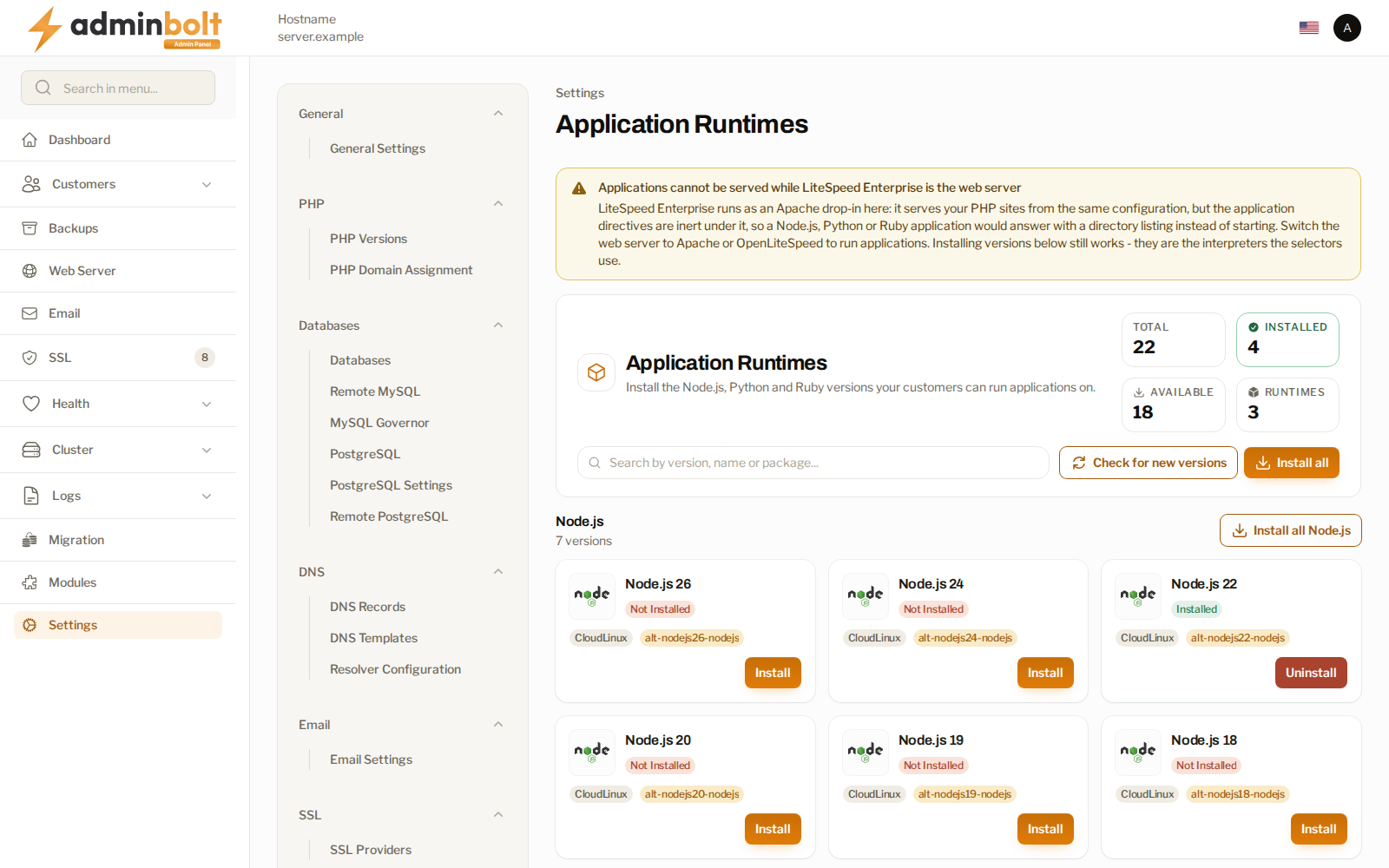
The header counts what the repositories offer against what this server has:
| Figure | Meaning |
|---|---|
| Total | Every version the repositories offer. |
| Installed | Versions on this server. |
| Available | Versions not installed yet. |
| Runtimes | How many languages are covered. |
Check for new versions re-reads the repositories. Install all installs every offered version, and each language has its own Install all as well.
Installing a version
Each row names the version, whether it is installed, where it comes from, and the package behind it. Install adds it; Uninstall removes it. Since panel 1.9.3, the page reads what is installed from the server each time it opens, and a server default build that is missing has an Install button too.
Install what your customers actually ask for rather than everything. Each version is a package on the server, and a version nobody uses is still one more thing to keep updated.
The web server matters
Applications run on Apache, on OpenLiteSpeed, and, since panel 1.9.0, on LiteSpeed Enterprise in native mode. Since panel 1.9.3 they also run on LiteSpeed Enterprise in Apache drop-in mode; see LiteSpeed Enterprise as the Apache drop-in. The panel decides by the web server it is set to, the one shown as Active engine on Web Server. Since panel 1.9.2 a server where no web server was ever chosen counts as Apache, also when OpenLiteSpeed is installed on it but does not serve. Updating to 1.9.2 records OpenLiteSpeed as the web server on a server where it already serves without ever having been chosen, so its applications keep being served.
Phusion Passenger on Apache
On Apache, applications are served by Phusion Passenger. While Apache is the web server and Passenger is missing, the page says so at the top:
- Phusion Passenger is not installed - the runtimes below can be installed, but no application serves a request until Passenger is installed. Install Passenger installs it from this page: confirm with Install it, and the install log opens. Apache is restarted at the end of the install. It is the same install as the Phusion Passenger module in Modules.
- Phusion Passenger is installed but not enabled in Apache - enable the Passenger module in MyApache, or applications are not served.
Since panel 1.9.2 the warning and Install Passenger also show on an Apache server where OpenLiteSpeed is installed but not serving; before, such a server was taken for an OpenLiteSpeed one.
While Passenger is missing, customers do not see Applications in their panel. Since panel 1.9.2 the client API also refuses to create an application then, with a message that says what is missing and where the administrator fixes it.
LiteSpeed Enterprise as the Apache drop-in
Since panel 1.9.3, LiteSpeed Enterprise in Apache drop-in mode serves applications itself, without Phusion Passenger, and each application runs as its account. The page says Applications are served by LiteSpeed at the top and what each runtime needs:
- Node.js - served natively; nothing to install beyond a Node.js version.
- Ruby - needs the ruby-lsapi extension. Enable Ruby support builds it for the server's Ruby, on any operating system.
- Python - needs lswsgi beside the server's Python, which LiteSpeed's runner setup installs for CloudLinux alt-python only. Without lswsgi, Python applications cannot be served in drop-in mode.
On a CloudLinux server, Set up LiteSpeed runners installs lswsgi for Python and ruby-lsapi for Ruby on the CloudLinux runtimes. It shows while either is missing for the default alt-python or alt-ruby version. Confirm with Run it; the setup can take several minutes and does not restart the web server. LiteSpeed runners set up names what is now in place. When the setup fails, the notification gives the reason and a correlation ID to quote to support. Install a Python version first if the page asks for one. Enable Python support is not offered in drop-in mode.
Until a runtime's runner is in place, customers see it marked as needing setup, or as not servable, and cannot create an application on it.
When you switch the web server, or convert LiteSpeed Enterprise between drop-in and native mode, the panel sets existing applications up again for the new web server in the background, so an application can be unavailable for a short while.
Installing versions works under every web server. They are the interpreters the version selectors offer, and they will be there when the web server changes.
What the server reports
The page reports what is running, and says so when the application server is missing rather than implying everything is in place. On CloudLinux servers, the CloudLinux builds are preferred when no runtime version has been chosen. Since panel 1.9.0 the page also finds the CloudLinux alt-ruby versions installed on the server, so customers choose their Ruby version for Ruby applications on the Applications page.
Related pages
- Client Applications - where customers create and run applications.
- Module Manager - the modules the application stack depends on.
- PHP Versions - the equivalent for PHP, which is managed separately.