

Vsftpd Settings
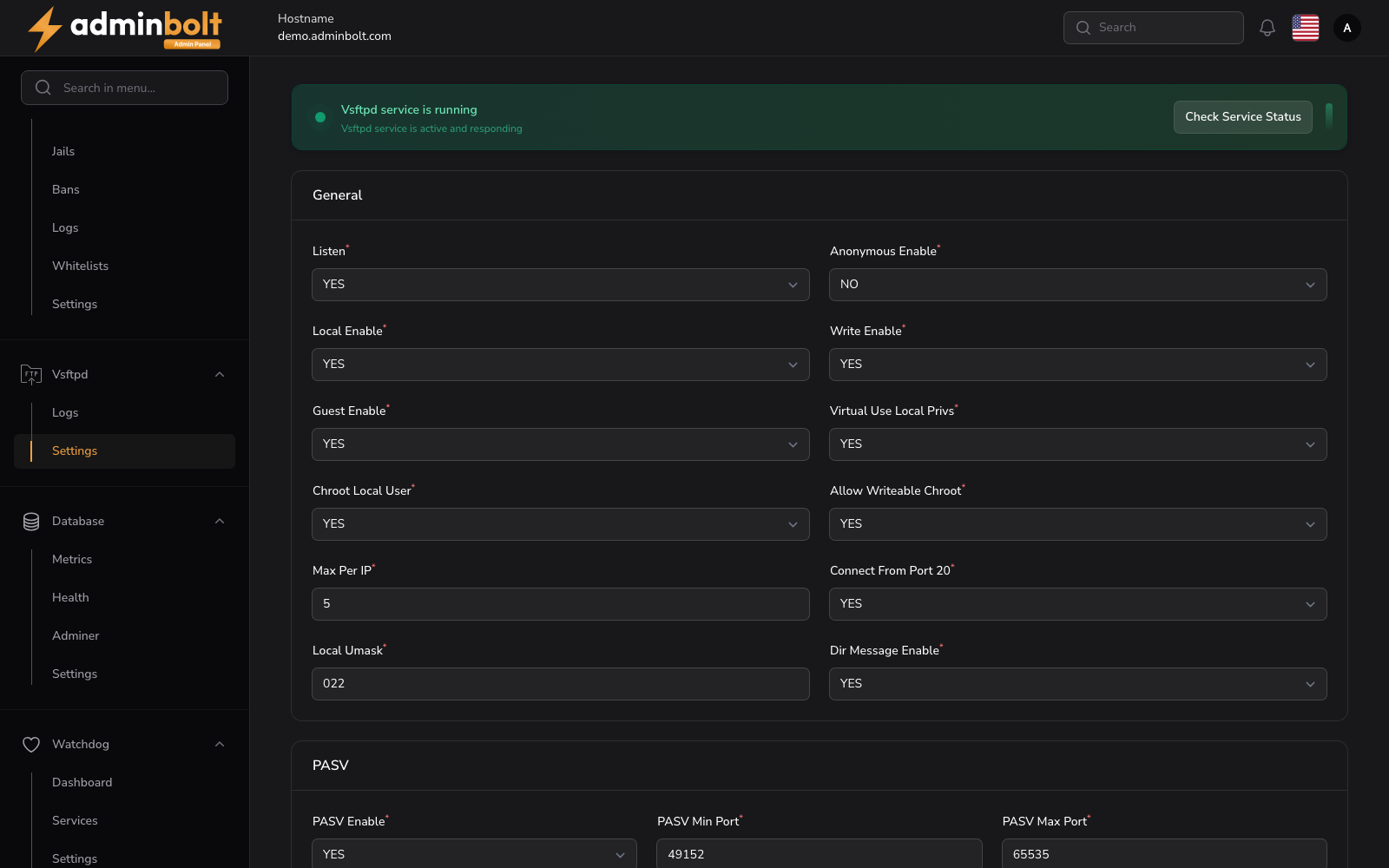
The Vsftpd Settings page configures the vsftpd FTP server. In the panel both the navigation entry and the page heading read FTP.
Overview
URL: /admin/settings/vsftpd-settings
Navigate to Settings > Tools > FTP.
At the top, a service status banner shows whether the vsftpd service is running, with a Check Service Status button. Below it, a Service Status Monitor section holds the service controls and a terminal view of the service logs.
The configuration form is divided into three sections: General, PASV, and SSL.
General
- Listen (required) - Whether Vsftpd listens for connections (YES/NO dropdown).
- Anonymous Enable (required) - Allow anonymous FTP access (YES/NO dropdown).
- Local Enable (required) - Allow local user logins (YES/NO dropdown).
- Write Enable (required) - Allow write commands (YES/NO dropdown).
- Guest Enable (required) - Enable guest users (YES/NO dropdown).
- Virtual Use Local Privs (required) - Whether virtual users use local user privileges (YES/NO dropdown).
- Chroot Local User (required) - Restrict local users to their home directory (YES/NO dropdown).
- Allow Writeable Chroot (required) - Allow chroot directory to be writable (YES/NO dropdown).
- Max Per IP (required) - Maximum number of connections per IP address.
- Connect From Port 20 (required) - Use port 20 for data connections (YES/NO dropdown).
- Local Umask (required) - File permission mask for local users (e.g.,
022). - Dir Message Enable (required) - Show directory messages when entering a directory (YES/NO dropdown).
PASV
- PASV Enable (required) - Enable passive mode (YES/NO dropdown).
- PASV Min Port (required) - Minimum port for passive mode connections (e.g.,
49152). - PASV Max Port (required) - Maximum port for passive mode connections (e.g.,
65535).
SSL
- SSL Enable (required) - Enable SSL/TLS encryption (YES/NO dropdown).
- Allow Anonymous SSL (required) - Allow anonymous users to use SSL (YES/NO dropdown).
- Force Local Data SSL (required) - Force SSL for data connections (YES/NO dropdown).
- Force Local Logins SSL (required) - Force SSL for login connections (YES/NO dropdown).
- SSL TLSv1 (required) - Enable TLSv1 protocol (YES/NO dropdown).
- SSL TLSv1.1 (required) - Enable TLSv1.1 protocol (YES/NO dropdown).
- SSL TLSv1.2 (required) - Enable TLSv1.2 protocol (YES/NO dropdown).
- SSL SSLv2 (required) - Enable SSLv2 protocol (YES/NO dropdown).
- Require SSL Reuse (required) - Require SSL session reuse (YES/NO dropdown).
- SSL Ciphers (required) - Allowed SSL cipher list (e.g.,
HIGH). - RSA Cert File (required) - Path to the RSA certificate file.
- RSA Private Key File (required) - Path to the RSA private key file.
Click Save changes to apply the configuration.
Service Control
- Refresh - Reload the current service status.
- Restart - Restart the vsftpd service.