

AI Bot Blocking
The AI Bot Blocking page decides, per domain, which AI crawlers may read your site. It is useful when you do not want your content collected for model training, or when crawler traffic is costing you bandwidth.
Overview
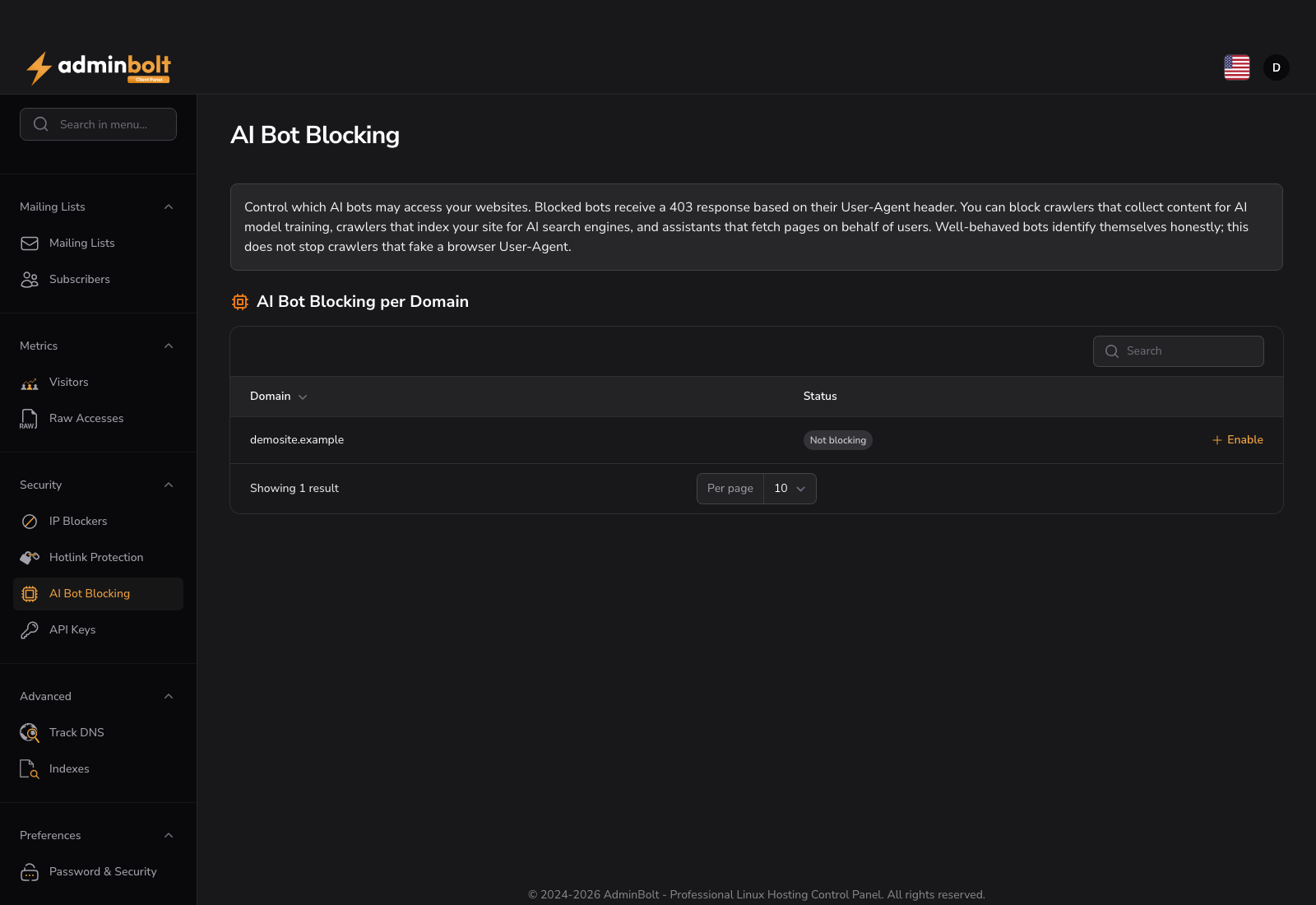
URL: /client/ai-bot-blocking-page - under Security.
Blocking is applied by the web server: the rules are written into a section of the site's .htaccess file that AdminBolt manages for you. A blocked bot receives a 403 response, matched on its User-Agent header, before your application runs, so the protection also saves CPU and bandwidth.
Not the same as robots.txt
robots.txt is a request that well-behaved crawlers may honour. These rules are enforced by the web server, so they also stop crawlers that ignore robots.txt. Matching is done on the User-Agent header, which a determined client can forge; treat this as a strong deterrent rather than an absolute guarantee.
Domain table
| Column | Description |
|---|---|
| Domain | A domain on your hosting account. Sortable and searchable. |
| Status | Whether blocking is active for that domain. A domain with no rules shows Not blocking. |
Each row has its own actions:
- Enable - turn on blocking for the domain.
- Configure - choose exactly which bots to block.
- Disable - remove the rules, so every bot is allowed again.
Blocking is per domain. Turning it on for one site does not affect the others on your account.
When a change is refused
Since panel 1.9.3, Enable, Configure, and Disable first check where the domain's website folder and its .htaccess file really lead. If the website folder, a folder above it, or the .htaccess file has been replaced with a symbolic link that leads outside your home directory, the change is refused and nothing is stored or written:
The folder this change writes to, or a file in it, leads outside your hosting account, for example through a symbolic link. Nothing was changed.
Replace the link with a real folder or file, or point it inside your own home directory, then try again. A link that stays inside your home directory is accepted, also when it points outside the website folder.
If the panel cannot complete this check because the server agent does not answer, the change is refused with "Check that the agent is running, then try again." and nothing is changed. If the message persists, contact your hosting provider.
When the rules are not applied
Since panel 1.9.3, a change that is stored but whose web server rules could not be written is reported as a warning with the cause, not as a success:
| Action | Warning | What it means |
|---|---|---|
| Enable | "AI bot blocking was saved, but the web server rules were not applied." | The bots are not blocked yet. Save the settings again once the reported cause is cleared. |
| Configure | "AI bot blocking was saved, but the web server rules were not applied." | The previous rules stay in force. Save the settings again once the reported cause is cleared. |
| Disable | "AI bot blocking was removed, but the web server rules were not applied." | The setting is removed, but the bots may still be blocked, and Disable is no longer offered for the domain. Contact your hosting provider to have the domain's web server rules applied again once the reported cause is cleared. |
Choosing what to block
Configure presents the bot catalog grouped into three types, so you can make a decision by purpose rather than by bot name:
| Type | What these crawlers do | Typical decision |
|---|---|---|
| Training crawlers | Collect your content for AI model training. | The usual reason people come to this page. Blocking them has no effect on how your site is found. |
| AI search crawlers | Index your site for AI search engines. | Blocking them can remove your site from AI-generated search answers. Consider leaving these allowed. |
| AI assistants | Fetch pages on a live user request, on behalf of a person using an assistant. | Blocking them stops assistants from reading a page a real user asked about. |
Within each type, bots are listed by owner, so you can block everything from one company without going through the list bot by bot. Select the bots to block and save. AdminBolt confirms with "AI bot blocking settings saved."
Bot catalog
AdminBolt ships with 27 known AI bots:
| Owner | Bot | Type |
|---|---|---|
| OpenAI | GPTBot | Training |
| OpenAI | OAI-SearchBot | Search |
| OpenAI | ChatGPT-User | Assistant |
| Anthropic | ClaudeBot | Training |
| Anthropic | Claude-SearchBot | Search |
| Anthropic | Claude-User | Assistant |
| Google-Extended | Training | |
| GoogleOther | Training | |
| Google-CloudVertexBot | Assistant | |
| Meta | Meta-ExternalAgent | Training |
| Meta | FacebookBot | Training |
| Meta | Meta-ExternalFetcher | Assistant |
| Apple | Applebot-Extended | Training |
| Amazon | Amazonbot | Training |
| ByteDance | Bytespider | Training |
| Common Crawl | CCBot | Training |
| Perplexity | PerplexityBot | Search |
| Perplexity | Perplexity-User | Assistant |
| Mistral | MistralAI-User | Assistant |
| Cohere | Cohere | Training |
| Allen Institute | AI2Bot | Training |
| DuckDuckGo | DuckAssistBot | Search |
| You.com | YouBot | Search |
| Diffbot | Diffbot | Training |
| Huawei | PanguBot | Training |
| Webz.io | Omgili | Training |
| ImageSift | ImagesiftBot | Training |
Note: Blocking an AI crawler does not affect ordinary search engine crawlers such as Googlebot or Bingbot. Your normal search ranking is unchanged. Two entries in the list, Google-Extended and Applebot-Extended, are primarily opt-out tokens used in
robots.txt; they are included because some operators also send them as user agents.
Over the API
Since panel 1.9.4, the client REST API manages AI bot blocking:
| Method and path | What it does |
|---|---|
GET /api/client/ai-bot-blocking | Every domain of the account with the bots it blocks, and the catalog of bots that can be blocked, grouped as on this page. |
POST /api/client/ai-bot-blocking/{domainId} | Turn blocking on for a domain, like Enable. Without blocked_bots, the training crawlers are blocked, as the form preselects them. |
PUT /api/client/ai-bot-blocking/{domainId} | Change which bots a domain blocks, like Configure. blocked_bots replaces the list. |
DELETE /api/client/ai-bot-blocking/{domainId} | Turn blocking off for a domain, like Disable. |
When the choice is saved but the web server rules are not applied, the answer carries status: partial and next_step says what to do. The endpoints need this page's feature in your hosting plan; see API Keys.
Related pages
- Hotlink Protection - another rule set written into the same managed
.htaccesssection. - IP Blockers - block traffic by address rather than by user agent.
- Raw Access Logs - see which crawlers are actually reaching your site.