

System Updates
System Updates is where everything this server can install is checked, installed, and followed. It has one tab per set of packages, and each tab works the same way.
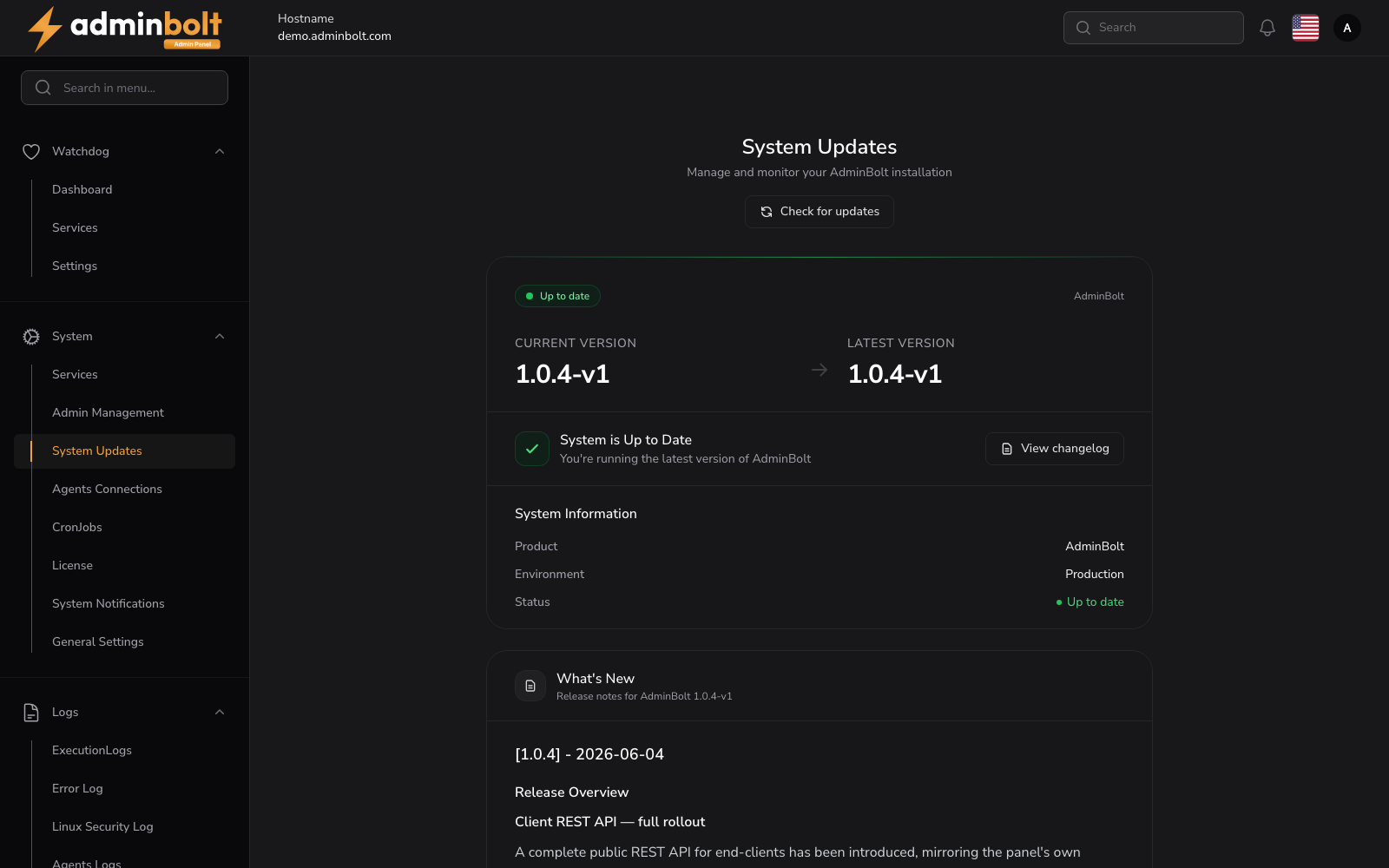
Overview
URL: /admin/settings/system-updates
Open it from Settings > System > System Updates in the sidebar. The page checks for updates as soon as it opens.
The tabs
| Tab | What it covers |
|---|---|
| Components | AdminBolt itself and every AdminBolt component installed on the server. |
| OS packages | The operating system's own packages, with security updates marked. |
| CloudLinux | The CloudLinux packages. Present on a converted server only. |
Each tab carries a count of what is outstanding behind it, so the page tells you where the work is before you open a tab. The OS packages count turns red when security updates are among the pending ones.
The page opens on Components, unless an operating system or CloudLinux update is running, in which case it opens on the tab that is busy.
The CloudLinux tab appears as soon as a server is converted. It stays visible even when the agent cannot be read at that moment, so a converted server never loses the screen that would explain why.
Every tab is built the same way
Each tab is laid out in the same order:
- A status line: Up to date, Update available, Update in progress, or Update failed.
- The Automatic updates switch for that package set.
- The counts: pending updates, and for the operating system also the security updates and whether a reboot is required.
- The package table.
- The action that installs.
Components
The AdminBolt components table lists every component with its Installed version, the Available version, and its Status.
System Information beside it holds the Product, the Environment, the Current version, the Latest version, and when that version was Released.
States:
- All components are up to date - nothing to do.
- Update available - the release notes appear inline, and Install update applies the update.
- Ahead of Latest - this server runs a build newer than the one its release channel offers, which happens on a pre-release build. The older build is not offered.
Actions:
- Check for updates - re-check the repository.
- Install update - install the available update.
- View changelog - open the Changelog.
OS packages
The Operating system packages tab lists what the distribution has pending: the Package, its Version, and the Repository it comes from. Above the table:
- Pending updates - how many packages are waiting.
- Security updates - how many of those are security updates.
- Reboot - Required to finish applying updates or Not required.
Actions:
- Check system updates - re-read the pending packages.
- Install system updates - install everything pending. You are asked to confirm.
- Install security updates - install the security subset only. You are asked to confirm.
The install runs with live progress and its log on the page. AdminBolt's own packages are never installed by this run: they belong to the Components tab.
The Attention Center raises a warning when a reboot is due, and when security updates are pending.
CloudLinux
On a converted server, the CloudLinux components tab lists the CloudLinux packages with their Installed and Available versions and their Status.
Actions:
- Check for updates - re-read the pending CloudLinux packages.
- Install update - install them. The confirmation notes that services may restart while they install.
The install upgrades only the CloudLinux packages, and the rest of the page stays usable while it runs. When the same packages fail twice, the page says the failure is not a new problem, so a repeat is not mistaken for a fresh fault.
Automatic updates
Every tab carries its own Automatic updates switch, and each one runs at its own time:
| Package set | Unattended run |
|---|---|
| Components | Every night at 03:30 server time |
| OS packages | Every night at 04:30 server time, with Security updates only as an option |
| CloudLinux | Every night at 04:45 server time |
All of them are off by default. A server that does not opt in installs nothing on its own.
When a switch is on, the outcome of each run is reported in the notifications of every administrator, so an unattended server does not quietly drift into a half-updated state. Turning a switch off returns that package set to installs started from this page.
Note: The switches are independent. Automatic component updates do not install operating system packages, and neither of them touches CloudLinux.
While an update runs
An update fills the page with System Update in Progress and keeps the sidebar and the header, so there is always a way off the screen.
The progress view reports:
- the version being installed,
- the phase the run is in,
- a clock counting the elapsed time,
- a heartbeat, reading active just now or naming how long ago the last output arrived, so a long step is visibly a long step rather than a hang,
- the full log, streaming live, rather than the last few lines.
The panel restarts its own services in the middle of its own update. The page expects that: it shows Reconnecting to the panel while its services restart, follows the run straight through, and reports Update finished only once the server is out of maintenance mode and usable again. Keep the page open until then.
When the page is reopened during a run, it picks the run back up.
When an update fails
A failed run shows Update failed with the log and a How to resolve this section naming the next step. View log shows the underlying error, that is the package manager output or the agent's response, rather than a generic installer message. Start there before retrying.
Open execution logs takes you to the Execution Logs, where the run's correlation id carries the detail behind a failure that could not be classified. Quote that id when you contact support.
One failing component does not stop the rest
An upgrade applies the panel and every installed component. A component that fails does not abort the chain: each remaining one is still attempted, and the result names the components that failed rather than only reporting that something went wrong.
Update status unconfirmed
When the page cannot read the update status for long enough, it says Update status unconfirmed rather than declaring a result it does not have. The server update may still be running. Open execution logs shows what the run itself recorded; check there before starting another update.
Scheduled checks never collide with an upgrade
The scheduled update check and a running upgrade are serialised, so a check that fires mid-upgrade cannot interrupt it. The scheduled check is listed on Cron Jobs.
The administrator API
Everything on this page is on the administrator REST API, so an update can be checked, started, and followed from your own tooling. Authentication is the same as for the rest of the API.
| Method and path | What it does |
|---|---|
GET /api/system-updates | The current state: versions, components, and what is pending. |
POST /api/system-updates/check | Check the repository for a newer version. |
POST /api/system-updates/start | Start the AdminBolt update. |
GET /api/system-updates/progress | The progress of the running update. |
GET /api/system-updates/log | The update log. |
GET /api/system-updates/changelog/{version} | The release notes of a version. |
GET /api/system-updates/automatic | Whether unattended updates are on. |
PUT /api/system-updates/automatic | Turn unattended updates on or off. |
GET /api/system-updates/os-packages | Pending operating system packages, with the security count and the reboot state. |
POST /api/system-updates/os-packages/upgrade | Install the pending operating system packages, or the security subset. |
GET /api/system-updates/os-packages/job | The state of the running operating system update. |
GET /api/system-updates/os-packages/log | The operating system update log. |
GET /api/system-updates/cloudlinux | Pending CloudLinux packages. |
POST /api/system-updates/cloudlinux/upgrade | Install the pending CloudLinux packages. |
GET /api/system-updates/cloudlinux/job | The state of the running CloudLinux update. |
GET /api/system-updates/cloudlinux/log | The CloudLinux update log. |
Related pages
- Changelog - what each version brought.
- Execution Logs - the durable record of every run.
- Updating AdminBolt - the update path end to end.