

Health
Health is the one page that answers "is anything wrong with this server". It collects what is broken or at risk, says why, says how old the observation is, and offers the safest next action for each item.
Overview
URL: /admin/health
Open it from Health > Overview in the sidebar, or from View health on the dashboard.
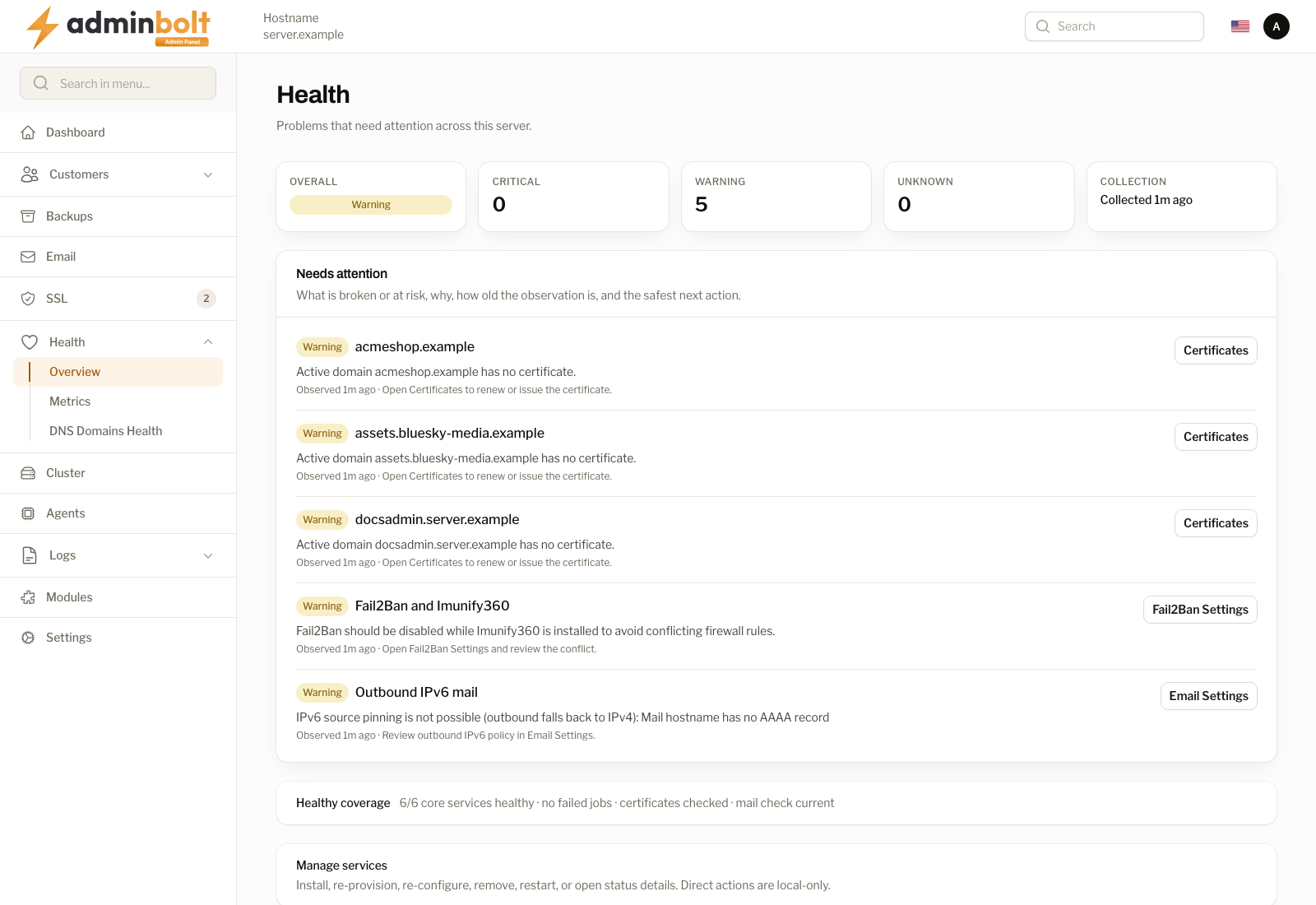
Five tiles across the top summarise the server:
| Tile | Meaning |
|---|---|
| Overall | The worst state found anywhere on the server. |
| Critical | Findings that need attention now. |
| Warning | Findings that are not urgent but will bite later. |
| Unknown | Checks that could not be carried out, for example because a service did not answer. |
| Collection | How long ago the observations were gathered. |
An empty page is a good result. If nothing needs attention, the list says so rather than listing everything that is fine.
Needs attention
Every finding carries four things:
- What is broken or at risk, as a short title.
- Why it matters, in one sentence.
- How old the observation is, so you can tell a live problem from a stale one.
- The safest next action, as a button that takes you to the screen where you fix it.
For example, a domain without a certificate offers Certificates, and a conflict between Fail2Ban and Imunify360 offers Fail2Ban Settings.
Account homes
Since panel 1.9.0, Health checks that every hosting account owns its home directory, its domain directories, and its document roots.
- A critical finding lists the accounts where one of these directories belongs to someone else. Nothing that runs as such an account can write there, and the file manager fails on every request. Repair ownership gives those directories back to their accounts after a confirmation. Only the directories themselves change; the files inside them and the directory permissions stay as they are.
- A warning lists accounts that have no home directory on the server at all. Restore such an account from a backup, or recreate it.
The same repair runs from the server's command line. --dry-run only reports what it would change:
bolt-cli repair-home-ownership --dry-run
bolt-cli repair-home-ownership
When the server recreates a missing home folder, domain folder, or document root for an account, for example while applying website or PHP settings, those folders belong to that account.
CloudLinux website isolation
Since panel 1.9.0, on a CloudLinux server, Health raises a critical issue while websites still run PHP outside the accounts' LVE and CageFS, that is on Remi PHP or LSPHP instead of CloudLinux alt-php. The issue counts the websites and links to the Isolation Report, where Move websites to alt-php moves them.
Background jobs
Since panel 1.9.2, the Background jobs finding links to Background Jobs. It is critical while a background job has failed, with the next step "Open Background Jobs, then run the failed jobs again or delete them." While jobs are only waiting to run, it is a warning: "Waiting jobs normally start within a minute. Background Jobs shows what is waiting."
Scopes
The page can be narrowed to one area of the server. The sidebar shows the whole picture; these addresses open one slice of it:
| Scope | URL | Covers |
|---|---|---|
| Web | /admin/health?scope=web | The web server and its status. |
| Database | /admin/health?scope=database | Database load, query rate, and cache readings. |
| Security | /admin/health?scope=security | Fail2Ban and related protections. |
Healthy coverage
Under the findings, one line states what was checked and came back clean, for example how many core services are healthy, whether any job failed, and whether certificates and mail were checked. It exists so an empty findings list is not ambiguous: you can see the checks ran.
Manage services
The lower part of the page installs, re-provisions, re-configures, removes, restarts, and opens status details for the managed services. These actions apply to the machine you are signed in to.
The section is collapsed until you open it, so the page stays quick to read.
A row whose actions are unavailable says why in a short note under its name. Since panel 1.9.2 the Installed column can also read Unknown, when the panel could not tell what is installed. Over the API, GET /api/services returns the same note for each row, null when there is nothing to explain.
LiteSpeed Enterprise and OpenLiteSpeed
The LiteSpeed row is LiteSpeed Enterprise. Where OpenLiteSpeed is installed on the server you are signed in to, an OpenLiteSpeed row takes its place. Both products answer to the same service on the server, so since panel 1.9.2 the panel tells them apart by what is installed, and the LiteSpeed row acts on LiteSpeed Enterprise only:
- When OpenLiteSpeed is installed on the server the row is about, the LiteSpeed row reads Not installed and offers no Install, Re-provision, Remove, or Re-configure. Its note reads "OpenLiteSpeed is installed on this server. Manage it on its own page." Restart is refused with the same reason, and nothing is changed. Manage OpenLiteSpeed on its own page.
- When the panel cannot tell which product is installed, the row reads Unknown and offers no action, so nothing can install over a working web server. The note says why: the panel could not check the server (try again in a moment), the panel is not connected to that server's agent (check the server's connection settings), or LiteSpeed was not installed from a package, in which case you manage it on the server itself.
- Files an earlier LiteSpeed Enterprise left behind no longer make the row read as installed.
Remove on the LiteSpeed row also moves the files LiteSpeed Enterprise leaves behind to a dated folder, and every administrator gets a Files left by LiteSpeed Enterprise notification with the outcome. See Remove LiteSpeed.
What is not on this page
Per-domain DNS findings are not collected here. They are a specialist check with its own page, DNS Domains Health, reachable from the button at the bottom of Health.