

Backups
Backups is where per-account backup repositories live, along with everything that runs against them. It is one area with five tabs rather than five entries in the sidebar.
Overview
URL: /admin/backups
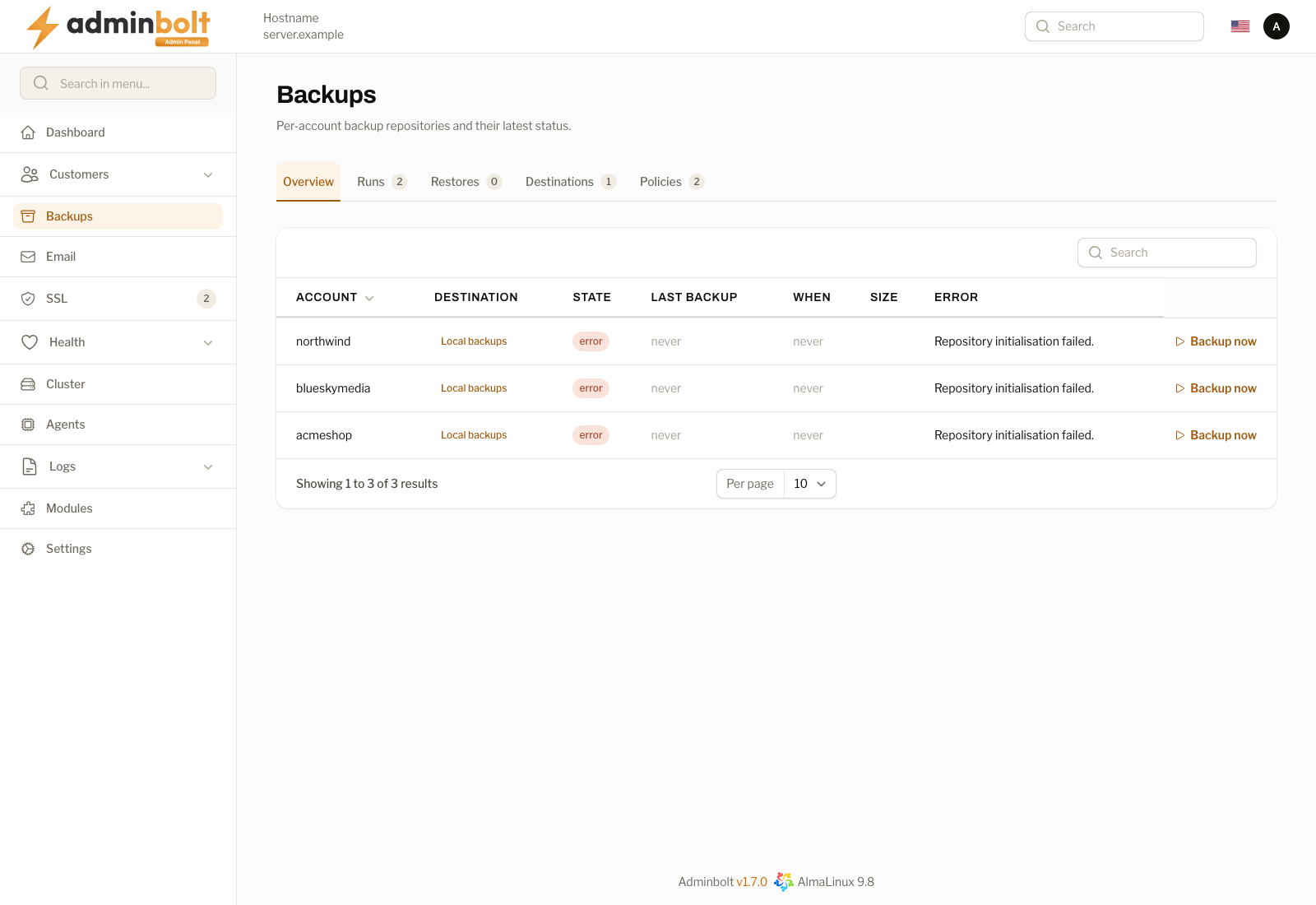
The Overview tab lists the backup repositories, one per hosting account, with the latest status of each. A server with no repositories yet says so instead of showing an empty table.
The tabs, each with its own address so it can be bookmarked:
| Tab | URL | What it holds |
|---|---|---|
| Overview | /admin/backups | Repositories and their latest status. |
| Runs | /admin/backups/runs | Every backup run, finished or in progress. |
| Restores | /admin/backups/restores | Restore jobs and their outcome. |
| Destinations | /admin/backups/destinations | Where backups are written. |
| Policies | /admin/backups/policies | What is backed up, how often, and how long it is kept. |
Each tab shows a count next to its name, so you can see at a glance whether anything is queued or failing without opening it.
Backup slots
A server runs a limited number of account backups at once. Each running backup takes a backup slot, whether its policy's schedule started it or someone pressed Backup now.
Since panel 1.9.1, the number of slots is half of the server's CPUs, rounded down, and at least one. To set a fixed number instead, run this from the server's command line, with the number of slots you want:
bolt-cli set-ini-settings BOLT_BACKUP_CONCURRENCY 4The value must be a whole number of 1 or more. Anything else is refused, and nothing is stored.
A due backup starts when a slot is free. When every slot is in use, it waits for a free one.
When scheduled backups fall behind
Since panel 1.9.1, the Overview tab warns Scheduled backups are falling behind when an account's next scheduled time has passed and the backup it was due still has not started. The warning says:
- how many accounts are behind their schedule, how many are waiting for a backup, and since when the oldest has been due,
- how many backup slots are in use, out of how many, and where that number comes from: half of the server's CPUs, or
BOLT_BACKUP_CONCURRENCYwhen you set it.
It then names one of two causes:
- All backup slots are in use, so due accounts wait for a free slot. Raise the limit with
bolt-cli set-ini-settings BOLT_BACKUP_CONCURRENCY <n>, spread the policy schedules over the day, or use a faster destination. - Backup slots are free but due backups are not being started. Check that the panel scheduler is running.
The warning covers the whole server, so it appears on the administrator's Backups page only, not on a reseller's.
Starting a backup by hand
Backup now on a repository's row starts a backup of that account at once. Since panel 1.9.1, when the backup does not start, the notification says why:
| Message | Meaning and next step |
|---|---|
| Please wait for the current backup to finish. | The account already has a backup running. Wait for it to finish. |
| All backup slots on this server are in use by other backups. | Try again in a few minutes, once one of them has finished. See Backup slots. |
| Another backup was being started at the same moment. | Try again in a moment. |
| The server did not accept the backup, so no backup is running for this account. | Check that the backup destination is reachable, then try again. |
| The stored settings of backup destination name cannot be decrypted. Edit the destination, enter all of its settings again and save it. | Since panel 1.9.2. The destination's settings cannot be read, so no backup can use it. Enter them again; see Unreadable destination settings. |
| Backups are disabled for this account, it has no active backup policy, or the server could not be reached. | Check which of the three applies. Which accounts a policy covers is on the Policies tab. |
A scheduled backup to a destination whose settings cannot be read stops the same way: the run is recorded as failed on the Runs tab with that message, and the Account backup failed notification is sent. Since panel 1.9.2, a backup whose repository could not be set up on the destination is recorded as a failed run and notified too; the next scheduled run, or Backup now, tries to set the repository up again.
On a reseller's Backups page, an unreadable destination is reported as "The backup destination settings for this account cannot be read, so no backup is running. Contact your server administrator to fix the destination.", because only an administrator can edit destinations.
Backups of a deleted account
Deleting a hosting account does not delete its backups. The repository stays on the Overview tab under the account's old username, marked Account deleted with the date, and carries two actions of its own:
- Restore to new account - recreate the account and restore the snapshot into it. When you keep the original username and the snapshot was taken after the server was updated to 1.9.0, the account's mailboxes, databases, database users, and grants come back as well (see Restoring a whole account). Otherwise only the home directory is restored, and you recreate the databases and import each dump afterwards.
- Delete backups - remove the repository together with its history. This cannot be undone.
Creating an account again under the same username adopts the repository that is already there, rather than starting a second one beside it.
Restoring a whole account
Since panel 1.9.0, Restore on a repository's row offers Whole account (files, mailboxes, databases and users). It restores the home directory and recreates every mailbox, database, database user, and grant the account is missing, with their original passwords, then imports the data of each database it recreated.
What still exists is left as it is:
- an existing mailbox keeps its password, its quota, and its mail,
- an existing database is never imported into, and an existing database user keeps its password.
It needs a snapshot taken after the server was updated to 1.9.0, because only those record what the account held. An older snapshot is refused before anything changes; restore its files and import its dumps as before. The restore is also refused up front when the snapshot belongs to a different username, or when something in it now belongs to another account on this server.
A few things are not recreated automatically. PostgreSQL databases and users are reported and left for you to recreate before restoring the dump. Remote MySQL hosts are not restored. A mailbox on a separate mail server is not recreated. The report names each of these with what to do.
Administrators and resellers can start a whole-account restore. Clients cannot.
The restore report
The restore runs in the background. When it has run, Restore report on the repository's row, and the job on the Restore Jobs page, list every object with its outcome:
| Outcome | Meaning |
|---|---|
| Recreated | The object was missing and is back, with its original password where it has one. A recreated database has its data imported. |
| Left as it was | The object still existed and was not touched. |
| Failed | The object could not be recreated. The row says why. |
| Not restored | The object could not be recreated automatically, for example because the snapshot does not hold its password. The row says what to do. |
The job succeeds only when nothing failed and nothing was left unrestored. Running the restore again after a failure finishes what the first attempt could not, without creating anything twice.
A mailbox recreated this way has its original password, which the panel does not know. The account owner signs in to webmail with that password, or sets a new one to use the panel's one-click webmail sign-in again.
Warning: Downgrading the panel below 1.9.0 is not supported after a whole-account restore has run on the server.
How the pieces fit together
- A destination is a place backups are stored.
- A policy says what to back up, on what schedule, and how many copies to keep.
- A run is one execution of a policy. It succeeds, fails, or is still going.
- A restore job takes data back out of a repository.
- A repository is the per-account store that all of the above act on.
Set up a destination first, then a policy, and the runs follow on their own.