

Outbound Sending Limits
Sending limits cap how much mail leaves this server, per mailbox and per domain. Their purpose is to contain a compromised mailbox password or an exploited website script before it costs the server its sending reputation, not to ration ordinary use.
Where the two halves live
| What | Where |
|---|---|
| The limits themselves, per-plan values, and per-sender overrides | The Sending Limits tab of Email Settings |
| The record of what was rejected, and whether the limits are actually being applied | This page |
Overview
URL: /admin/email/sending-limits
The page is the Sending Limits tab of the Email area.
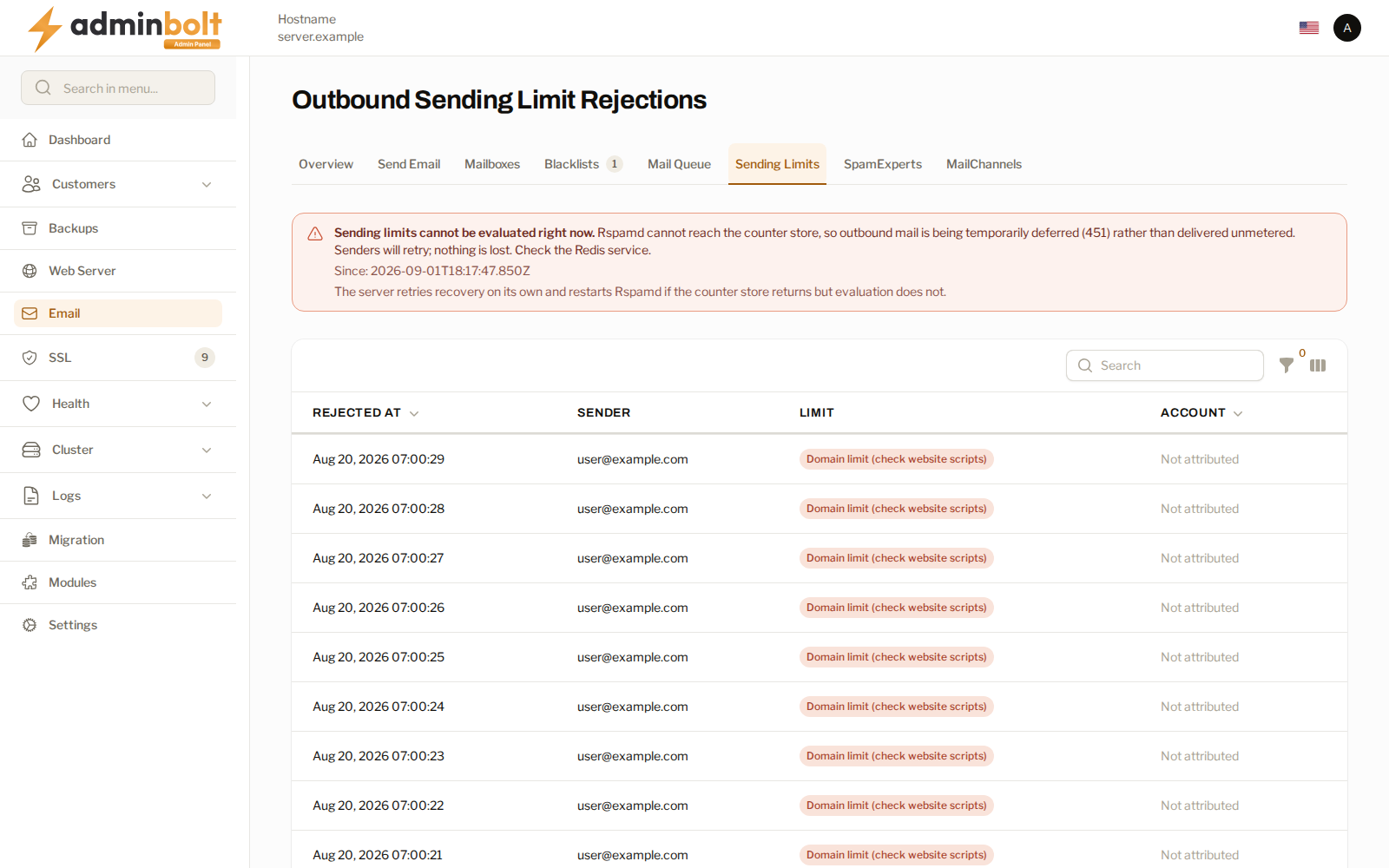
| Column | What it shows |
|---|---|
| Rejected at | When the message was refused. |
| Sender | The address it was sent from. |
| Limit | Which limit it hit, mailbox or domain. |
| Account | The hosting account it belongs to, where the sender could be attributed to one. |
A domain-limit rejection is the one to look at first. Mailbox limits key on an authenticated login, so they usually mean a password has leaked. Domain limits also catch mail sent by website scripts, which never log in, so a burst of them points at a compromised site rather than a mailbox. The list labels those rows accordingly.
Whether the limits are being applied
The banner above the list states the enforcement state, and the three states mean different things:
- Enforcing - limits are being counted and applied.
- Degraded - the limits cannot be evaluated, so outbound mail is being deferred rather than sent unmetered. Senders retry and nothing is lost, but delivery is delayed until the cause is cleared. The banner names what to check and states since when.
- Unknown - the panel cannot ask the server, so it will not claim either way.
The server retries recovery on its own. Treat degraded as an incident on the mail path, not as a limits problem: mail is being held back, and the fix is whatever the banner names.
Suspension
With automatic suspension on, a mailbox over its limit loses SMTP login until its rate drops back under the limit. IMAP and webmail keep working, so the customer can still read mail while they cannot send it.
An administrator can also suspend a mailbox by hand. A manual suspension is never lifted automatically - it stays until you remove it, which is what makes it usable as a deliberate stop.
Since panel 1.9.3 the panel records who suspended sending: the sending limit, an administrator, or the customer. The customer's Email Accounts page shows it, and the customer can lift only a suspension they set themselves. While the sending limit's suspension runs, or after an administrator suspended the mailbox, the customer's Restore Sending and Outgoing mail controls are disabled and say who suspended the mailbox and, for the sending limit, when sending returns. Administrators, also when signed in to the customer's account, and the admin REST API can lift any suspension.
Exemptions
The panel's own notifications and bounces go out through a mailbox login that is exempt from these limits, so a busy server cannot silence the channel a mail problem would be reported through. The page states the exemption, lists the exempt logins, and raises a banner if the panel's own mail is ever throttled.
Mail that merely claims the panel's hostname is limited like any other customer mail. The exemption follows the login, not the address.
Related pages
- Email Settings - the limits, per-plan values, and per-sender overrides.
- Email Dashboard - the state of the mail stack as a whole.
- Mail Queue - what is waiting for delivery.
- Email Accounts - where a customer sees their own usage.