

MyApache ModSecurity Configuration
ℹ️ Where to find it - this is the ModSecurity Config tab of Web Server in the sidebar. Since panel 1.9.2, the tab is shown with every web server except OpenLiteSpeed, which does not enforce ModSecurity; when ModSecurity is not installed, the page shows its own not-installed state.
The page, titled ModSecurity Configuration in the panel, configures ModSecurity, the web application firewall integrated with Apache. It gives you control over rule enforcement, connection handling, logging behavior, performance tuning, and external data integration.
Overview
ModSecurity helps detect and block common web exploits and threats in real time. This page offers a structured and modular approach to manage:
- WAF activation and rule processing
- Logging and auditing
- Resource and performance tuning
- External threat data integration
URL: /admin/web-server/modsecurity-config
Open Web Server in the sidebar and choose the ModSecurity Config tab, which follows the Apache tabs. The individual rule files are on a separate page, ModSecurity Rules.
The four tabs below are Core Settings, Logging & Auditing, Performance, and External Services.
Core Settings
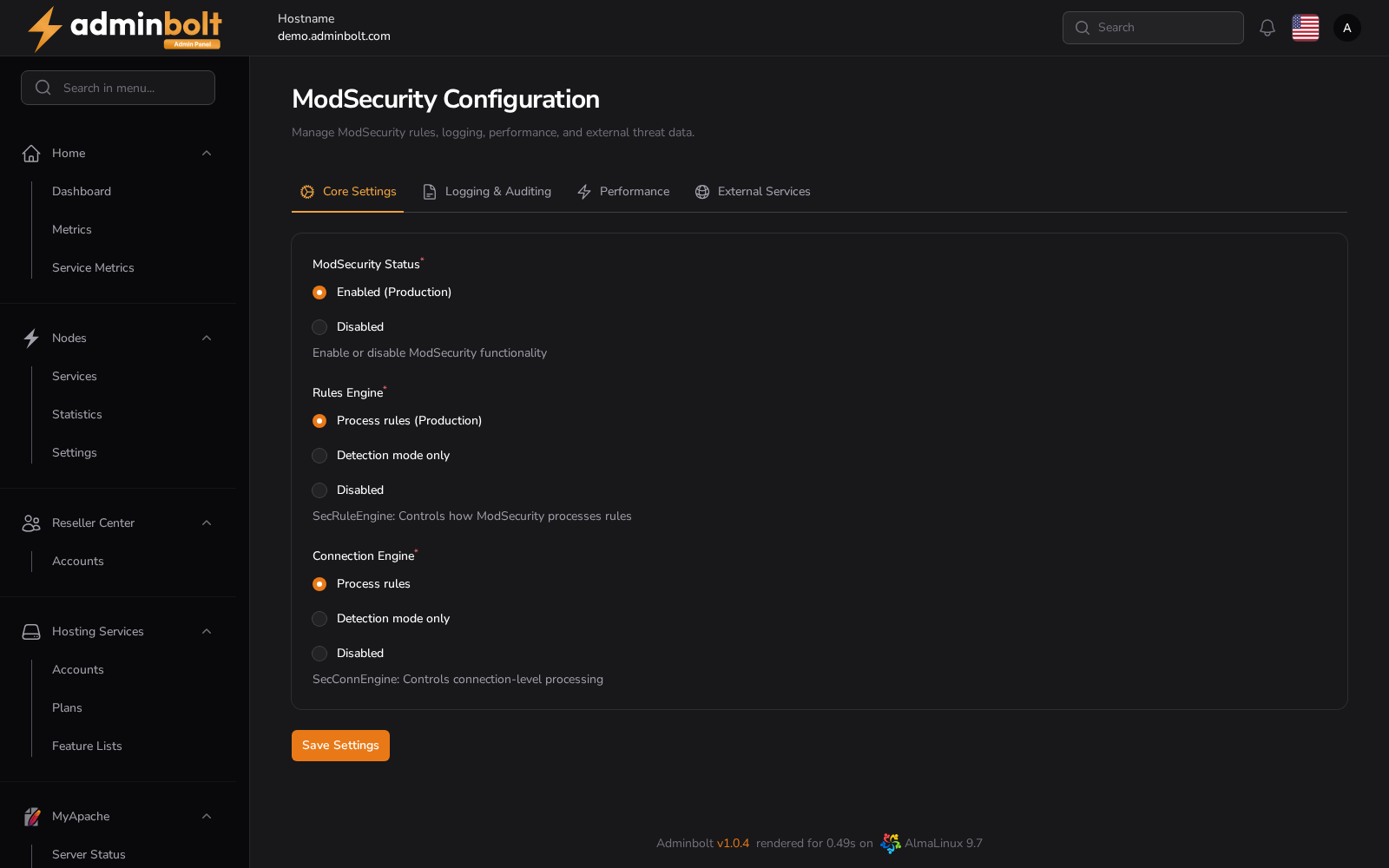
In effect on the server
Since panel 1.9.3, In effect on the server at the top of the tab shows what Apache actually runs, next to what was saved below it:
- "ModSecurity is loaded in Apache." when it is on, or "ModSecurity is switched off."
- A warning when ModSecurity was saved as enabled but Apache runs without the ModSecurity module, so no rules apply. Save the settings to apply them; if that fails, the message says why.
- A warning when Apache is not running, with the command that starts it again.
- With Imunify360 installed, whether its rules are included. When they are not, its WAF blocks nothing; save the settings to include them.
The state is read when the page opens and again after each save.
ModSecurity Status
- Enabled (Production) - Activates ModSecurity globally.
- Disabled - Turns off all ModSecurity processing.
Rules Engine
- Process rules (Production) - Full rule evaluation and enforcement.
- Detection mode only - Rules are processed but not enforced (log only).
- Disabled - Rule engine is completely turned off.
Connection Engine
- Process rules - Applies rules at the connection level.
- Detection mode only - Logs matching rules without enforcement.
- Disabled - Disables connection-level processing.
Logging & Auditing
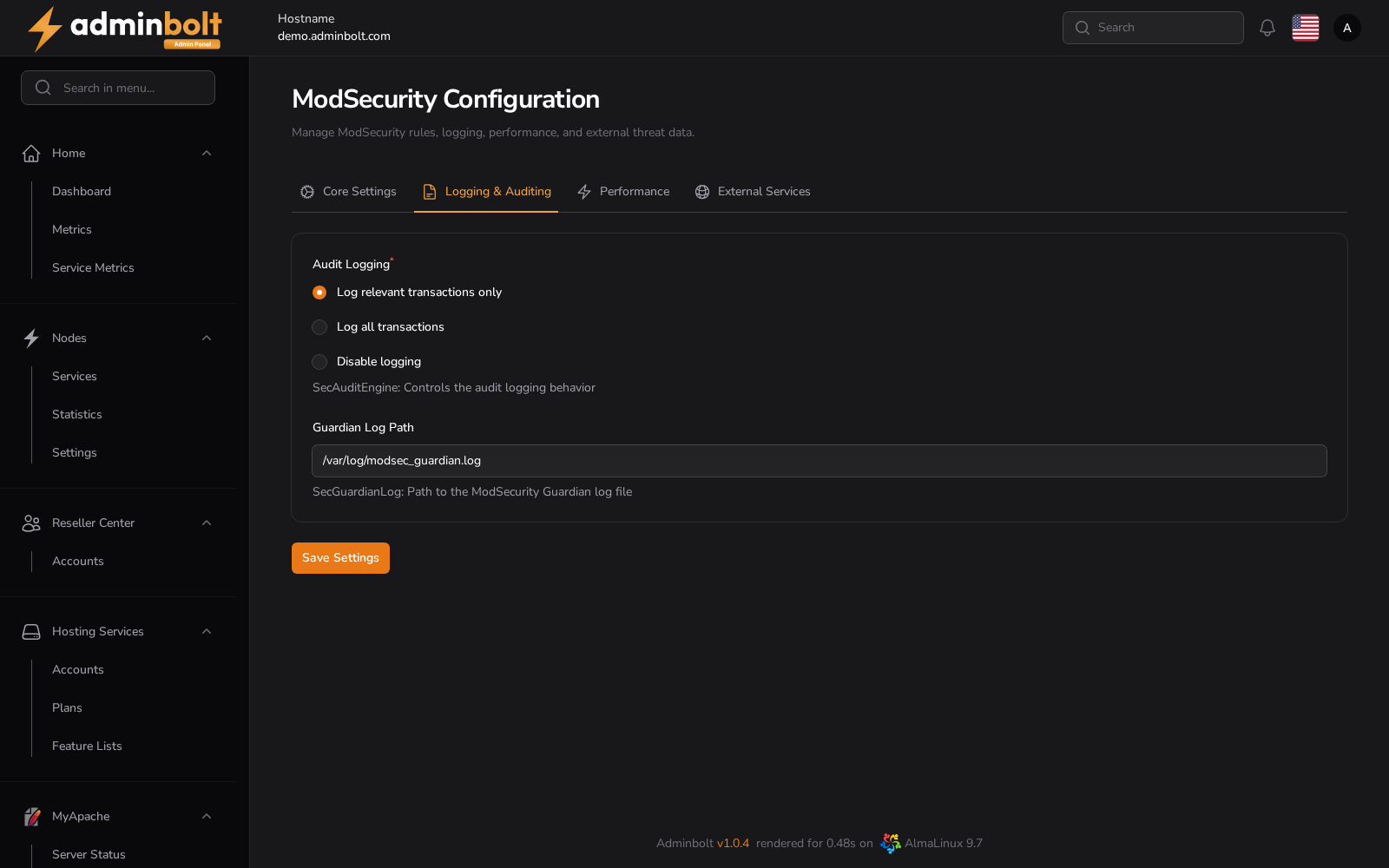
Audit Logging
- Log relevant transactions only - Logs only suspicious/matching requests.
- Log all transactions - Logs all HTTP traffic.
- Disable logging - Disables logging entirely.
Guardian Log Path
- Default:
/var/log/modsec_guardian.log - Stores audit logs for the Guardian integration of ModSecurity.
Performance
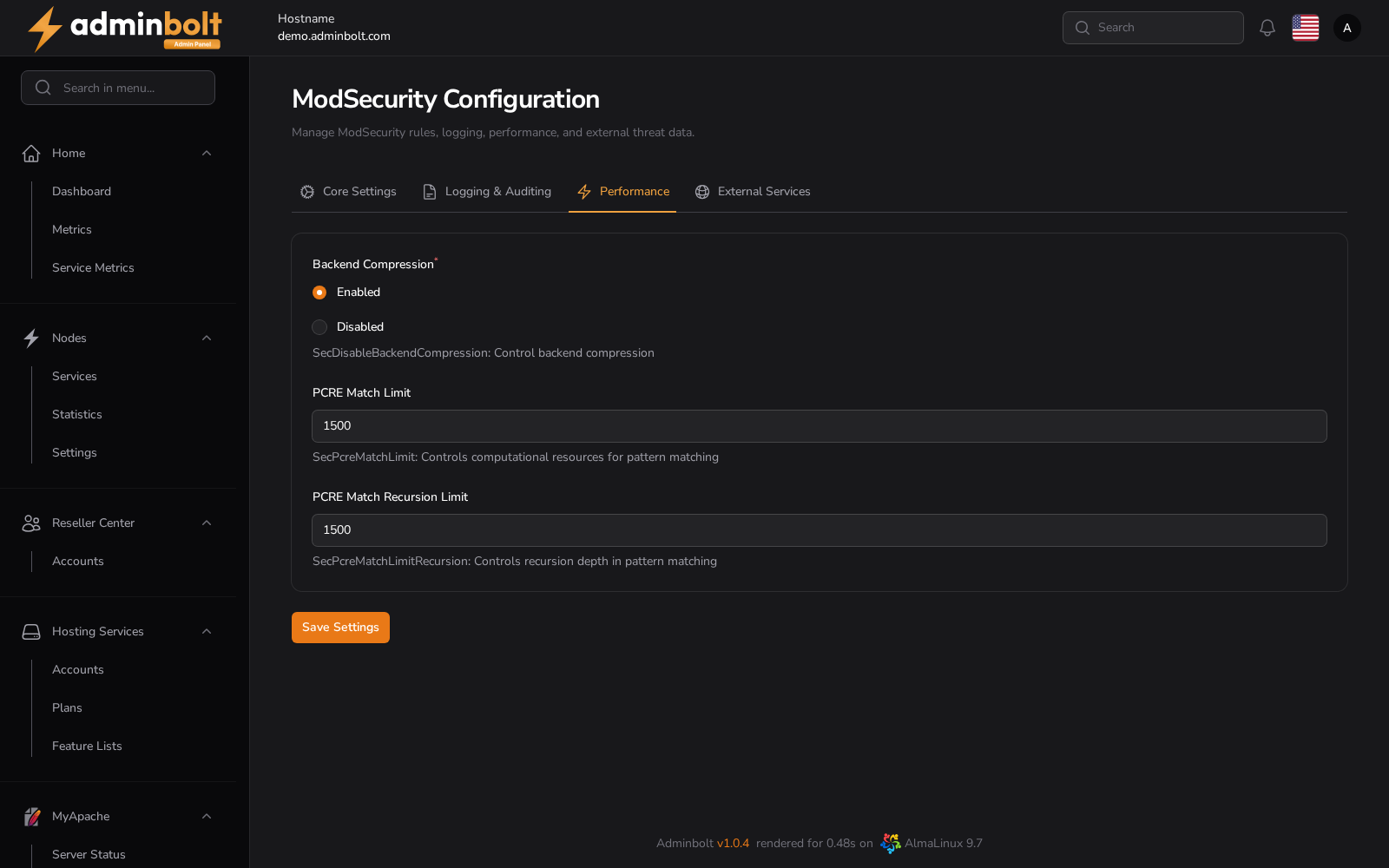
Backend Compression
- Enabled - Enables compression for backend data transfer.
- Disabled - Disables backend compression.
PCRE Match Limit
- Default:
1500 - Controls the maximum number of pattern matches processed.
PCRE Match Recursion Limit
- Default:
1500 - Controls recursion depth for pattern matching.
External Services
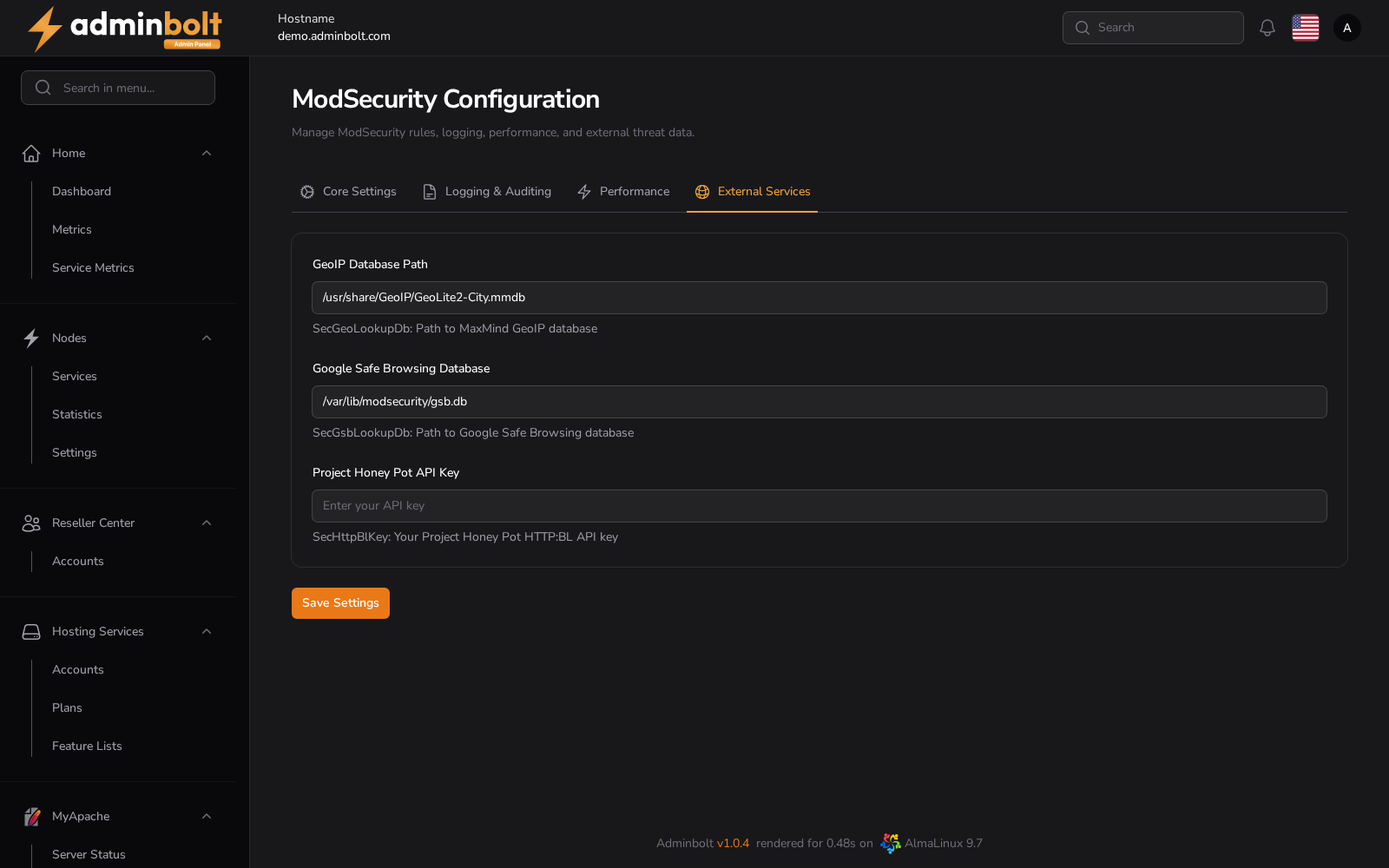
GeoIP Database Path
- Default:
/usr/share/GeoIP/GeoLite2-City.mmdb - Used for geolocation-based rule evaluation.
Google Safe Browsing Database
- Path:
/var/lib/modsecurity/gsb.db - Protects against malicious URLs and phishing domains.
Project Honey Pot API Key
- Optional integration for real-time spammer and bot detection.
- Requires a valid HTTP:BL API key.
Saving Changes
Use the Save Settings button to persist configuration changes.
Since panel 1.9.3, when the panel holds an Apache configuration, a save applies the settings to Apache and is kept only once Apache has taken them. When the panel holds no Apache configuration yet, a save only stores the settings in the panel. With an Apache configuration:
- A save reloads Apache. The first save that switches ModSecurity on restarts Apache once instead, because ModSecurity has to be loaded when Apache starts; later saves reload again. If that restart fails, the save fails and the next save tries again.
- When Apache's configuration test refuses the new settings, nothing is changed and Apache's configuration is left as it was. When the module package is missing, the message names it, for ModSecurity
mod_security; install it, then save again. - When another Apache configuration file is already broken, the new settings are not written and the message names that file when it can. Repair the file, then save again.
- When ModSecurity is on but its package was removed, switching ModSecurity off and saving repairs Apache's configuration.
When Apache refuses the change, or the reload or restart that loads it fails, the Save ModSecurity settings notification says "Nothing was saved, because the change was not applied to Apache.", followed by the cause and a correlation ID to give support. Nothing is stored in the panel.
On a form that was not saved, your edits stay in the form so you can correct them and save again.
The administrator API
Since panel 1.9.4, GET /api/admin/modsecurity/settings reads the settings of this page, grouped by its sections, and PATCH lays the settings sent over the current ones, checks them with this page's form, and saves them as Save does. The rule files are listed by GET /api/admin/modsecurity/rules (see ModSecurity Rules), and the vendors are on the API as ModSecurity Vendors describes.
ModSecurity on new installations
Since panel 1.9.3, a new installation loads ModSecurity in the default Apache profile, with the OWASP Core Rule Set, so the web application firewall protects every site from the start. The rule set includes the official WordPress exclusions, so the WordPress block editor saves normally. The rules take effect as soon as they are installed.
Servers installed before 1.9.3 keep their ModSecurity setting when they are updated. Re-applying the default Apache profile turns ModSecurity on there too. The rule set itself is listed on ModSecurity Vendors.