

MySQL Governor
MySQL Governor throttles database usage per account, so one busy site cannot starve the whole server. It is a CloudLinux component and the page is available on CloudLinux servers.
Overview
URL: /admin/settings/mysql-governor
Location in Sidebar: Settings > Databases > MySQL Governor. The entry appears once the server has been converted to CloudLinux; before that, the URL sends you to the CloudLinux Installer.
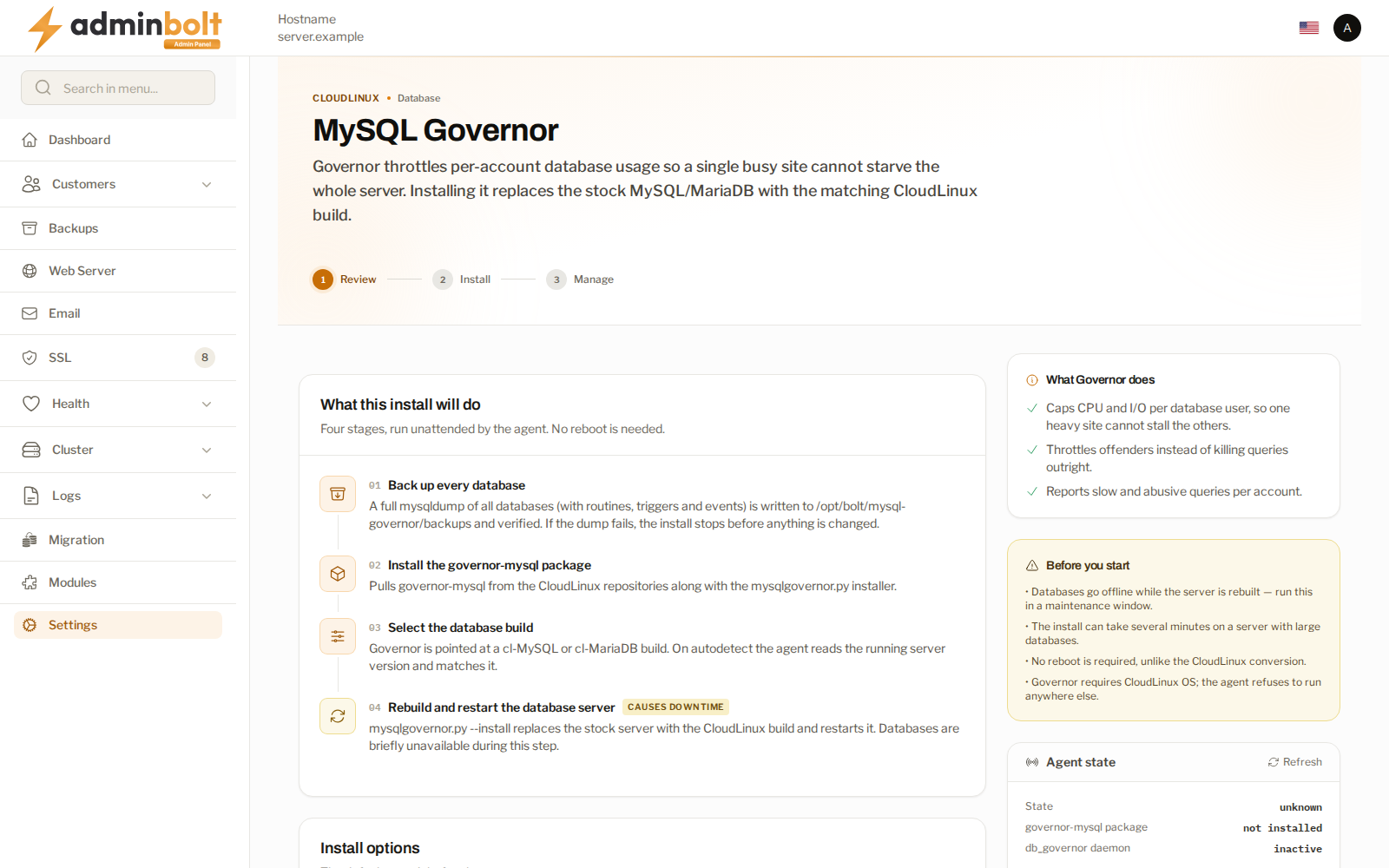
The page is a three-step wizard: Review, Install, Manage. Once an install has been started, or when Governor is installed, its first card shows where Governor stands: queued, installing, installed, or failed.
Before you install
Warning: Installing Governor replaces the stock database server with the matching CloudLinux build, and the database server is restarted as part of it. Databases are unavailable while that happens, so every site on the server is affected for the length of the restart. Do this in a maintenance window, not on a whim.
The review step states plainly what the install will do and in what order. Two things are worth knowing before you start:
- Every database is backed up first, and the backup is verified. If the backup fails, the install stops before anything is changed. This is the safety net, and it is why the first stage takes the longest on a server with large databases.
- No reboot is needed. The server stays up; the database service does not.
Under Install options, Target database build stays on autodetect unless you deliberately move to another build, and Skip the pre-install backup is off by default. Tick the confirmation that the database server will be rebuilt and restarted, then select Install MySQL Governor and confirm.
Following the install
The installer output is shown as it runs, so you can follow the stage it is on rather than watching a spinner. You can leave the page; it shows the real state when you come back.
Queued behind another package operation
Since panel 1.9.3, an install you start while another package operation runs on the server (a PHP version install or a system update, for example) waits for it instead of failing. The page shows MySQL Governor install is queued, names the operation under Waiting for, and starts the install on its own once that operation ends. While the install waits, the page offers neither the install form nor the removal, and starting a second install is refused.
When the install fails
The last MySQL Governor install failed shows the stage it failed at and, since panel 1.9.3, the cause and the next step, for example:
- another package operation kept the package manager busy, or the install waited too long behind one: the database server was not touched, so retry once that operation has finished,
- the CloudLinux installer failed, or the install was interrupted: check the installer output, then retry,
- the database server could not be started again: start it, then retry.
A line under the cause says whether the database server is running, was stopped by the install and started again, or is not running. The button then reads Retry install.
Governor already on the server
Since panel 1.9.3, a server that already runs Governor, including one where Governor was installed outside the panel, shows MySQL Governor is installed and offers no install form and no install button. A panel install that failed partway stays retryable with Retry install.
The install is also refused, with nothing changed, when Governor is already installed, when an install or removal is still running, or when the page cannot read the Governor status. In the last case, check that the agent is running and try again.
After it is installed
The Manage step reports whether Governor is running, with the database build and the time of the install. When the install finished but the database server is not running, the card says so: start the database server. Open LVE Manager leads to the per-account limits.
Removing it
Removal has its own page at /admin/settings/mysql-governor/remove, reached through Remove MySQL Governor on the Governor page. Removing Governor is the same kind of change as installing it: the database server is replaced and restarted, so treat it with the same care.
On the removal page, choose the engine to restore under Restore this database engine (the default, What was here before Governor (recommended), puts back the engine that ran before Governor), keep Skip the pre-removal backup off, tick the confirmation, and select Remove Governor.
Removal steps
Since panel 1.9.3, the page shows each step of the removal as it runs:
- Backing up the databases - every database is dumped. The database server is still running.
- Checking the package repositories - every enabled package repository has to answer before the database packages are touched. Nothing has been changed yet.
- Replacing the database packages - the CloudLinux build is removed and a stock one installed. Databases are offline until this step finishes.
- Checking the database server - the installed engine and its answers to queries are checked.
When the removal did not leave the requested engine running, a Repairing the database server step reinstalls it; the data directory is not touched. Whenever the database server stops answering during a removal, a separate The database server is down card says so, until it is back.
When the removal stops or fails
- The removal stopped before changing anything - a package repository did not answer, and the page names it when it can. Governor and the database server were left as they were. Fix or disable that repository, then start the removal again.
- A removal that ended on another engine or version than the one you asked for shows what is installed now, whether the database server runs, and whether the data files were touched. Retry the removal to install the requested engine; the dump taken before the removal is there if that does not bring the databases back.
- When installing the engine would also have removed packages that are not database packages, the install is refused on purpose. The card lists those packages and names the missing package to put back before you retry.
The removal button then reads Retry the removal. A failed removal also shows on the Governor page, with a Retry the removal link and the database server state, until a removal succeeds. A removal cannot start while a Governor install is queued or running.
Related pages
- CloudLinux - the rest of the CloudLinux integration.
- LVE Manager - per-account resource limits.
- MySQL Settings - the MariaDB configuration.
- Backups - the backups that protect the data Governor sits in front of.