

Email Servers
Email Servers lists the mail servers this panel manages. Since panel 1.9.3 the mail of hosting accounts can run on a separate server: a dedicated mail server you add here, or, on a hub, a fleet node you use as a mail server. Every panel lists its own mail server, Local Mail Server, which runs on the panel's server itself.
Overview
URL: /admin/settings/email-servers
Open it from Settings > Infrastructure > Email Servers, or from Manage servers on the Email Dashboard. The old address /admin/email-servers leads here. On a hub, the page is the Email tab next to Hosting, the Nodes list.
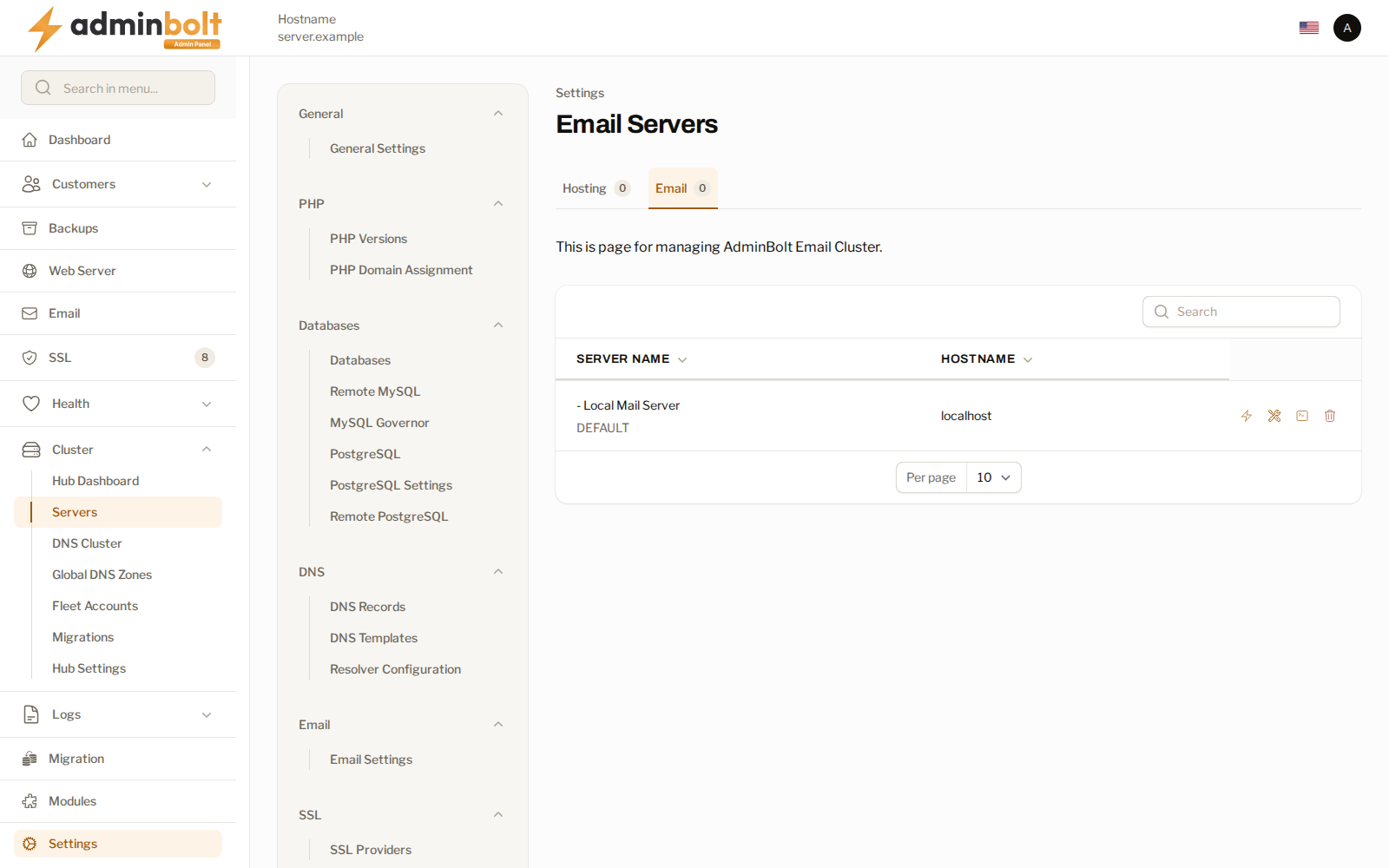
| Column | What it shows |
|---|---|
| Server Name | The name of the mail server. The default one is marked DEFAULT. |
| HostName | The hostname mail is addressed to. The local mail server shows localhost. |
| Status | The state of the server, see below. |
The list refreshes by itself.
Status
| Status | Meaning |
|---|---|
| Local | The panel's own mail server. |
| Not deployed | A dedicated mail server that was added but not deployed yet. |
| Online | The panel reached the server at its last check. |
| Offline | The panel could not reach the server at its last check. Hover over the badge to read why. |
| Unknown | The server has not been checked yet. |
Under the badge, the page shows how long ago the server was checked. The panel checks every mail server regularly, and at once after you add, deploy, or reconfigure one.
Adding a dedicated mail server
A dedicated mail server is a separate machine that runs only mail for this panel's accounts. You need:
- A fresh server running AlmaLinux 9, reachable over SSH with a password, as
rootby default. - A hostname for it, such as
mx1.example.com, that already resolves to that server in DNS. The hostname is set on the server during the deployment, and its certificate is issued for it. An IP address is not accepted.
Adding the server and deploying it are two steps:
- Click Add Email Server and fill in Friendly Name, Server Hostname, SSH Port (22 by default), SSH User (
rootby default), and SSH Password. - Click Check Connection & Add. The panel signs in over SSH and sets up its own access to the server, so the password is not stored. The server is added as Not deployed. If the panel cannot connect, a Connect remote mail server notification gives the reason, and nothing is added.
- Click Deploy on the server's row and confirm Install Bolt-Mailserver on target?. The deployment installs the mail stack on the server and takes a few minutes. It runs in the background, where Background Jobs lists it as Deploy a mail server.
- Click Check Deployment on the row to see whether it has finished. Once it has, the status becomes Online, and the server can be assigned to accounts.
Removing the server from the panel later, with Delete, does not uninstall anything from it.
Using a fleet node as a mail server
On a hub, Use Fleet Node turns a paired fleet node that already runs AdminBolt into a mail server for this panel's accounts. The button shows while the hub has at least one paired node that is not a mail server yet.
Before you start:
- Save the node's SSH access on the Nodes screen: Edit the node and fill in its SSH Access section.
- Give the node a hostname that resolves to it. Mail cannot be addressed to an IP address.
Then click Use Fleet Node, choose the Fleet node, and click Enable Mail Role. The node gets the Mail role in the Roles column of the Nodes list and appears on this page. The hub creates the mailboxes of its accounts on the node directly; they do not appear in the node's own panel.
When the node cannot be used, the notification gives the reason and the next step, for example that the hub could not open an SSH session to the node, or that the node has no hostname mail can be addressed to.
Row actions
| Action | What it does |
|---|---|
| View Logs | For the local mail server, opens the Email Logs page. For a deployed mail server, shows its last 100 mail log lines. |
| Set as Default | Makes this server the default mail server; see The default mail server. |
| Settings | Opens Email Settings for this server. |
| Configure Connection | On a deployed dedicated mail server, changes its Friendly Name, Server Hostname, SSH Port, and SSH User. |
| Check Deployment and Deploy | On a dedicated mail server that is not deployed yet. |
| Delete | Removes the server from the panel; see Deleting a mail server. Not offered for the local mail server. |
Most actions are icons; hover over one to see its name.
Choosing an account's mail server
Each hosting account has a Mail Server:
- Default Mail Server - the account follows the server set with Set as Default, and moves with it when the default changes.
- Local Mail Server - the panel's own mail server.
- A deployed mail server by name.
You choose it in the Mail Server field when you create an account (on the Server Configuration tab) and in Edit Account. The field shows once the panel has at least one mail server besides the local one, and only administrators can change it. New accounts start on Default Mail Server. Accounts that existed before panel 1.9.3 are on Local Mail Server, so they stay where they are until you change them.
A reseller can be given Override Mail Server on its reseller account. Accounts created under that reseller afterwards use that server; the reseller's existing accounts keep theirs.
The default mail server
Set as Default asks for confirmation, then makes the server the default. Only a deployed mail server can be the default. Accounts set to Default Mail Server switch to the new default: their mail DNS is changed in the background, where Background Jobs lists it, and their new mailboxes are created on the new server. The notification says how many accounts follow the default.
What changes when an account's mail server changes
When an account moves to another mail server, by Edit Account or by a change of the default, the mail DNS of its domains is pointed at the new server:
- the MX records that point at a server of this panel,
- the
mail.<domain>record, - the mail SRV records,
- the DKIM record,
- and the mail settings that mail clients discover automatically.
An MX record that points elsewhere, for example at an external mail provider, stays as it is, and so do the records you added to the zone by hand. While a domain uses MailChannels or SpamExperts, or its email routing is set to remote, its MX and mail.<domain> records are not changed.
Existing mailboxes are not moved. They stay on the server they were created on, and the account's new mailboxes are created on the new server. Move the mail of existing mailboxes yourself, or choose the mail server before the account has mailboxes. In the client panel, the connection details of a mailbox name the host to connect to.
When the change cannot be completed, the account is saved and the notification says so: "The hosting account was updated, but the mail server change was not completed.", followed by the cause. When the cause is that the mail DNS of some domains could not be updated, the account already has the new mail server, so saving the same choice again changes nothing: correct the mail records listed above in those domains' DNS zones yourself.
Deleting a mail server
A mail server that hosting accounts or resellers still use cannot be deleted. The notification The mail server cannot be deleted says why:
- "This server is used by Hosting Accounts or Resellers. Please change Mail Server for them first."
- "This server is the default mail server, and accounts set to Default Mail Server use it. Set another server as the default first."
For a fleet node, Delete only removes its mail role: "The node stays in the fleet; its mail role and agent credential were removed." The same guard applies on the Nodes screen: a node that accounts or resellers use as their mail server cannot be deleted or unpaired until you move them to another mail server.
Webmail on a hub
On a hub, webmail signs in to and sends from mailboxes of accounts whose mail runs on a mail server, the same way as for mailboxes on the hub itself.
Related pages
- Email Dashboard - the state of the mail stack, with the email servers.
- Email Settings - the mail configuration itself.
- Hosting Accounts - where an account's mail server is chosen.
- Nodes - the fleet nodes of a hub.
- Mail Queue - what is waiting for delivery.
- System Mailboxes - the panel's own mailboxes.