

Web Server
Web Server is the one place that says which engine is serving this server's sites, whether it is healthy, and where every web server setting lives. Apache, LiteSpeed, and OpenLiteSpeed are tabs of this page rather than separate destinations. Since panel 1.9.2 the page shows only the tabs that apply to this server's web server; see The tabs.
Overview
URL: /admin/web-server
The page is a top-level entry in the admin navigation and opens on Overview.
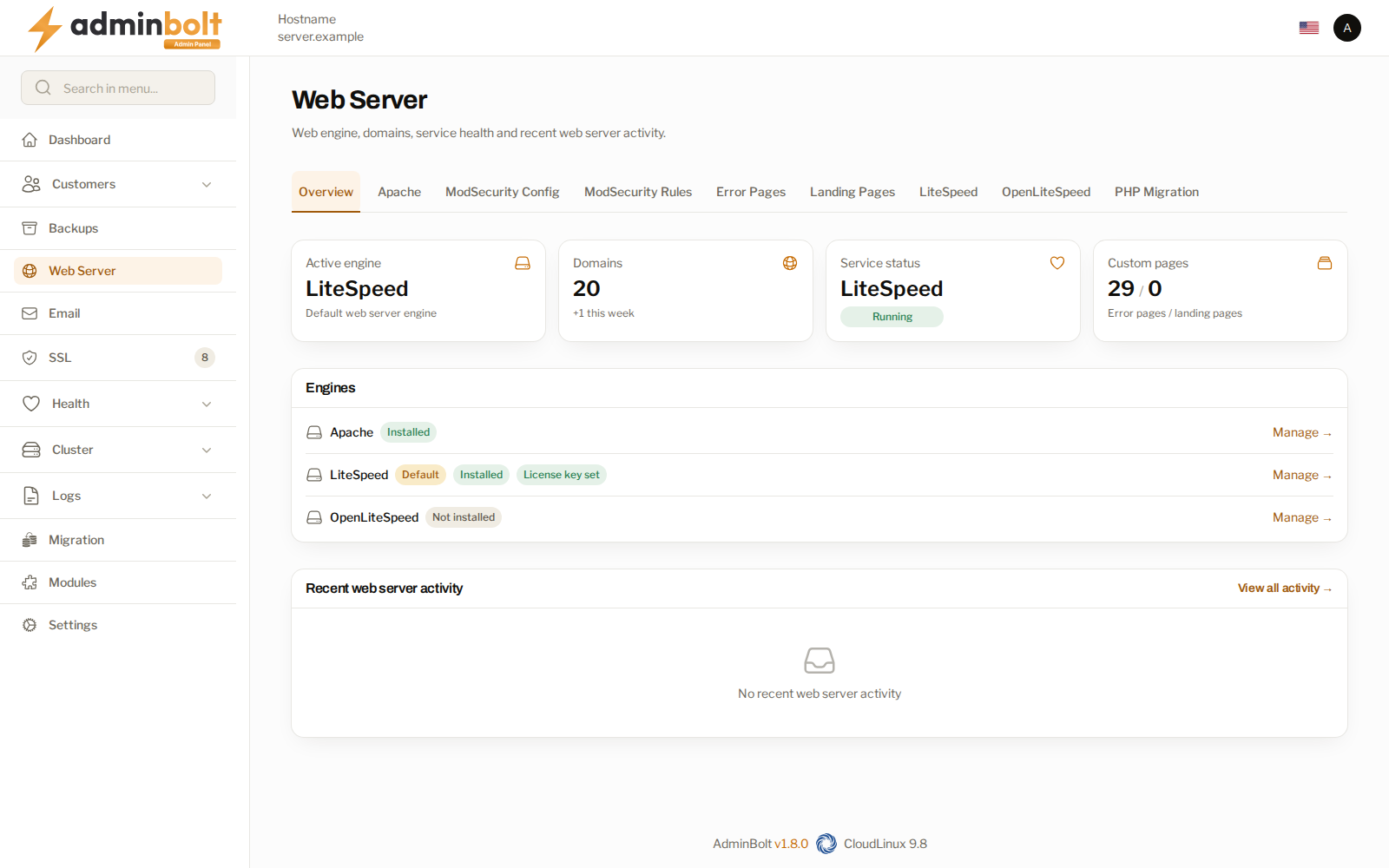
| Figure | What it shows |
|---|---|
| Active engine | The web server the panel is set to, or No engine chosen yet - Apache assumed. A line below it says when another web server holds ports 80 and 443, or when none does. |
| Domains | How many domains this server serves, and how many were added this week. |
| Service status | The web server the panel is set to, with Running, Warning, Not running, or Unknown. Hover over it for the detail. |
| Custom pages | How many error pages and landing pages exist. |
Since panel 1.9.2 Service status agrees with that web server's card under Engines: a web server the card shows as Stopped reads Not running here too.
Engines
The Engines section lists Apache, LiteSpeed, and OpenLiteSpeed with the state of each: Installed or Not installed, Running or Stopped, Serving on 80/443, Default for the one the panel is set to, and, for LiteSpeed Enterprise, Trial Key or License key set.
Since panel 1.9.2 a card links only to a page that applies on this server:
- Manage opens the engine's own tab, when that tab is shown (see The tabs).
- Install is on the LiteSpeed or OpenLiteSpeed card while that engine is not installed. It opens the engine's module page, for example
/admin/modules/openlitespeed, where you install it. - The Apache card has no link while OpenLiteSpeed, or LiteSpeed Enterprise in native mode, is the web server, because the Apache settings are not used then.
More than one engine can be installed at once; one of them serves. A switch is reported as successful only once the incoming engine serves. If it does not, the panel tries to bring the previous engine back on the ports and the message says whether that worked. When it did not, the sites are down until you start the previous engine again.
When the serving engine is not the one the panel is set to
The panel is set to one web server and writes every site's configuration for it. If a different web server holds ports 80 and 443, for example one started by hand, sites answer with an error or not at all until the two agree. Since panel 1.9.0 the panel detects this:
- The Needs attention card on the dashboard and the Health page show a critical fault that names both servers and links to this page.
- The Active engine figure names the server that holds ports 80 and 443 instead, or says that no web server holds them.
Two header actions put things right:
- Restore followed by the stored server's name - stops the server that is running and starts the one the panel is set to, the same way a manual switch does. It is refused, like a manual switch, when a domain uses a PHP handler that server cannot serve.
- Adopt followed by the running server's name - keeps the server that is running and makes it the one the panel is set to. The panel rewrites every site's configuration for it. Nothing is stopped or started. It is refused when a domain uses a PHP handler the running server cannot serve.
Choose Adopt when the running server is the one you want, and Restore when it was started by mistake.
Site declarations
When OpenLiteSpeed, or LiteSpeed Enterprise in native mode, is the server the panel is set to, the page checks that every site it declares has its configuration and that no declaration belongs to an account the panel no longer has. Problems are listed in a declarations section, and the Needs attention card on the dashboard shows a warning.
Rebuild followed by the server's name, such as Rebuild LiteSpeed Enterprise vhosts or Rebuild OpenLiteSpeed vhosts, writes every site's configuration and the server configuration again from the panel's accounts and domains, then reloads the server. Run it when the section lists a problem.
The tabs
Since panel 1.9.2 the tab bar shows only the tabs that apply to this server. Which ones apply depends on the web server the panel is set to and on the engines installed. A tab that does not apply is also left out of the menu search, and its address answers with a page-not-found error, so an old bookmark to it does not open.
| Tab | What it covers | Shown |
|---|---|---|
| Overview | This page. | Always. |
| Apache | Apache settings. | While Apache is the web server, or LiteSpeed Enterprise in Apache drop-in mode. |
| Apache Includes | Your own Apache directives. | Same as Apache. |
| ModSecurity Config | The web application firewall configuration. | With every web server except OpenLiteSpeed. |
| ModSecurity Rules | The rule sets in force. | With every web server except OpenLiteSpeed. |
| ModSecurity Vendors | The rule sets ModSecurity loads. | With every web server except OpenLiteSpeed. |
| Error Pages | Custom error pages. | Always. |
| Landing Pages | Landing page templates. | Always. |
| LiteSpeed | LiteSpeed Enterprise, its settings and cache. | While LiteSpeed Enterprise is installed, or is the web server. |
| OpenLiteSpeed | OpenLiteSpeed and its settings. | While OpenLiteSpeed is installed, or is the web server. |
| PHP Migration | Moving domains between REMI PHP and LSPHP. | On every server except CloudLinux, where websites move to alt-php from the Isolation Report instead. |
An engine that is not installed has no tab. Install it from Modules, or with Install on its card under Engines. Once it is installed, its tab stays whether or not it serves, because the tab is where you switch to it.
In practice:
- Apache shows every tab except the tab of an engine that is not installed, and, on CloudLinux, PHP Migration.
- LiteSpeed Enterprise in native mode shows no Apache and no Apache Includes tab, because LiteSpeed then does not read the Apache configuration.
- OpenLiteSpeed shows no Apache, Apache Includes, or ModSecurity tabs.
Recent web server activity
The last operations that touched the web server, with their outcome. View all activity opens the full record in the Logs Center. Use it when a change did not take: the entry names what ran and whether it succeeded.
The administrator API
Since panel 1.9.1, the web server is on the administrator REST API, so a server can be set up end to end from your own tooling. Authentication is the same as for the rest of the API. The API refuses what the panel pages refuse, and the response says why.
Which web server is serving
GET /api/admin/web-server answers with the reading this page shows, taken afresh on every call:
| Field | What it holds |
|---|---|
configured | The web server the panel is set to: httpd (Apache), lsws (LiteSpeed Enterprise), or ols (OpenLiteSpeed). |
configured_explicit | false when no web server was ever chosen and Apache is assumed. |
running | The web server that is serving, or none, other, or unknown. |
bound | The web server holding ports 80 and 443, or none, other, or unknown. |
active | The web server whose service is active, or none, both, or unknown. |
diverged | true when a known web server is running and it is not the configured one: the case Restore and Adopt put right. |
installed | The web servers installed on this server. |
servers | One entry per web server, installed or not, with its label, installed, active (null when the running state could not be read), and unit_state: whether it starts at boot (enabled, disabled, or masked). Since panel 1.9.2 unit_state is null for a web server that is not installed. |
litespeed_mode | native or drop-in for LiteSpeed Enterprise, null when it is not installed. |
observed_at | When the reading was taken. |
When the server cannot be asked, the call answers 502 with a message and the configured value. Since panel 1.9.2 it also carries a correlation_id, as the other web server calls do. Quote it when you contact support.
Installing, removing, and re-configuring
The API installs and removes the same components as Modules and the Services page. Each one has a key:
| Key | Component |
|---|---|
httpd | Apache |
lsws | LiteSpeed Enterprise |
ols | OpenLiteSpeed |
mod_passenger | Phusion Passenger |
mod_proxy_lsapi | LSAPI Engine (mod_proxy_lsapi) |
| Method and path | What it does |
|---|---|
GET /api/admin/web-server | The configured web server against the one serving, as above. |
GET /api/admin/web-server/components | Every component: whether it is installed, a job still running for it (running_job_id), and whether an install or a removal would be accepted right now (can_install, can_remove), with the reason when not (install_refusal, remove_refusal). can_reconfigure says whether a re-configure would be accepted now: since panel 1.9.2 it is true only for a component that has a re-configure action and is installed. |
GET /api/admin/web-server/components/{component} | One component, in the same form. |
POST /api/admin/web-server/components/{component}/install | Start the install that Modules or the Services page runs. Answers 202 with the job_id and the poll and log addresses. Installing Apache when it is already installed re-provisions it (action is reprovision). |
DELETE /api/admin/web-server/components/{component} | Start the removal. Answers 202 with the job, as install does. |
POST /api/admin/web-server/components/{component}/reconfigure | Re-apply the default configuration of Apache or LiteSpeed Enterprise, as Re-configure on the Services page does. Answers when it has finished, with reconfigured. |
GET /api/admin/web-server/jobs/{jobId} | The state of an install or removal: running, completed, failed, or unknown, with its messages, any error, and whether the component is installed now. |
GET /api/admin/web-server/jobs/{jobId}/log | Every step the job recorded, in order, with its level (info, success, warning, or error). |
What to expect:
- Installing a web server does not switch to it. The configured web server stays as it is.
- A refused request answers
409with amessagethat gives the reason.can_installandcan_remove, withinstall_refusalandremove_refusal, show beforehand whether a request would be accepted. - A job can also be refused while it runs. It then ends as
failed, with the reason in its log. - A failed install names its cause. Since panel 1.9.2, when LiteSpeed Enterprise, OpenLiteSpeed, or one of their LSPHP versions cannot be installed because a package it needs is in no enabled package repository, the job's
errorand its log name the package, what it needs, and what to do next. See When the install fails. - Removing LiteSpeed Enterprise (
DELETEonlsws) also moves the files it leaves behind into a dated folder, as Remove LiteSpeed describes. Until that has finished, installingolsis refused with409and amessagethat says to wait. - Re-configure answers
422for a component that has no re-configure action. - Job state
unknownmeans the job has ended but the server no longer has a record of how. Readinstalledto see the result. - An unknown component or job id answers
404. - A job that could not start, or a re-configure that failed, answers
502with acorrelation_id. Quote it when you contact support.
Related pages
- Apache Settings - the Apache tab in full.
- LiteSpeed and OpenLiteSpeed - the LiteSpeed family.
- PHP Versions - what runs behind the web server.
- Health - where a stopped web server is surfaced.
- API Reference - authentication and the rest of the REST API.