

Global DNS Zones
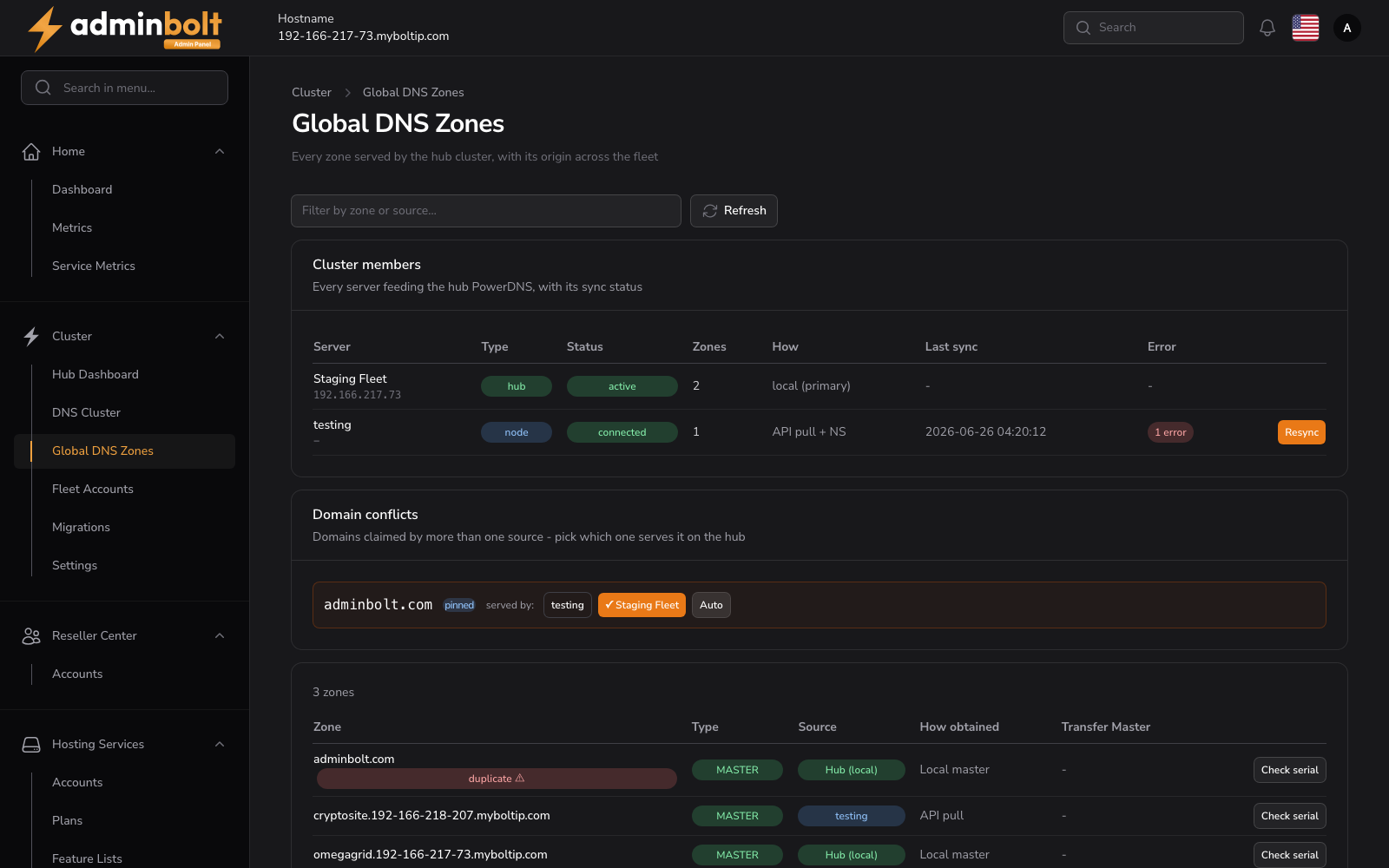
The Global DNS Zones page is the cross-server view of every DNS zone served by the hub cluster, together with where each zone originates.
Overview
URL: /admin/cluster/dns-zones - under Cluster > Global DNS Zones. Its earlier address /admin/hub/dns-zones leads here.
Every zone the hub serves, with the server or source it comes from
Use Filter by zone or source to search, and Refresh to re-read the current state.
Cluster members
Every server feeding the hub PowerDNS, with its sync status
| Column | Description |
|---|---|
| Server | Member name and address (for example the hub Fleet One, or a node named node-01). |
| Type | hub, node, secondary (a secondary DNS server the hub feeds), or external (an external source). |
| Status | The member's state, such as active, inactive, or a node's connection status. |
| Zones | Number of zones the member contributes. |
| Sync | How the member feeds the cluster, such as local (primary), API pull, AXFR, or NOTIFY + AXFR, with the time of the last sync or Never synced. |
| Errors | The number of problems from the member's last sync. Click the badge to open Sync issues, which lists them. |
Since panel 1.9.3 a secondary row shows what that secondary actually serves, from the hub's last check: Zones counts the zones checked, Sync shows Last check with its time or Not checked yet, and Errors counts the zones it does not serve correctly. A secondary that does not answer is shown as disconnected. See Checking that a secondary serves the zones.
Since panel 1.9.3 a node row also has a Zone sync button, described under Sync status of node zones.
Node and external source rows have a Resync button. On a node it pulls every zone of the node again, changed or not, and since panel 1.9.3 then sends every zone to every active secondary DNS server in the background (see Sending the zones again); on an external source it reads the source now, and an AXFR-mode source answers that there is nothing to pull. Since panel 1.9.2 the scheduled sync of a node updates only the zones that changed, and zones a busy node did not answer for are read first on the next sync; see Node zones on the hub.
Zones
Below the members, every zone is listed with its provenance:
| Column | Description |
|---|---|
| Zone | The DNS zone (domain). |
| Type | Zone type, such as MASTER. |
| Source | Where the zone comes from, such as Hub (local) or an external source. |
| How obtained | For example, Local master. |
| Zone sync | Since panel 1.9.3, for a zone that comes from a node: the result of the hub's last sync of that zone, see Sync status of node zones. Other zones show a dash. |
| Transfer Master | The transfer master for slaved zones, if any. |
| Check serial | Row action that checks the zone's current serial. |
Sync status of node zones
Since panel 1.9.3 you can check, zone by zone, whether the hub holds the current copy of each zone it pulls from a node. For such a zone the Zone sync column shows a badge with the result of the last attempt, Last attempt with its time (or Never synced), and whether the hub holds what that attempt read:
| Badge | Meaning | Line under it |
|---|---|---|
| Synchronized | The last attempt wrote the zone to the hub or found it unchanged, and the hub holds that version. | The hub holds this attempt |
| Failed | The last attempt failed. Hover over the badge to read the reason. The zone keeps showing as failed until a later sync of it succeeds. | The hub does not hold this attempt |
| Not yet confirmed | The last attempt worked, but the hub has not confirmed yet that it holds that version, for example right after the update to 1.9.3, until the next sync of the node. | Not yet confirmed whether the hub holds this attempt |
| Not read from the node yet | The hub knows the zone but has not read it from the node yet. | The hub does not hold this attempt |
The Zones list shows only what the hub serves. To see every zone of one node, including the zones that never reached the hub, use Zone sync on the node's row of Cluster members. The window lists the node's zones page by page, failed zones first, each with the same badge, time, and line about the hub, and the reason of a failure in red. Resync on the same row retries every zone of the node at once.
Do not compare the SOA serial of a node zone on the hub with the serial on the node to check whether the zone is in sync. While the DNS cluster is enabled, the hub serves its own copy of each node zone, with the cluster's NS records and SOA, and the hub and the node set their serials independently, so the two serials differ even right after a successful sync.
Large hubs
The zone list loads one page at a time, so a hub with tens of thousands of zones opens quickly. The search and the page count cover every zone on the hub.
A zone left by an external source or a node that no longer exists shows its origin as removed external source or removed node.
Orphaned zones
Check for orphaned zones looks for zones on the hub that nothing in the panel owns: no hosting domain, node, external source, or pinned owner. The check reads every zone on the hub, so it runs only when you ask for it. It lists what it finds, and Remove orphaned zones deletes them in the background. The outcome arrives as a notification. Slave zones are never treated as orphans. Available since panel 1.9.0.
The same check runs from the hub's command line:
bolt-cli dns-orphan-zones                  # list orphaned zones
bolt-cli dns-orphan-zones --remove --yes   # delete them without asking
bolt-cli dns-orphan-zones --notify         # also send the result as a notification
Export and import a zone
Export
Export zone downloads any served zone as a standard BIND zone file, named <domain>.zone. The records are read back from the hub's own PowerDNS, so a mirrored zone exports exactly what the hub is serving rather than what a source once sent.
Import
Import zone loads a BIND zone file into a hub-local zone. The form offers:
- BIND zone file (required) - up to 512 KB. A standard BIND zone file works, for example an export from cPanel, Plesk or another AdminBolt server.
- Import mode (required) - Add to existing records, where duplicates are skipped, or Replace existing records, where the SOA record is kept and the NS records are kept when the file has none. Add is the default.
- Preview - shown as soon as a file is selected. It lists what would be applied, and every line that cannot be applied with the reason: an unsupported record type, a record outside the zone, or a malformed line. TTLs outside the
60to86400range are clamped, with a warning.
Warning: Import is available only for zones hosted on this panel. A mirrored zone, whether it comes from a node or an external source, cannot be imported into: its source stays authoritative and the next synchronisation would overwrite whatever you imported. Change such a zone at its source instead.
Related
- DNS Cluster - configure the unified nameservers, secondary DNS servers, and external sources that feed this view.