

Accounts
The Accounts page allows resellers to create, view, and manage hosting accounts.
Overview
URL: /reseller/hosting-accounts
Location in Sidebar: Hosting Management > Accounts
The page header reads: "Create and manage individual hosting accounts."
A Create Hosting Account button opens the account creation modal.
Accounts Table
The table displays all hosting accounts under the reseller. Default columns:
- Username - The system username assigned to the account (sortable).
- Setup Date - The date the account was created (sortable).
- Quota - Maximum disk space allocation (sortable).
- Disk Used - Current disk space usage (sortable).
- Package - The assigned hosting plan name (sortable).
- Reseller/Owner - The reseller who owns this account (sortable).
- Suspended - Whether the account is suspended (sortable).
- Actions - Login button and three-dot context menu.
Toggle Columns
Click the Toggle columns button to show or hide optional columns: Domain, Feature List, Status, Provision State, Disk Usage, Disk Warning, DB Disk Usage, Bandwidth, Addon Domains, Subdomains, Alias Domains, FTP Accounts, Databases, Email Accounts, Email Forwarders, Email Autoresponders.
Since panel 1.9.3, Addon Domains counts the account's domains besides its main domain, so an account with only its main domain shows 0. An account not refreshed since the update still shows the old figure, which includes the main domain, until its next Refresh Data or scheduled usage refresh. See How addon domains are counted.
Search and Filter
A search bar filters results. Click the Filter button to apply advanced filters:
- Hosting Plan - Filter by hosting plan (dropdown).
- Reseller - Filter by reseller (dropdown).
- Feature List - Filter by feature list (dropdown).
A Reset button clears all filters.
Empty State
When no accounts exist, the page shows "No Accounts".
Creating a Hosting Account
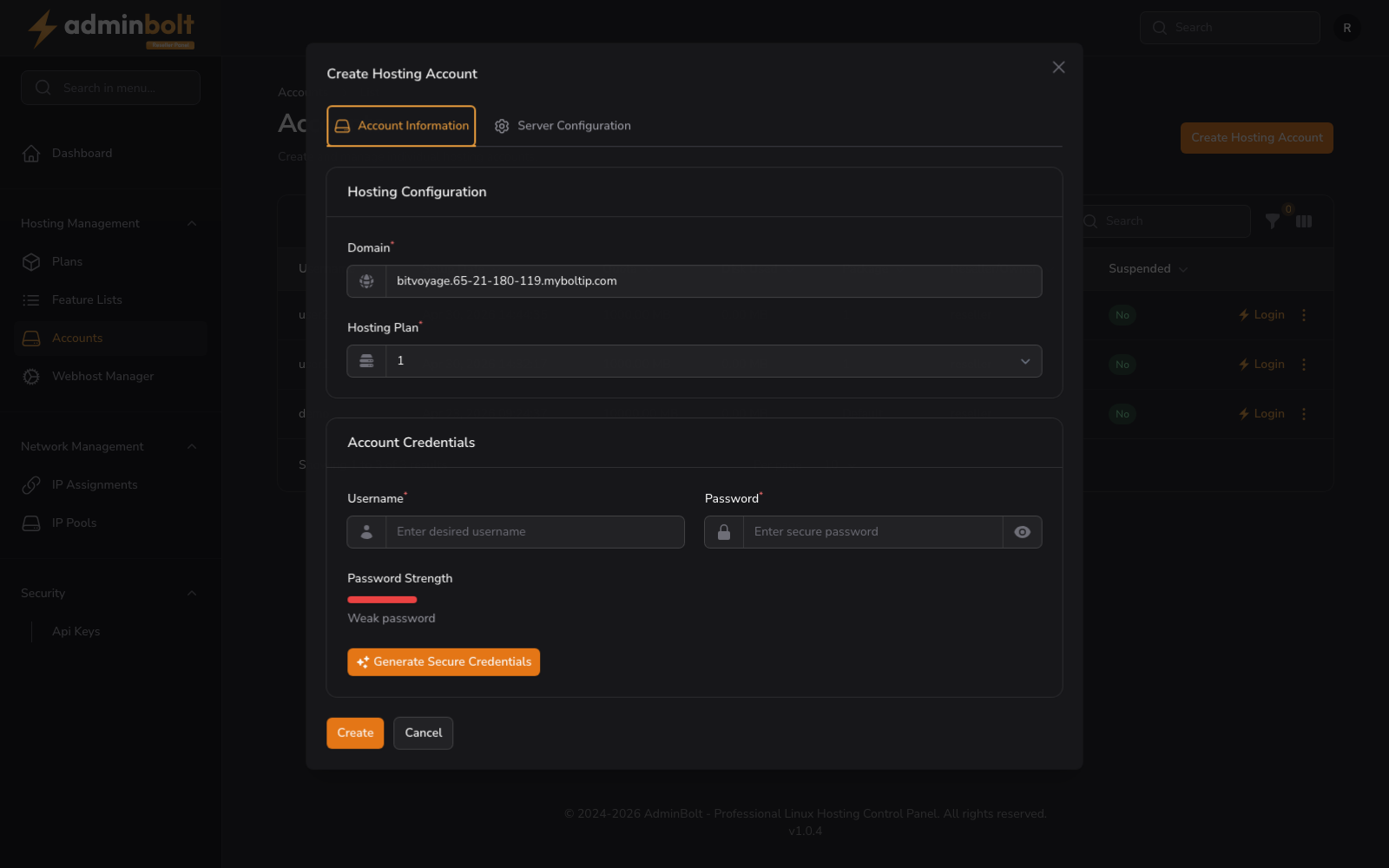
Clicking Create Hosting Account opens a modal with the following fields:
- Domain (required) - The main domain for the new account.
- Hosting Plan (required) - Choose one of your own hosting plans. Since panel 1.9.3 a plan that is not yours is refused with "Invalid hosting plan" before anything is created.
- Username (required) - A unique system username. When the folder
/home/<username>already exists on the server, the account is refused with that folder named; choose another username, or ask the server administrator to review the folder. - Password (required) - A secure password with strength meter.
- Password Strength - A visual indicator showing your password strength.
- Generate Secure Credentials - Button to auto-generate a strong username and password.
- Enable SSH Access (toggle) - Allow SSH access for this hosting account.
Form Actions
- Create - Submit and create the new account.
- Cancel - Close the modal without saving.
Row Actions
Clicking the three-dot menu on any row opens a context menu with the following options:
- View - Open the account details page.
- Usage Details - View resource usage in a modal (see below).
- Edit Account - Change the hosting plan and other account settings (see below).
- Change Password - Set a new password for the account (see below).
- Suspend - Temporarily suspend the account.
- Delete - Permanently remove the account.
Usage Details
The Usage Details modal displays a table of resource usage with columns: Resource, Used, Total, Usage (percentage). Resources shown include: Disk Space, of which Databases, Bandwidth (This Month), Addon Domains, Subdomains, Parked Domains, FTP Accounts, Databases, Email Accounts, Email Forwarders, Email Autoresponders. Since panel 1.9.3 it opens on the figures of the last usage refresh and says when they were taken, and Refresh Data measures the account now. The Usage column reads 0% when nothing is used and N/A for a value that has not been measured. Addon Domains does not count the account's main domain. See Viewing Hosting Account Usage and Last known disk usage in the admin guide, which apply here too.
Edit Account
The Edit Account modal contains:
- Hosting Plan (required) - Change the hosting plan assigned to this account (dropdown). Since panel 1.9.3 the list holds your own hosting plans and the account's current plan, and a plan that is not yours is refused with "Invalid hosting plan". Keeping the current plan is always accepted, even when it is not one of yours.
- Contact email - The address security alerts and account notices are sent to.
- Bandwidth Limit Override - A monthly bandwidth cap in MB for this account only.
- CloudLinux LVE Resource Overrides - on a CloudLinux server, limits for this account only, within your own LVE limits.
- Enable SSH Access - shown when the server offers SSH access to accounts.
The account's reseller, its mail server, and Extra open_basedir Paths are set by administrators only. Since panel 1.9.3 the reseller panel does not show Extra open_basedir Paths, and a value sent from it is ignored.
Your own limits still apply when you change a plan: a plan that would take you past a limit is refused with the reason.
Form buttons: Submit, Cancel
Change Password
The Change Password modal contains:
- Password (required) - Enter a new secure password (placeholder: "Enter secure password"). Includes a visibility toggle.
- Confirm Password (required) - Re-enter the password to confirm (placeholder: "Confirm password"). Help text: "Must match the password above".
- Password Strength - A visual indicator showing the strength of the chosen password.
- Generate Secure Credentials - Button to auto-generate a strong password.
Form buttons: Submit, Cancel
Pagination
Results per page can be set to: 5, 10, 25, 50, or All.