

Email Dashboard
The Email Dashboard provides a centralized overview of the system's email services and real-time email log activity. It is designed to give administrators a quick snapshot of service status and recent email-related events.
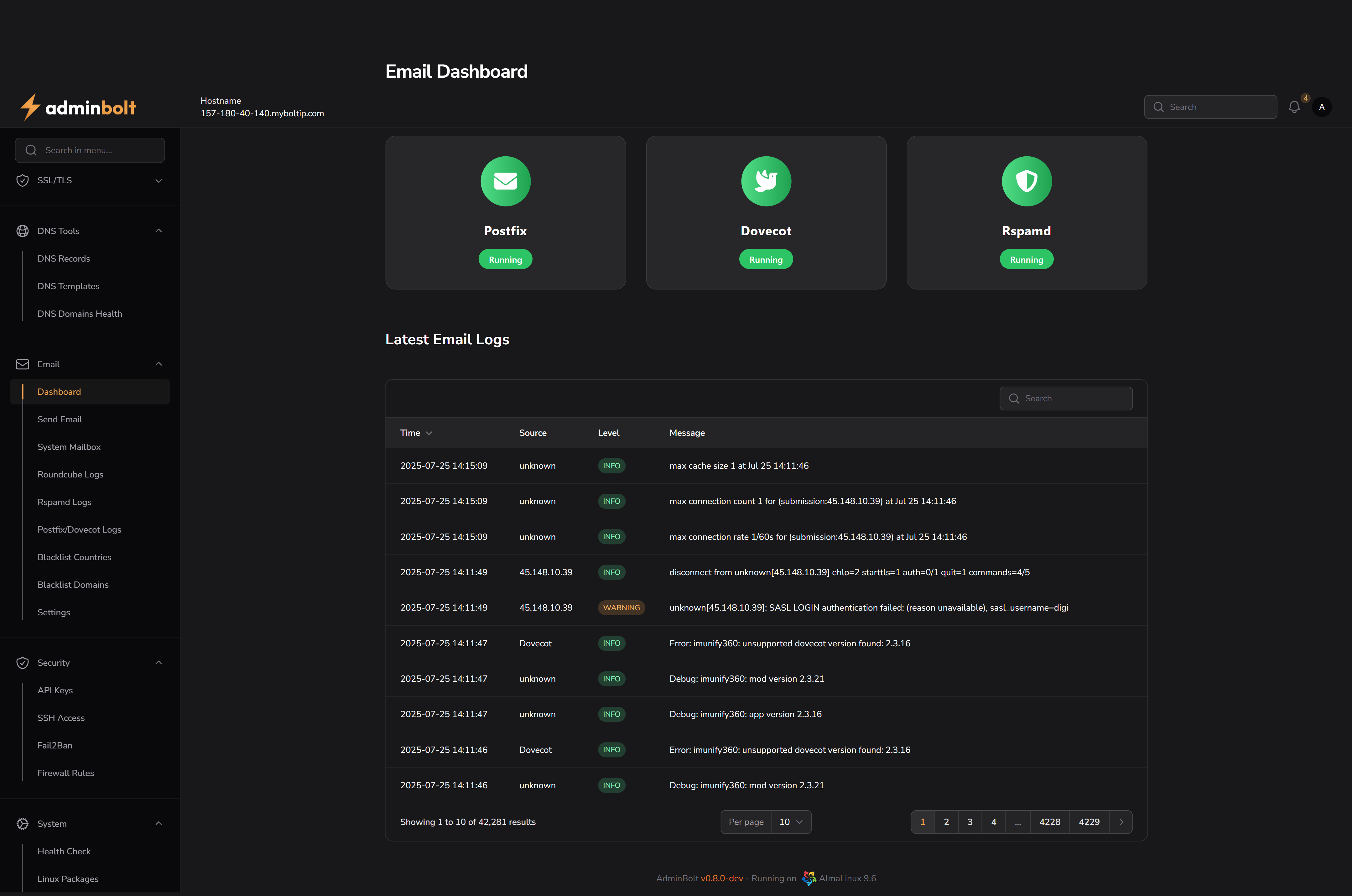
URL: /admin/email-dashboard
Service Status Cards
At the top of the page, service status indicators are shown for the following email components:
- Postfix – Mail transfer agent responsible for sending and receiving mail.
- Dovecot – Mail delivery agent for handling IMAP and POP3.
- Rspamd – Spam filtering system.
Each card indicates whether the service is currently Running or stopped.
Latest Email Logs
Below the status section, a live table displays the most recent email logs.
Columns:
- Time – The exact timestamp of the log event.
- Source – The origin of the log entry (e.g. Dovecot, IP address, etc.).
- Level – Log severity level such as
INFO,WARNING, orERROR. - Message – The content of the log message, which may include connection attempts, delivery failures, or debug messages.
Features:
- Pagination controls at the bottom allow you to navigate through a large number of log entries.
- You can search the logs using the Search bar at the top-right of the table.
- Search supports filtering by Time, Source, or Level.