

Hosting Accounts (AutoSSL Management)
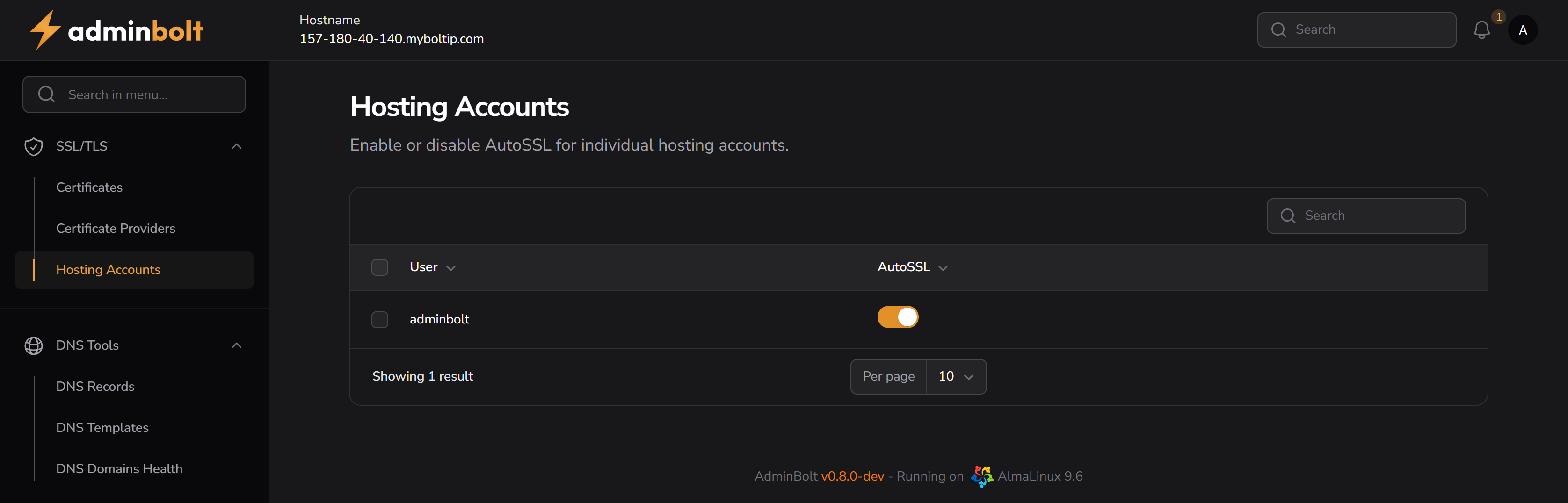
The Hosting Accounts page allows administrators to enable or disable the AutoSSL feature for individual hosting accounts in the system.
Overview
AutoSSL is used to automatically issue and install SSL/TLS certificates for hosted domains. On this page, you can manage AutoSSL status per account, giving you granular control over which accounts benefit from automatic certificate management.
URL
/admin/auto-ssl-hosting-accounts
Description
Each row in the table represents a hosting account. The toggle in the AutoSSL column determines whether that specific account is included in the AutoSSL issuance process.
This can be useful in scenarios where:
- You want to disable AutoSSL for accounts that use custom certificates.
- You need to troubleshoot certificate issues per account.
- A customer explicitly disables automatic SSL provisioning.
Interface Elements
| Element | Description |
|---|---|
| User | The username of the hosting account. |
| AutoSSL | A toggle that enables or disables automatic SSL for the selected account. |
| Search Bar | Allows you to search accounts by username. |
| Per Page | Sets how many accounts to display per page (pagination control). |
Actions
- Toggle AutoSSL – Switch AutoSSL ON or OFF for each individual account.
- Search – Filter accounts by name to quickly locate the one you want to manage.
Notes
- Changes made here are saved instantly.
- This interface is ideal for fine-tuning SSL behavior on a per-client basis, especially in multi-tenant environments.